Rear
Panel
About
the
IR
REMOTE
jack
You can operate the player without pointing the
remote toward the remote sensor
of
the player
if
you connect an
IR
repeater (not supplied) to the
IR
REMOTE
jack.
Use an
IR
repeater when you install the player in
a place where signals from the remote
cannot
reach.
10
G8
ill
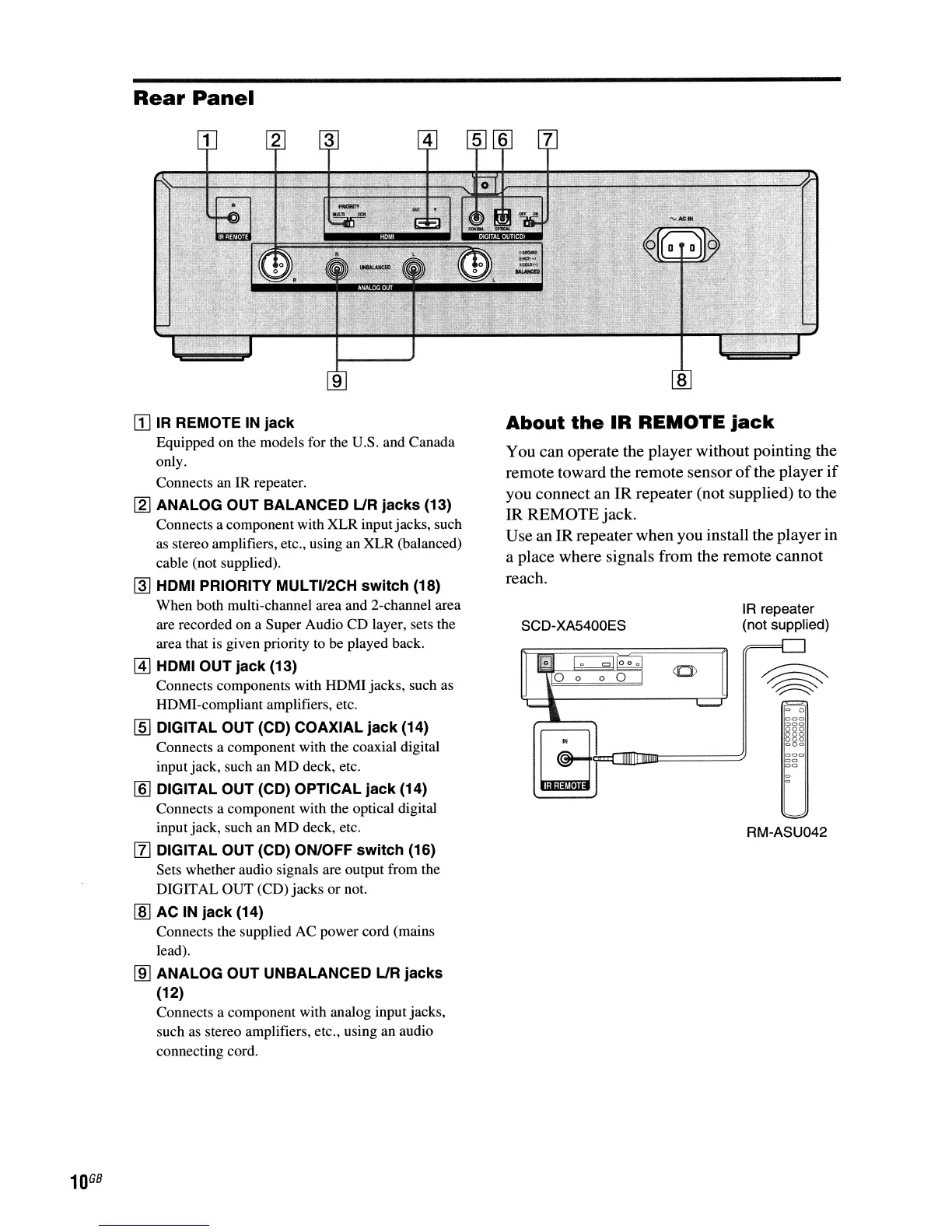
IR
REMOTE
IN
jack
Equipped on the models for the U.S. and Canada
only.
Connects an IR repeater.
[2J
ANALOG OUT BALANCED
UR
jacks (13)
Connects a component with XLR inputjacks, such
as stereo amplifiers, etc., using an XLR (balanced)
cable (not supplied).
~
HDMI PRIORITY MULTI/2CH switch (18)
When both multi-channel area and 2-channel area
are recorded on a Super Audio CD layer, sets the
area that is given priority to be played back.
@]
HDMI OUT jack (13)
Connects components with HDMI jacks, such as
HDMI-compliant amplifiers, etc.
[§] DIGITAL OUT (CD) COAXIAL jack (14)
Connects a component with the coaxial digital
input jack, such an MD deck, etc.
[§]
DIGITAL OUT (CD) OPTICAL jack (14)
Connects a component with the optical digital
input jack, such an MD deck, etc.
[l]
DIGITAL OUT (CD) ON/OFF switch (16)
Sets whether audio signals are output from the
DIGITAL OUT (CD) jacks or not.
[§] AC
IN
jack (14)
Connects the supplied AC power cord (mains
lead).
lID
ANALOG OUT UNBALANCED
UR
jacks
(12)
Connects a component with analog input jacks,
such as stereo amplifiers, etc., using an audio
connecting cord.
SCD-XA5400ES
IR repeater
(not supplied)
000
00
00
RM-ASU042



 To Next Page