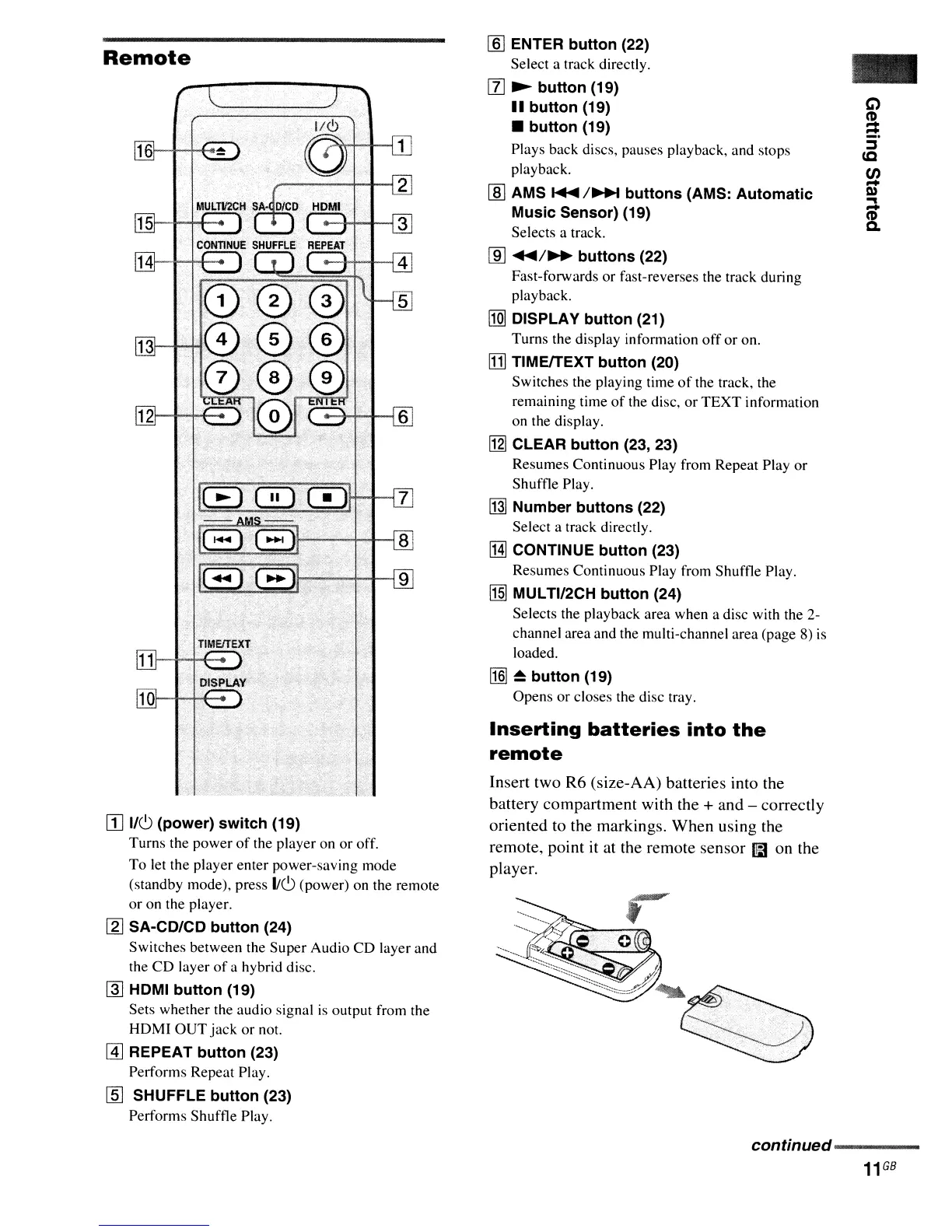
Remote
[]
1/6
(power) switch (19)
Turns the power
of
the player on
or
off.
To
let the player enter power-saving mode
(standby mode), press
1/6 (power) on the remote
or on the player.
[g]
SA-CD/CD button (24)
Switches between the Super Audio
CD
layer and
the
CD
layer
of
a hybrid disc.
~
HDMI button (19)
Sets whether the audio signal
is
output from the
HDMI
OUT
jack
or
not.
@]
REPEAT button (23)
Performs Repeat Play.
[ID
SHUFFLE button (23)
Performs Shuffle Play.
[§]
ENTER button (22)
Select a track directly.
[l]
~
button (19)
..
button (19)
• button (19)
Plays back discs, pauses playback, and stops
playback.
lID
AMS
~
I~
buttons (AMS: Automatic
Music Sensor) (19)
Selects a track.
[ID
....
1
..
buttons (22)
Fast-forwards
or
fast-reverses the track during
playback.
[Q]
DISPLAY button (21)
Turns the display information
off
or
on.
!TIl
TIMEITEXT button (20)
Switches the playing time
of
the track, the
remaining time
of
the disc, or
TEXT
information
on the display.
l12l
CLEAR button (23, 23)
Resumes Continuous Play from Repeat Play
or
Shuffle Play.
[j]]
Number buttons (22)
Select a track directly.
IHJ
CONTINUE button (23)
Resumes Continuous Play from Shuffle Play.
!1§]
MULTI/2CH button (24)
Selects the playback area when a disc with the 2-
channel area and the multi-channel area (page 8)
is
loaded.
!1§]
~
button (19)
Opens
or
closes the disc tray.
Inserting
batteries
into
the
remote
Insert two
R6
(size-AA) batteries into the
battery compartment with the
+ and - correctly
oriented to the markings. When using the
remote, point it at the remote sensor
l1B
on the
player.
-
continued---------
11
GB



 To Next Page