Setting the clock
Using the Auto Clock Set
feature
Some TV and cable channels transmit
time signals with their broadcasts. Your
VCR can pick up this time signal to
automatically set the clock.
The Auto Clock Set feature works only if
a channel in your area is broadcasting a
time signal. If broadcasters in your area
are not yet sending time signals, set the
time manually (page 43).
Before you start...
• Turn on the VCR and the TV.
• Set the TV to the VCR channel
(channel 3 or 4). If your TV is
connected to the VCR using A/V
connections, set the TV to video input.
• Press TV/VIDEO to display the
VIDEO indicator in the VCR's display
window.
• Press INPUT SELECT so that a
channel number appears in the VCR's
display window.
C23 (23
MENU
•tp_
OK
MENU
1 ©
@
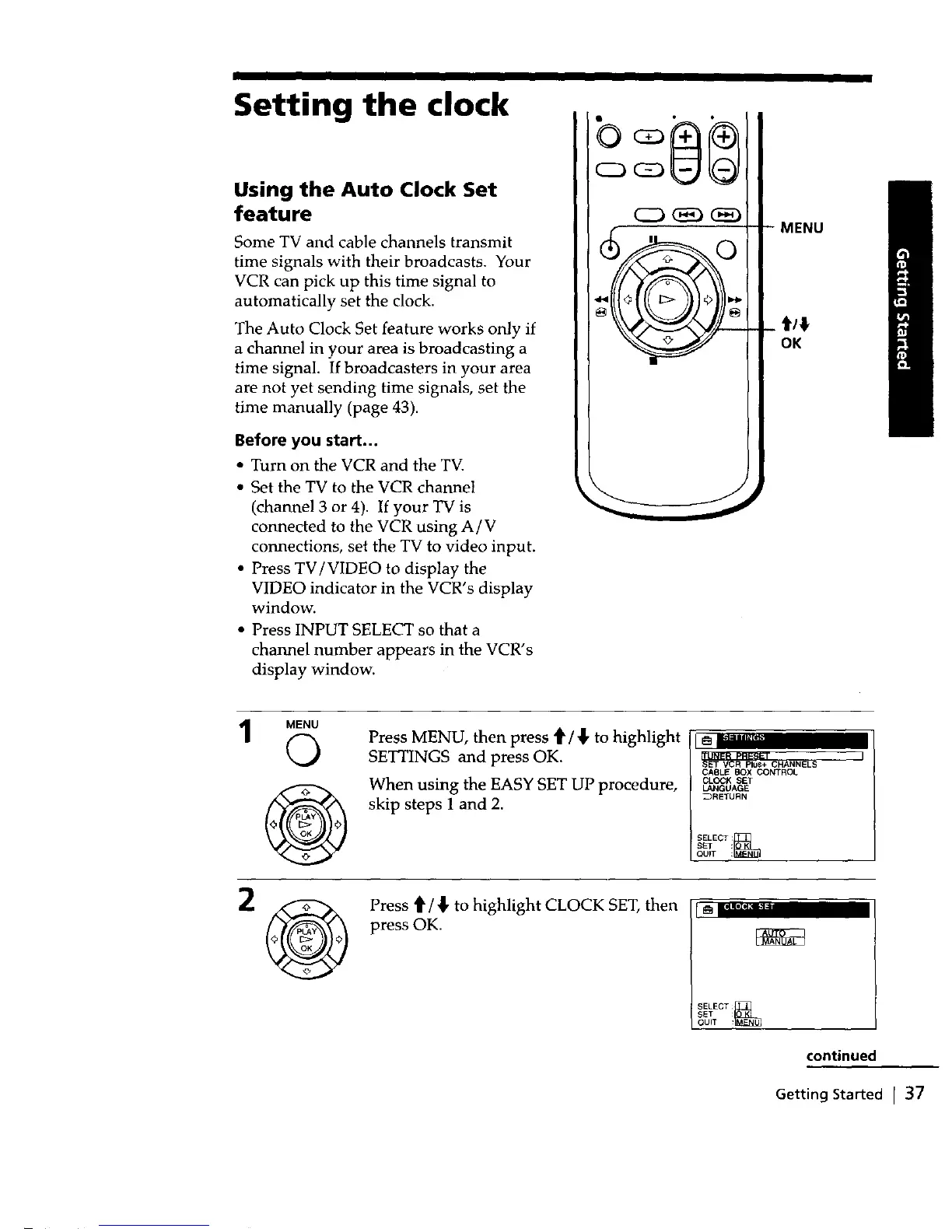
Press MENU, then press t/_' to highlight
SETTINGS and press OK.
When using the EASY SET UP procedure,
skip steps 1 and 2.
CASLEBOX CONTROL
CLOCK SET
LANGUAGE
_RETURN
Press'_/_,to highlight CLOCKSET, then
press OK.
r iI?1"- •
SELECT_
SET
QUIT :
continued
Getting Started I 37



 To Next Page