Setting up the cable box control (continued)
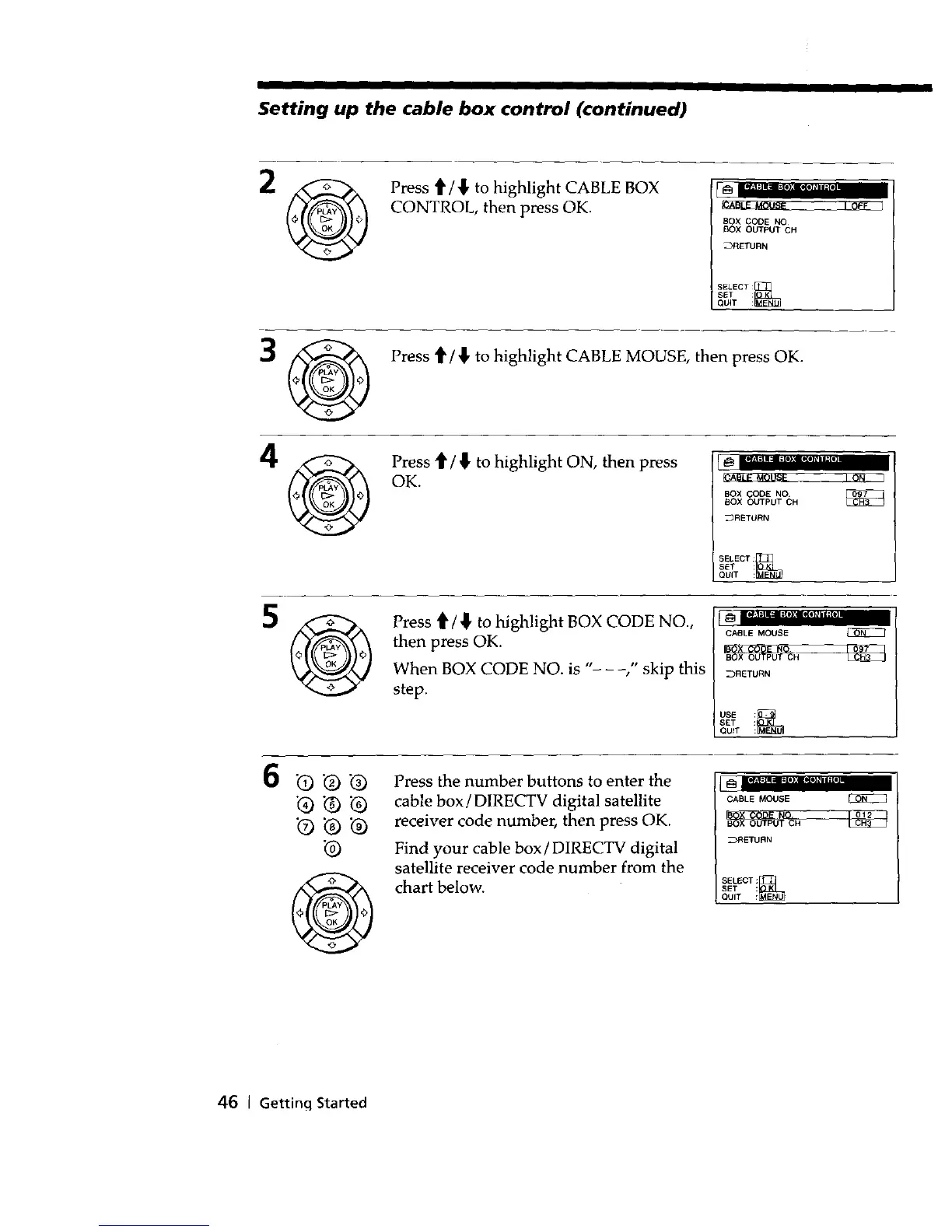
2 _ Press t1'/'_ to highlight CABLE BOX
CONTROL, then press OK.
BOX CODE NO
BOX OUTPUT CH
_RETURN
SELECT:_
SET :
QU(T :
3 Press t1'/_l, to highlight CABLE MOUSE, then press OK.
A
_ Press t1"/_ to highlight ON, then press
OK.
BOX CODE NO. _7_
BOX OUTPUT OH
_RETURN
SELECT:_
SET :
QUIT :
5 _ Press ti"/,1, to highlight BOX CODE NO.,
then press OK.
When BOX CODE NO. is "- ," skip this
step.
6
Q Q
@
Press the number buttons to enter the
cable box / DIRECTV digital satellite
receiver code number, then press OK.
Find your cable box/DIRECTV digital
satellite receiver code number from the
chart below.
mw_l=(ll i=l•):lllOl_l i ;LI
CABLE MOUSE
_RETURN
SEL_CT:_
SET :
OUIT :
46 I Getting Started



 To Next Page