I
Presetting channels (continued)
@
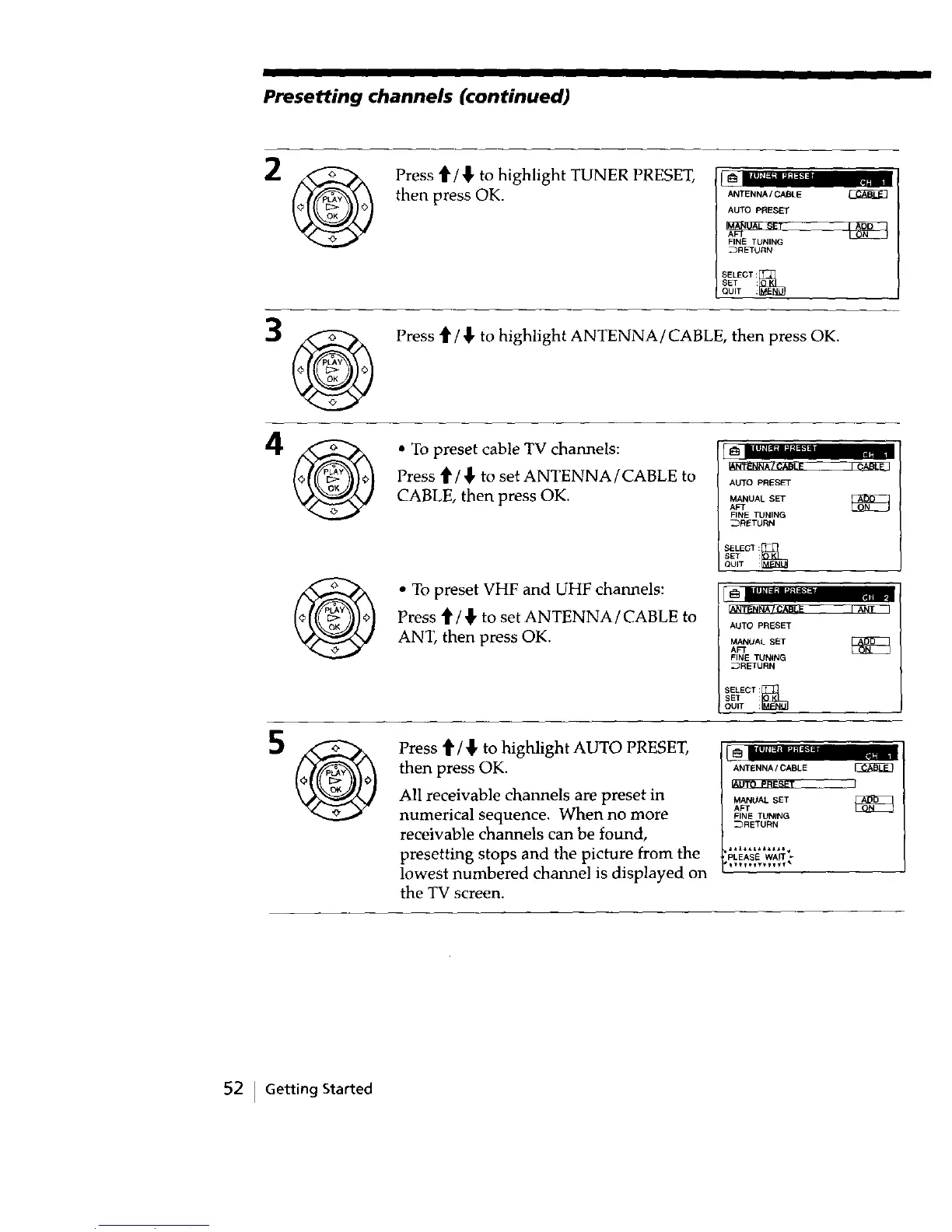
Press t1'/_ to highlight TUNER PRESET,
then press OK.
ANTENNA/C_LE
AUTO PRESET
FINE TUNING
SELECT:_
SET
QUIT :
Press t1'/ _, to highlight ANTENNA/CABLE, then press OK,
• To preset cable TV channels:
Press t/_' to set ANTENNA/CABLE to
CABLE, then press OK.
• To preset VHF and UHF channels:
Press ti"/_, to set ANTENNA/CABLE to
ANT, then press OK.
AUTO PRESET
MANUAL SET
AFT
FINE TUNING
_RETURN
SELEGT:_
SET :
QUIT :
i_ il I1_1_;| "J'l
_N_NNA / CABLE I
AUTO PRESET
AFTMANUALSET _
FINE TUNING
_RErURN
SELECT:_sET
OUIT :
Press '_/,_ to highlight AUTO PRESET,
then press OK.
All receivable channels are preset in
numerical sequence. When no more
receivable channels can be found,
presetting stops and the picture from the
lowest numbered channel is displayed on
the TV screen.
1_ lllli+f=l=l'._;l I J
ANTENNAICABLE
MANUALAFTSET
FINE TUNING
_RETURN
ll£+_AI++=+I+
PLEASE WAIT
++++e++_vly+ m
52 I Getting Started



 To Next Page