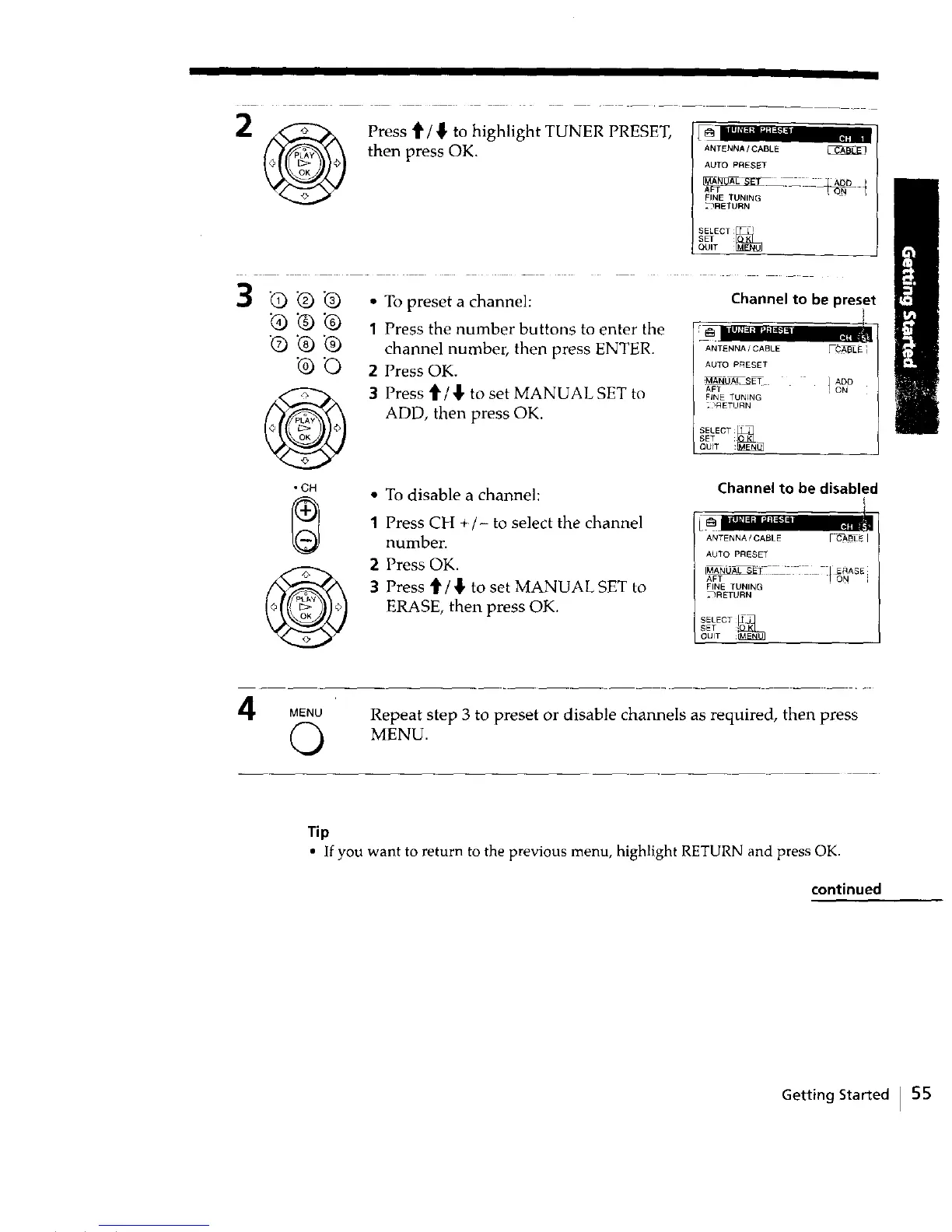
2 _ Press t/_ to highlight TUNER PRESET,
then press OK. ANT_"a_CABLE
AUTO PRESET
FINE TUNING .....
2?RETURN
3 "Q _) "Q • To preset a channel:
_) "Q "Q 1 Press the number buttons to enter the
"Q 'Q "Q channel number, then press ENTER.
"0 "C) 2 Press OK.
3 Press t_ / ,]],to set MANUAL SET to
ADD, then press OK.
@
• CH
• To disable a channel:
1 Press CH +/- to select the channel
number.
2 Press OK.
3 Press _/_, to set MANUAL SET to
ERASE, then press OK.
Channel to be preset
ANTENNA / CABLE FCABLL ]
AUTO PRESET
_AN_LJ_,L SET ] ADO
AFT I ON
FiNE TUNING
2 _RETURN
_ELECT_
SET
QUIT :
Channel to be disabled
ANTENNA/CABLE _CABLEI
AUTO PRESET
[M_T - _ [ ERASE
AFT ] ON ;
FINE TUNING
_RETURN
SELECT
SET '_
4 MENU
(3
Repeat step 3 to preset or disable channels as required, then press
MENU.
Tip
• If you want to return to the previous menu, highlight RETURN and press OK.
continued
Getting Started I 55



 To Next Page