Setting up the VCR Plus+ GOLD system (continued)
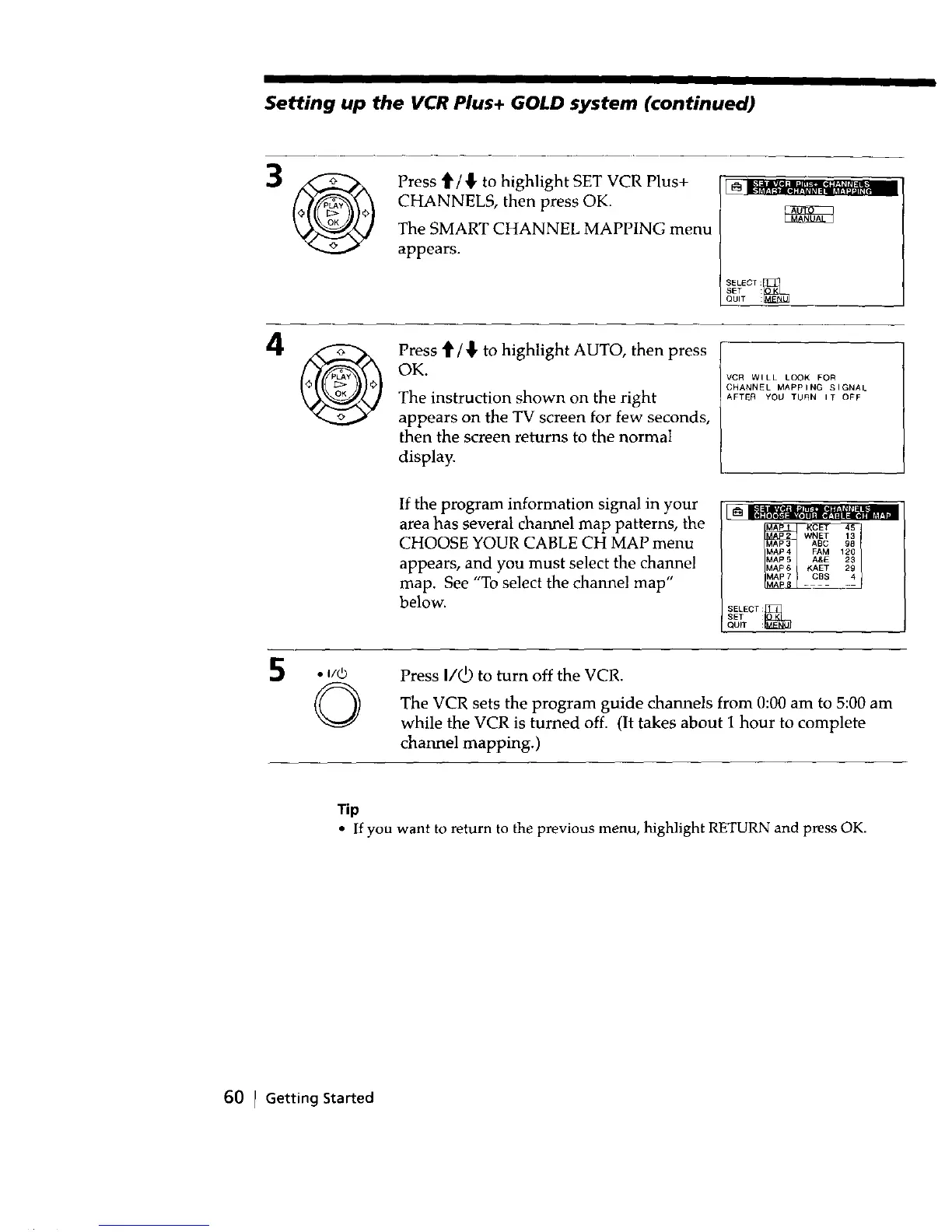
Press _/{, to highlight SET VCR Plus+
CHANNELS, then press OK.
The SMART CHANNEL MAPPING menu
appears.
SELECT :_
SET :
QUIT :
Press _ / {, to highlight AUTO, then press
OK.
The instruction shown on the right
appears on the TV screen for few seconds,
then the screen returns to the normal
display.
VCR WILL LOOK FOR
CHANNEL MAPPING SIGNAL
AFTEA YOU TURN IT OFF
If the program information signal in your
area has several channel map patterns, the
CHOOSE YOUR CABLE CH MAP menu
appears, and you must select the channel
map. See "To select the channel map"
below.
SELECT :
QDPT :_
SET :
,. I/_)
©
Press I/_ to turn off the VCR.
The VCR sets the program guide channels from 0:00 am to 5:00 am
while the VCR is turned off. (It takes about 1 hour to complete
channel mapping.)
Tip
• If you want to return to the previous menu, highlight RETURN and press OK.
60 I Getting Started



 To Next Page