Using the shuttle ring
With the shuttle ring, you can operate a variety of playback options, There
are two ways for using the shuttle ring, normal mode and jog mode.
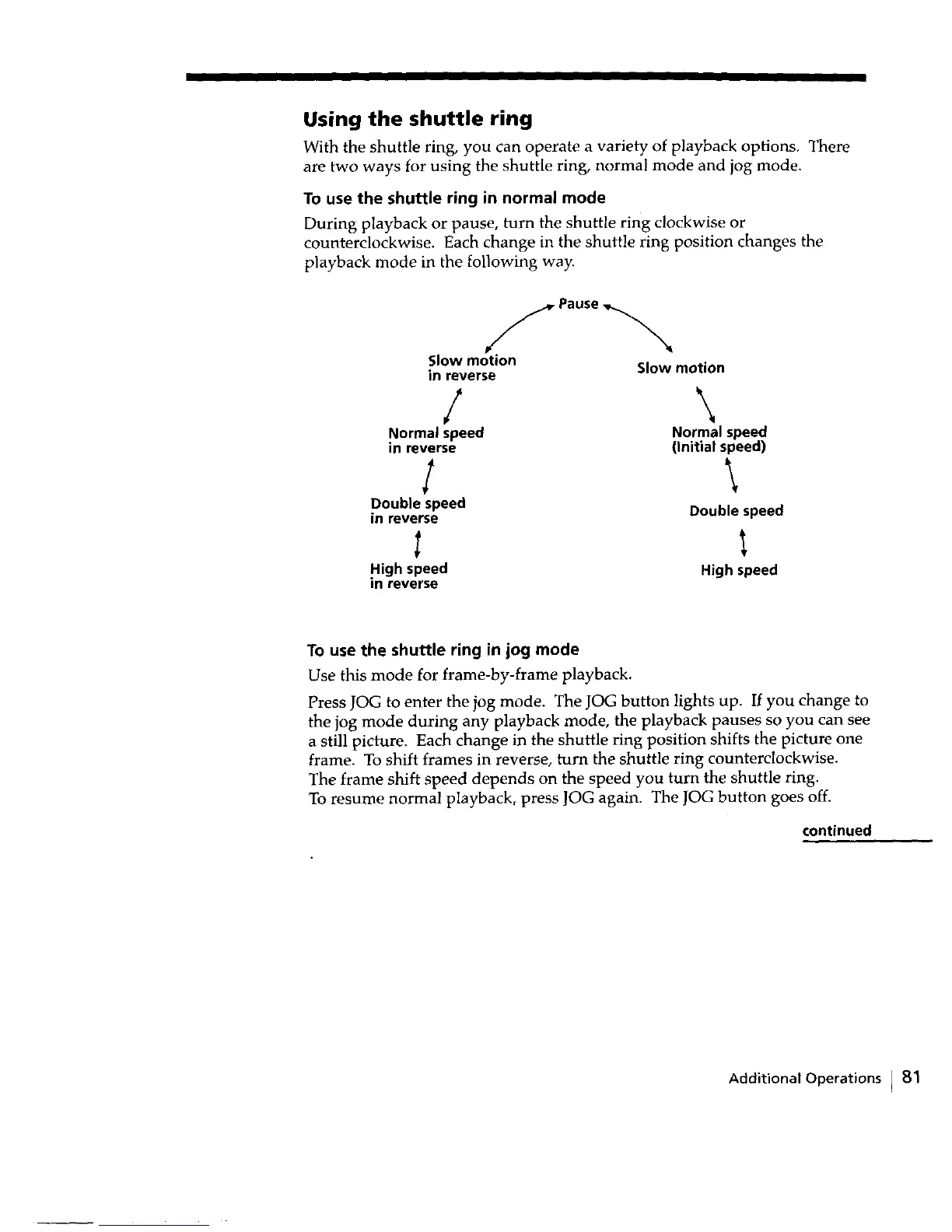
To use the shuttle ring in normal mode
During playback or pause, turn the shuttle ring clockwise or
counterclockwise. Each change in the shuttle ring position changes the
playback mode in the following way.
f Pause _,_
Slow motion Slow motion
in reverse
/ \
Normal speed Normal speed
in reverse (Initial speed)
I \
Double speed Double speed
in reverse
High speed High speed
In reverse
To use the shuttle ring in jog mode
Use this mode for frame-by-frame playback.
Press JOG to enter the jog mode. The JOG button lights up. If you change to
the jog mode during any playback mode, the playback pauses so you can see
a still picture. Each change in the shuttle ring position shifts the picture one
frame. To shift frames in reverse, turn the shuttle ring counterclockwise.
The frame shift speed depends on the speed you turn the shuttle ring.
To resume normal playback, press JOG again. The JOG button goes off.
continued
Additional Operations ) 81



 To Next Page