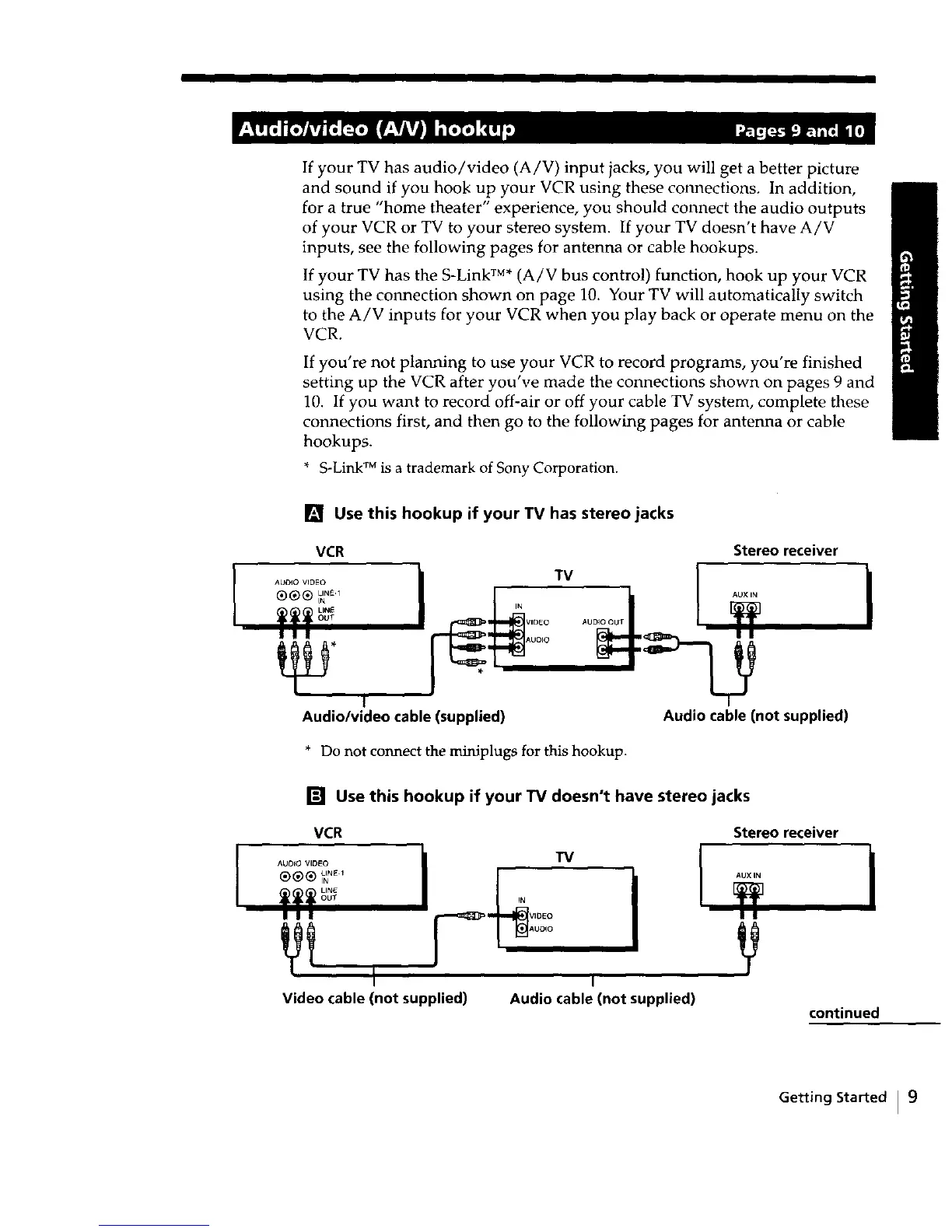
If your TV has audio/video (A/V) input jacks, you will get a better picture
and sound if you hook up your VCR using these connections, In addition,
for a true "home theater" experience, you should connect the audio outputs
of your VCR or TV to your stereo system. If your TV doesn't have A/V
inputs, see the following pages for antenna or cable hookups.
If your TV has the S-Link TM*(A/V bus control) function, hook up your VCR
using the connection shown on page 10. Your TV will automatically switch
to the A/V inputs for your VCR when you play back or operate menu on the
VCR.
If you're not planning to use your VCR to record programs, you're finished
setting up the VCR after you've made the connections shown on pages 9 and
10. If you want to record off-air or off your cable TV system, complete these
connections first, and then go to the following pages for antenna or cable
hookups.
* S-Link TM is a trademark of Sony Corporation.
[] Use this hookup if your TV has stereo jacks
VCR
TM
,. ,ooo
I ! I Auo,o
I
Audio/video cable (supplied)
Stereo receiver
Audio cable (not supplied)
* Do not connect the miniplugs for this hookup.
I
[] Use this hookup if your "IV doesn't have stereo jacks
VCR Stereo receiver
®@® _.E_ ,u×,.
OUT IN
I I I v,0Eo
I i
Video cable (not supplied) Audio cable (not supplied)
continued
Getting Started I 9



 To Next Page