EasyManua.ls Logo

Sony SLV-E205EY - Basic Operations; Recording TV Programmes using VIDEO Plus+

Sony SLV-E205EY
17 pages
Print Icon
To Next Page IconTo Next Page
To Previous Page IconTo Previous Page
Loading...
9-1
>
et
a
TONG
OS
ME
RL
ee.
Basic
Operations;
3S
ay
cs.
Recording
TV
programmes
using
Bee
,
@
©
®©
Press
the
number
buttons
to
set
the
CEO
E
EOS
Vi
DEO
P|
us+
ae
Plus+
®
©
pice
A
OUNe
position
that
corresponds
to
PLUSCODE
123456789
@ ®
‘O)
the
TV
programme.
PROG
DATE
START
STOP
;
CURSOR
©
¢
You
do
not
have
to
set
the
programme
(#6
FOUL
eee
ae
EXECUTE
Number
buttons
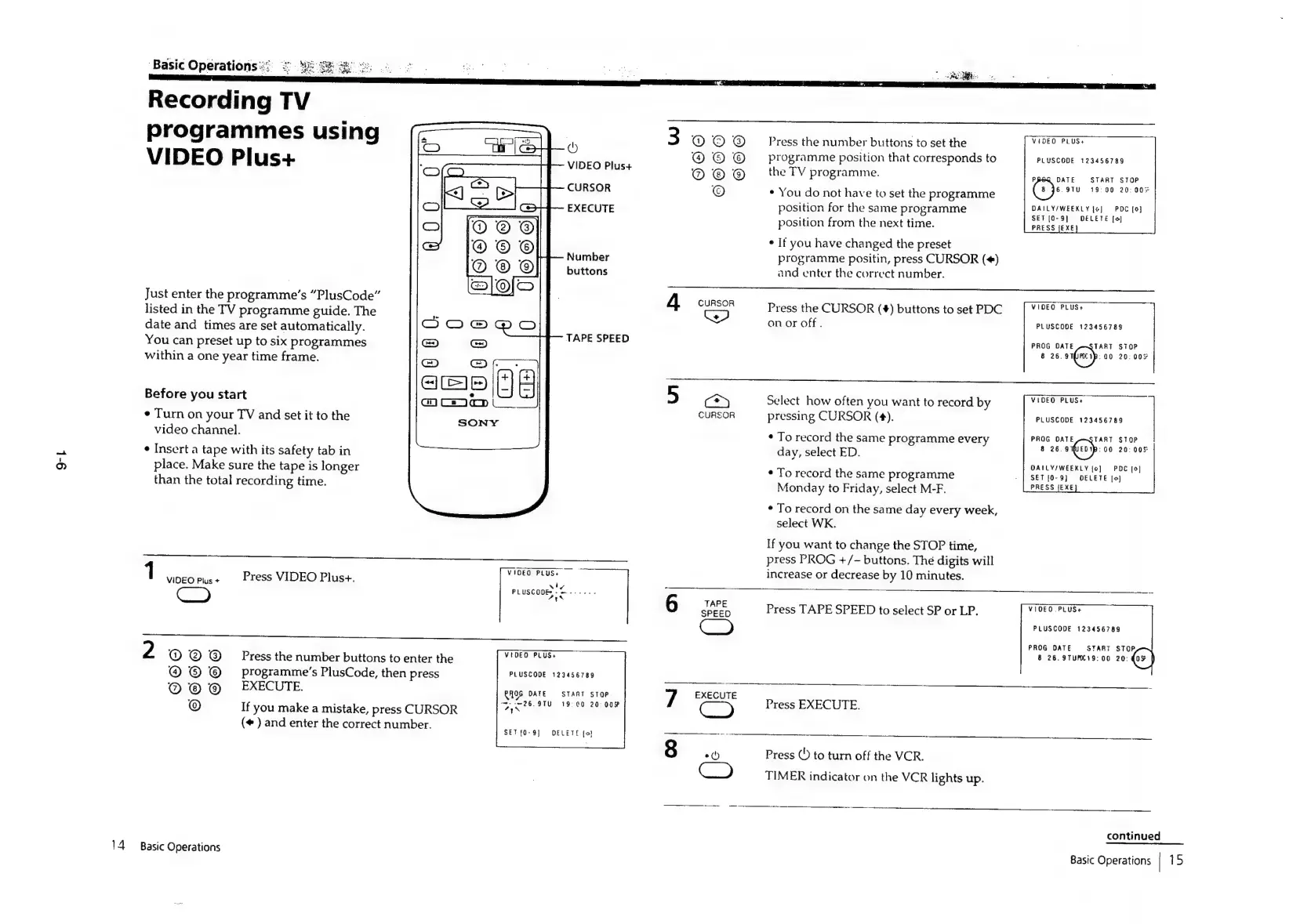
Just
enter
the
programme’s
“PlusCode”
listed
in
the
TV
programme
guide.
The
date
and
times
are
set
automatically.
You
can
preset
up
to
six
programmes
within
a
one
year time frame.
TAPE
SPEED
Before
you
start
¢
Turn
on
your
TV
and
set
it
to
the
video
channel.
¢
Insert
a
tape
with
its
safety
tab
in
place.
Make
sure
the
tape
is
longer
than
the
total
recording
time.
VIOEO
PLUSs
1
VIDEO
Pus+
Press
VIDEO
Plus+.
N
Pp
Sant
Ob
erect
(#
)
and
enter
the
correct
number.
SET{O-9]
DELETE
[o)
position
for
the
same
programme
DAILY
WEEKLY
1e)/
“POC
Ie}
SEF
[0-9]
DELETE
[eo]
position
from
the
next
time.
PRESS
{EXE
¢
If
you
have
changed
the
preset
programme
positin,
press
CURSOR
(¢)
and
enter
the
correct
number.
VIDEO
PLUS+
Press
the
CURSOR
(#)
buttons
to
set
PDC
on
or
off.
A
CURSOR
Ww
PLUSCODE
123456783
PROG
DATE
TART
STOP
8
26.
a1(imerp:
00
20:
00%
VIDEO
PLUS+
5
Cry
Select
how
often
you
want
to
record
by
CURSOR
pressing
CURSOR
(¢).
PLUSCODE
123456789
PROG
DATE
TART
STOP
8
28.
sien
po
20:
00S
DAILY/WEEKLY
jo]
PDC
[9]
SET
[0-9]
DELETE
[o]
PRESS
JEXE
¢
To
record
the
same
programme
every
day,
select
ED.
¢
To
record
the
same
programme
Monday
to
Friday,
select
M-F.
¢
To
record
on
the
same
day
every
week,
select
WK.
If
you
want
to
change
the
STOP
time,
press
PROG
+/-
buttons.
The
digits
will
increase
or
decrease
by
10
minutes.
6
TAPE
VIDEO
.PLUS+
SPEED
Press
TAPE
SPEED
to
select
SP
or
LP.
PLUSCODE
123456789
PROG
DATE
START
STOP
8
26.9TUPC19:
00
20:
Gs
|
@
©
Press
the
number
buttons
to
enter
the
MADER.
PLUS?
@ © ©
_
programme’s
PlusCode,
then
press
PLUSCODE
129456789
_
;
@
@
EXECUTE.
ROG
DATE
START
STOP
EXECUTE
@
If
you
make
a
mistake,
press
CURSOR
Dik
ore,
Seren
gan
7
Press
EXECUTE.
Press
(5
to
turn
off
the
VCR.
Cc)
TIMER
indicator
on
the
VCR
lights
up.
ren
ee
——
continued
14
Basic
Operations
Basic
Operations
|
15

Related product manuals