EasyManua.ls Logo

Sony SLV-E205EY - Advanced Operations; Recording TV Programmes using the Quick Timer; Checking;Cancelling Timer Settings

Sony SLV-E205EY
17 pages
Print Icon
To Next Page IconTo Next Page
To Previous Page IconTo Previous Page
Loading...
6-1
20
Recording
TV
programmes
using
the
quick
timer
Advanced
Operations
@
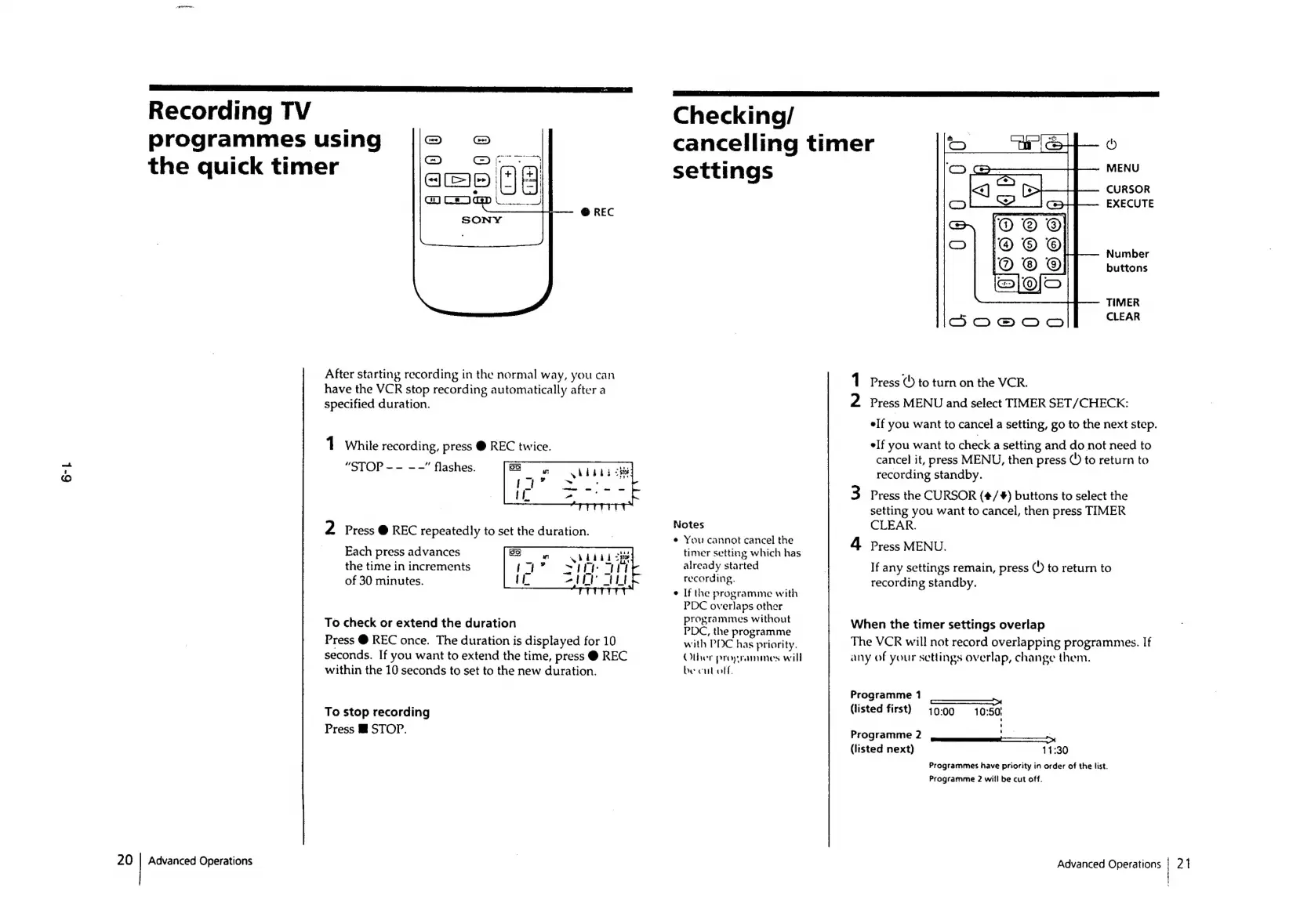
REC
After
starting
recording
in
the
normal
way,
you
can
have
the
VCR
stop
recording
automatically
after
a
specified
duration.
1
While
recording,
press
@
REC
twice.
“STOP
--
--”
flashes.
2
Press
@
REC
repeatedly
to
set
the
duration.
Each
press
advances
the
time
in
increments
of
30
minutes.
To
check
or
extend
the
duration
Press
@
REC
once.
The
duration
is
displayed
for
10
seconds.
If
you
want
to
extend
the
time,
press
@
REC
within
the
10
seconds
to
set
to
the
new
duration.
To
stop
recording
Press
@
STOP.
Checking/
cancelling
timer
settings
Notes
e
You
cannot
cancel
the
timer
setting
which
has
already
started
recording.
If
the
programme
with
PDC
overlaps
other
programmes
without
PDC,
the
programme
with
PDC
has
priority.
Olher
proyrammes
will
be
cul
off
©
MENU
CURSOR
EXECUTE
Number
buttons
TIMER
CLEAR
1
Press
()
to
turn
on
the
VCR.
2
Press
MENU
and
select
TIMER
SET/CHECK:
elf
you
want
to
cancel
a
setting,
go
to
the
next
step.
elf
you
want
to
check
a
setting
and
do
not
need
to
cancel
it,
press
MENU,
then
press
©
to
return
to
recording
standby.
3
Press
the
CURSOR
(#/+#)
buttons
to
select
the
setting
you
want
to
cancel,
then
press
TIMER
CLEAR.
4
Press
MENU.
If
any
settings
remain,
press
©)
to
return
to
recording
standby.
When
the
timer
settings
overlap
The
VCR
will
not
record
overlapping
programmes.
If
any
of
your
settings
overlap,
change
them,
Programme
1
: :
So
(listed
first)
19:00
10:50!
Prog
ramme
2
ee
(listed
next)
11:30
Programmes
have
priority
in
order
of
the
list.
Programme
2
will
be
cut
off.
Advanced
Operations
|
21

Related product manuals