EasyManua.ls Logo

Sony SLV-E205EY - Basic Operations; Playing a Tape

Sony SLV-E205EY
17 pages
Print Icon
To Next Page IconTo Next Page
To Previous Page IconTo Previous Page
Loading...
v-t
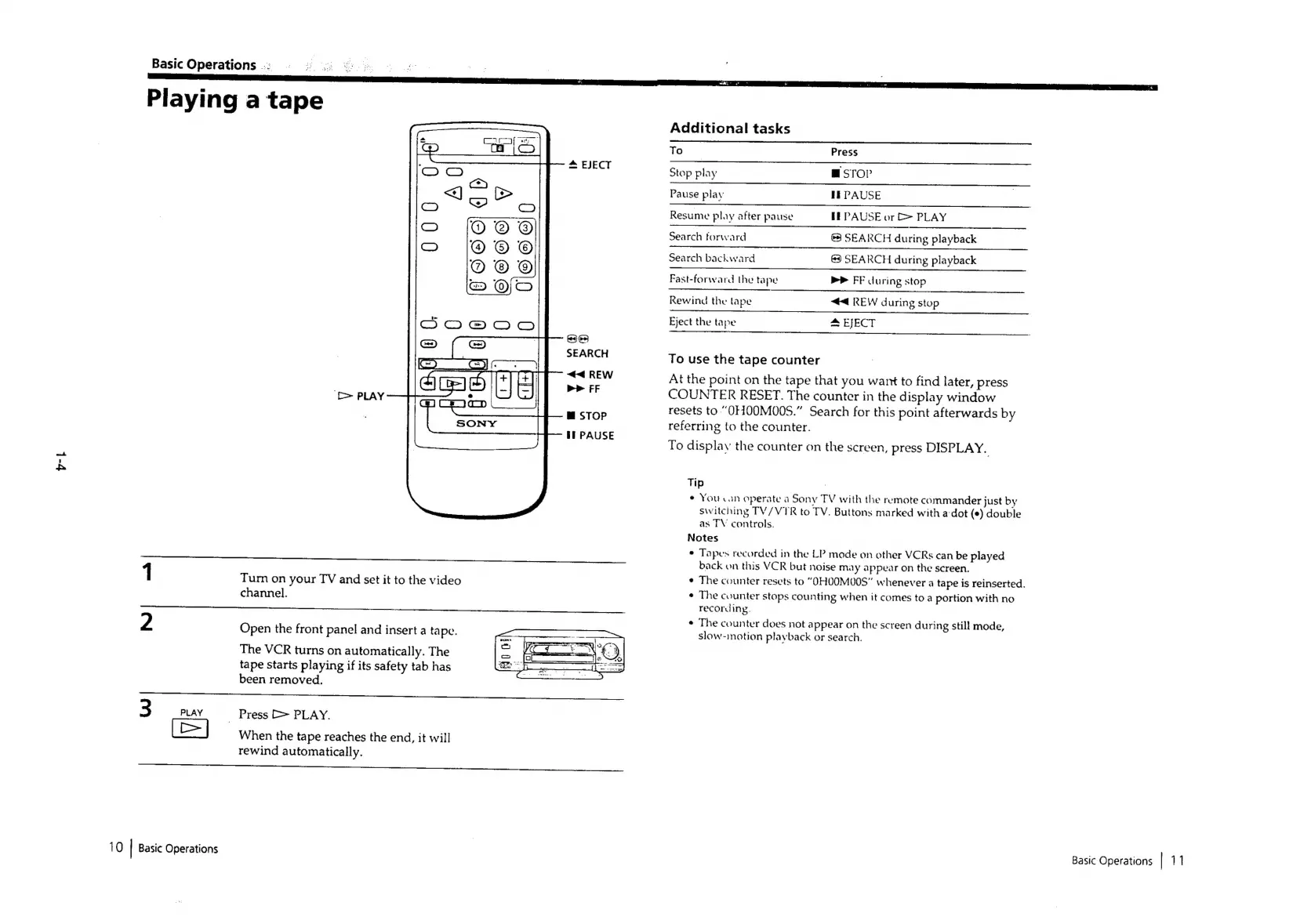
Basic
Operations
Playing
a
tape
*
EJECT
Si)
SEARCH
44
REW
>>
FF
m™
STOP
tI
PAUSE
1
Tum
on
your
TV
and
set
it
to
the
video
channel.
2
Open
the
front
panel
and
insert
a
tape.
The
VCR
turns
on
automatically.
The
tape
starts
playing
if
its
safety
tab
has
been
removed.
_
Press
>
PLAY.
When
the
tape
reaches
the
end,
it
will
rewind
automatically.
eee
3
PLAY
[=]
10
|
Basic
Operations
Additional
tasks
To
=
Press
Stop play
msrop
FEPAUSE
EE
PAUSE
or
>
PLAY
@3}
SEARCH
during
playback
SEARCH
during
playback
Pause
play
Resume
play
after
pause
Search
forward
Search
backward
mr
FF
during
stop
<4
REW
during
stop
4
EJECT
Fast-forward
the
tape
Rewind
the
lape
Eject
the
tape
To
use
the
tape
counter
At
the
point
on
the
tape
that
you
want
to
find
later,
press
COUNTER
RESET.
The
counter
in
the
display
window
resets
to
“OHOQMO0S.”
Search
for
this
point
afterwards
by
referring
to
the
counter.
To
display
the
counter
on
the
screen,
press
DISPLAY.
Tip
e
You
can
operate
a
Sony
TV
with
the
remote
commander
just
by
switching
TV/VTR
to
TV.
Buttons
marked
with
a-dot
(e)
double
as
TV
controls.
Notes
°
Tapes
recorded
in
the
LP
mode
on
other
VCRs
can
be
played
back
on
this
VCR
but
noise
may
appear
on
the
screen.
¢
The
counter
resets
to
“OHOOM00S”
whenever
a
tape
is
reinserted.
¢
The
counter
stops
counting
when
it
comes
to
a
portion
with
no
recording.
¢
The
counter
does
not
appear
on
the
screen
during
still
mode,
slow-inotion
playback
or
search.
Basic
Operations
|
11

Related product manuals