EasyManua.ls Logo

Sony SLV-E205EY - Advanced Operations; Playing;Searching at Various Speeds

Sony SLV-E205EY
17 pages
Print Icon
To Next Page IconTo Next Page
To Previous Page IconTo Previous Page
Loading...
Zt
Basic
Operations
Recording
TV
programmes
using
VIDEO
Plus+
(continued)
To
stop
recording
Press
&
STOP.
To
use
the
VCR
after
setting
the
timer
To
use
the
VCR
before
a
timer
recording
begins,
just
press
().
The
TIMER
indicator
turns
off
and
the
VCR
switches
on.
Remember
to
press
()
to
reset
the
VCR
after
using
the
VCR.
You
can
also
do
the
following
tasks
while
the
VCR
is
recording:
¢
Reset
the
counter.
¢
Display
tape
information
on
the
TV
screen.
¢
Check
the
timer
settings.
¢
Watch
another
TV
programme.
To
use
the
VCR
connected
to
the
EURO-AV
input
In
step
3,
press
INPUT
SELECT
to
display
"AV"
instead
of
selecting
a
programme
position.
About
PDC
signals
The
broadcast
system
may
transmits
PDC
(Programme
Delivery
Control)
signals
with
its
TV
programmes.
These
signals
ensure
that
your
timer
recordings
are
made
regardless
of
broadcast
delays,
early
starts
or
broadcast
interruptions.
When
setting
the
timer,
make
sure
to
enter
the
start
and
stop
times
exactly
as
indicated
in
the
TV
programme
guide,
otherwise
the
PDC
function
will
not
work.
Tip
¢
To
cancel
the
procedure,
press
VIDEO
Plus+
before
pressing
EXECUTE.
Notes
¢
When
you
press
VIDEO
Plus+,
the
following
menus
may
appear
instead
of
the
VIDEO
Plus+
menu:
~
The
clock
setting
menu
appears
if
you
need
to
set
the
clock.
~
The
TIMER
SET/CHECK
menu
appears
if
you
have
already
set
Six
programmes.
e
When
recording
satellite
broadcasts
programmes,
remember
to
keep
the
tuner
switched
on
until
the
VCR
finishes
recording.
Basic
Operations
Advanced
Operations
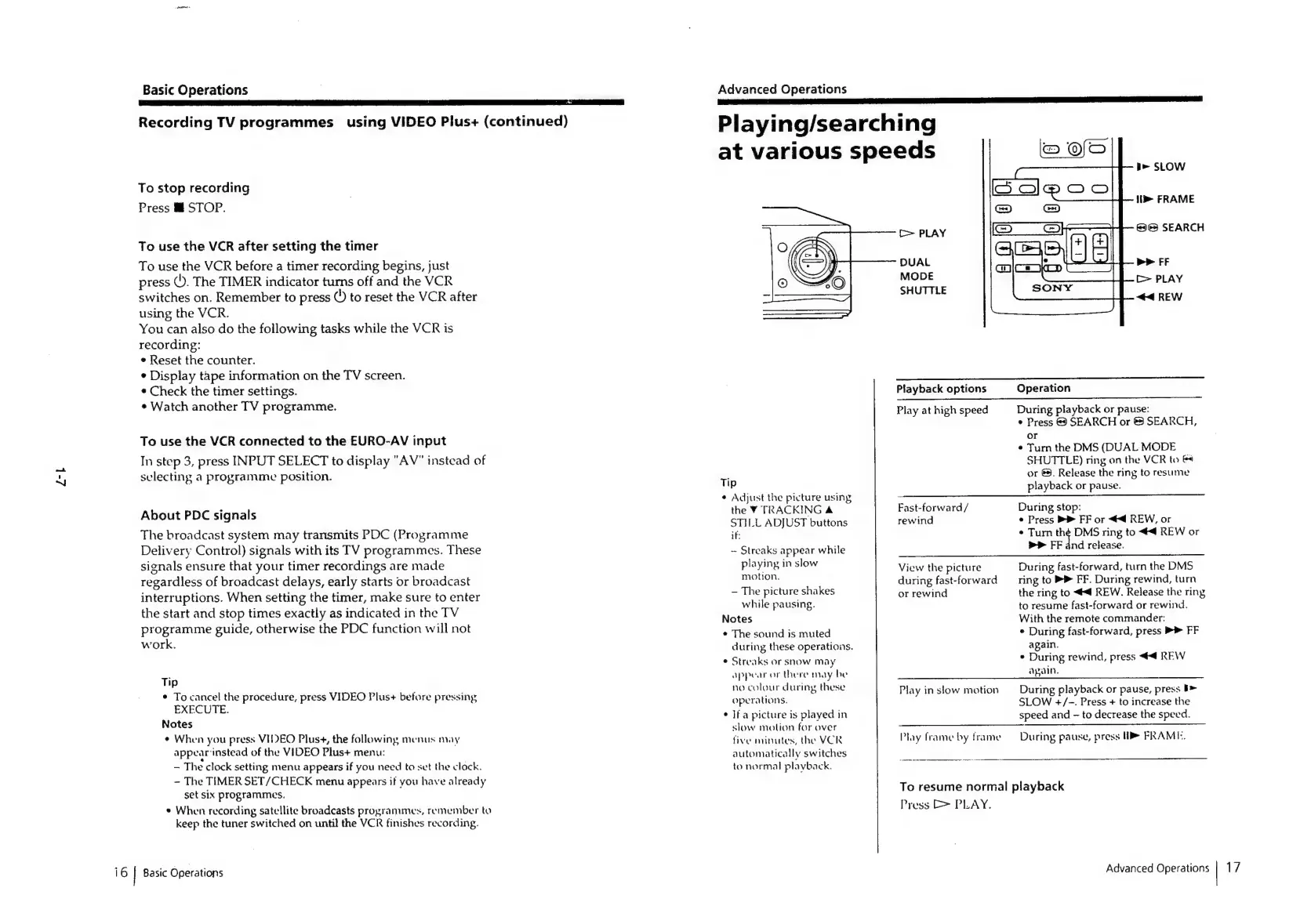
Playing/searching
at
various
speeds
Tip
¢
Adjust
the
picture
using
the
¥
TRACKING
é
STILL
ADJUST
buttons
if:
~
Streaks
appear
while
playing
in
slow
motion.
The
picture
shakes
while
pausing.
Notes
¢
The
sound
is
muted
during
these
operations.
¢
Streaks
or
snow
may
appear
or
there
may
be
no
colour
during
these
Operations.
¢
Ifa
picture
is
played
in
slow
motion
for
over
five
minutes,
the
VCR
automatically
switches
to
normal
playback.
©
OO
b>
SLOW
Sdecol
11>
FRAME
(=)
co)
|
>
PLAY
7
e)¢3
SEARCH
432))|*]
&
DUAL
anal
r
PP
FF
MODE
sONT
[>
PLAY
SHUTTLE
|
mained
Playback
options
Operation
Play
at
high
speed
During
playback
or
pause:
¢
Press
@
SEARCH
or
&
SEARCH,
or
¢
Turn
the
DMS
(DUAL
MODE
SHUTTLE)
ring
on
the
VCR
to
@
or
©.
Release
the
ring
to
resume
playback
or
pause.
Fast-forward/
During
stop:
rewind
¢
Press
>}
FF
or
<4
REW,
or
¢
Turn
a
DMS
ring
to
4
REW
or
>>
FF
and
release.
View
the
picture
During
fast-forward,
turn
the
DMS
during
fast-forward
ring
to
®®
FF.
During
rewind,
turn
or
rewind
the
ring
to
4
REW.
Release
the
ring
to
resume
fast-forward
or
rewind.
With
the
remote
commander:
*
During
fast-forward,
press
>
FF
again.
*
During
rewind,
press
<4
REW
apain.
Play
inslow
motion
During
playback
or
pause,
press
SLOW
+/-.
Press
+
to
increase
the
speed
and
to
decrease
the
speed.
Play
frame
by
frame
During
pause,
press
UW
FRAME.
To
resume
normal
playback
Press
b>
PLAY.
Advanced
Operations
17

Related product manuals