EasyManua.ls Logo

Sony SLV-E205EY - Step 5: Setting the clock; Additional Tuning Instructions

Sony SLV-E205EY
17 pages
Print Icon
To Next Page IconTo Next Page
To Previous Page IconTo Previous Page
Loading...
sath.
,
Additional
tuning
instructions
To
improve
the
picture
of
a
TV
channel
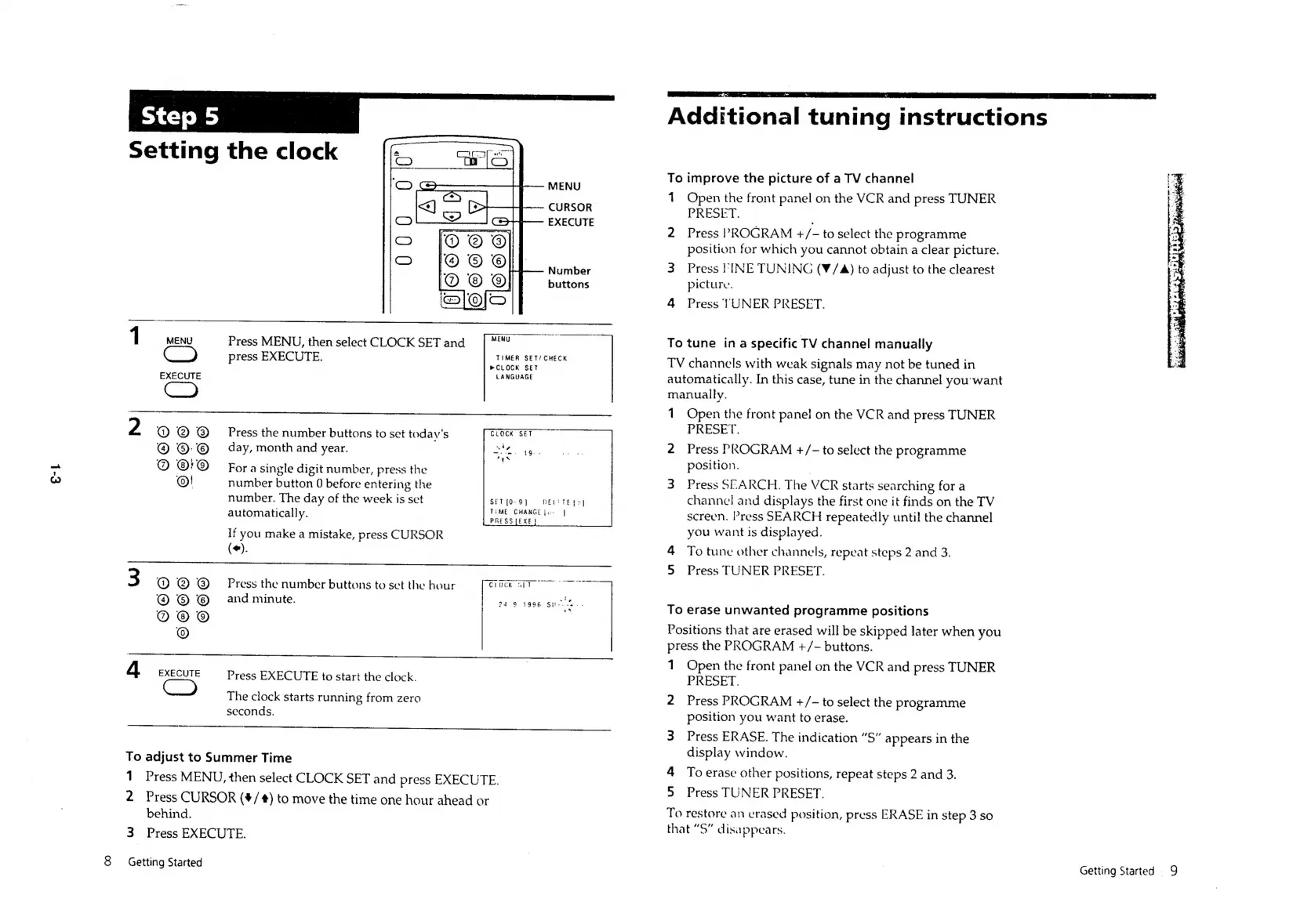
MENU
1
Open
the
front
panel
on
the
VCR
and
press
TUNER
atiesiotied
PRESET.
EXECUTE
ae
2
Press
PROGRAM
+/-
to
select
the
programme
position
for
which
you
cannot
obtain
a
clear
picture.
Number
3
Press
PINE
TUNING
(¥/4)
to
adjust
to
the
clearest
buttons
picture.
4
Press
TUNER
PRESET.
1
MENU
Press
MENU,
then
select
CLOCK
SET
and
—_
To
tune
ina
specific
TV
channel
manually
press
EXECUTE.
Re
as
TV
channels
with
weak
signals
may
not
be
tuned
in
EXECUTE
LANGUAGE
automatically.
In
this
case,
tune
in
the
channel
you-want
C=)
manually.
1
Open
the
front
panel
on
the
VCR
and
press
TUNER
2
@
@
@
Press
the
number
buttons
to
set
today's
PRESET.
®:©
_
day,
month
and
year.
2
Press
PROGRAM
+/-
to
select
the
programme
@
@r®@
For
a
single
digit
number,
press
the
pootnon:
@!
number
button
0
before
entering
the
3
Press
SEARCH.
The
VCR
starts
searching
for
a
number.
The
day
of
the
week
is
set
SET
[0-9]
DENTE
LS]
channel
and
displays
the
first
one
it
finds
on
the
TV
automatically.
oer
ey
vl
screen.
Press
SEARCH
repeatedly
until
the
channel
z
PRESS
[EXE
}
: i
Pp
y
If
you
make
a
mistake,
press
CURSOR
you
want
is
displayed.
(+).
4
To
tune
other
channels,
repeat
steps
2
and
3.
>
Press
TUNER
PRESET.
3
@@®@®
Press
the
number
buttons
to
set
the
hour
ChUGK
SIT
oe
S
and
minute.
ey
ae
To
erase
unwanted
programme
positions
©
Positions
that
are
erased
will
be
skipped
later
when
you
press
the
PROGRAM
+/-
buttons.
|
;
1
Open
the
front
panel
on
the
VCR
and
press
TUNER
4
a
Press
EXECUTE
to
start
the
clock.
PRESET.
The
clock
starts
running
from
zero
2
Press
PROGRAM
+/-
to
select
the
programme
seconds.
position
you
want
to
erase.
3
Press
ERASE.
The
indication
“S”
appears
in
the
To
adjust
to
Summer
Time
eePny
window.
1
Press
MENU,
then
select
CLOCK
SET
and
press
EXECUTE.
:
i
pee
Saas
ESD
etersee
gusts
2
Press
CURSOR
(#/#)
to
move
the
time
one
hour
ahead
or
ica
behid.
To
restore
an
erased
position,
press
ERASE
in
step
3
so
hat
“S”
disappears.
3
Press
EXECUTE.
8
Getting
Started
Getting
Started
9

Related product manuals