EasyManua.ls Logo

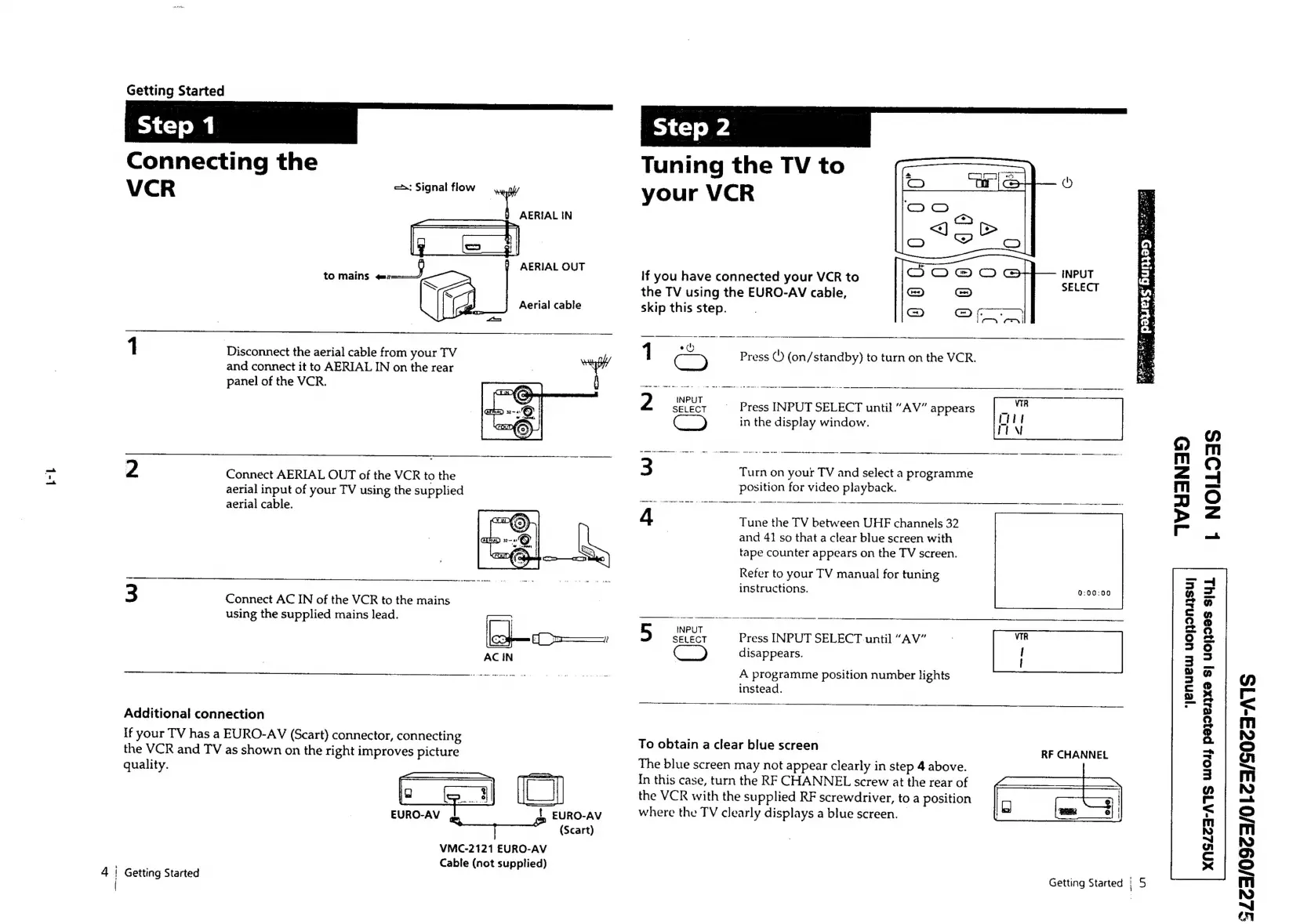
Sony SLV-E205EY - Getting Started; Step 1: Connecting the VCR; Step 2: Tuning the TV to your VCR

Sony SLV-E205EY
17 pages
Print Icon
To Next Page IconTo Next Page
To Previous Page IconTo Previous Page
Loading...
L-L
—s
Getting
Started
Connecting
the
VCR
«2:
Signal
flow
ed
AERIAL
IN
AERIAL
OUT
Aerial
cable
1
Disconnect
the
aerial
cable
from
your
TV
and
connect
it
to
AERIAL
IN
on
the
rear
panel
of
the
VCR.
2
Connect
AERIAL
OUT
of
the
VCR
to
the
aerial
input
of
your
TV
using
the
supplied
aerial
cable.
3
Connect
AC
IN
of
the
VCR
to
the
mains
using
the
supplied
mains
lead.
Additional
connection
If
your
TV
has
a
EURO-AV
(Scart)
connector,
connecting
the
VCR
and
TV
as
shown
on
the
right
improves
picture
quality.
EURO-AV
|
EURO-AV
pane)
ani
(Scart)
VMC-2121
EURO-AV
Cable
(not
supplied)
Getting
Started
Tuning
the
TV
to
your
VCR
If
you
have
connected
your
VCR
to
the
TV
using
the
EURO-AV
cable,
skip
this
step.
2
eee
'
Press
INPUT
SELECT
until
“AV”
appears
Cc)
in
the
display
window.
3
Turn
on
your
TV
and
select
a
programme
position
for
video
playback.
4
Tune
the
TV
between
UHF
channels
32
and
41
so
that
a
clear
blue
screen
with
tape
counter
appears
on
the
TV
screen.
Refer
to
your
TV
manual
for
tuning
instructions.
5
INPUT
SELECT
Press
INPUT
SELECT.
until
“AV”
disappears.
A
programme
position
number
lights
instead.
To
obtain
a
clear
blue
screen
The
blue
screen
may
not
appear
clearly
in
step
4
above.
In
this
case,
turn
the
RF
CHANNEL
screw
at
the
rear
of
the
VCR
with
the
supplied
RF
screwdriver,
to
a
position
where
the
TV
clearly
displays
a
blue
screen.
Press
©
(on/standby)
to
turn
on
the
VCR.
Tl
————“‘C<(_é‘(‘é
‘4
a
ity
"yenuew
uonyonsysuy
RF
CHANNEL
Getting
Started
|
5
AS
.
ie
4,
a
oO
a3
P=
|
a
bi
wr,
#e
:
3
it
-.
ed
IWYSNA9D
L
NOILOAS
=|
=
@
o
@
oe
.°)
b=
a
©
7
My
:
=
2)
3
rf
re
ITT
\
ui
c
a
r
=
mi
NO
©
a
NO
7
©
——<
Mm
NO
ay
mi
NO
~J
“xy

Related product manuals