EasyManua.ls Logo

Sony SLV-E205EY - Basic Operations; Recording TV Programmes

Sony SLV-E205EY
17 pages
Print Icon
To Next Page IconTo Next Page
To Previous Page IconTo Previous Page
Loading...
LZ
Basic
Operations
|
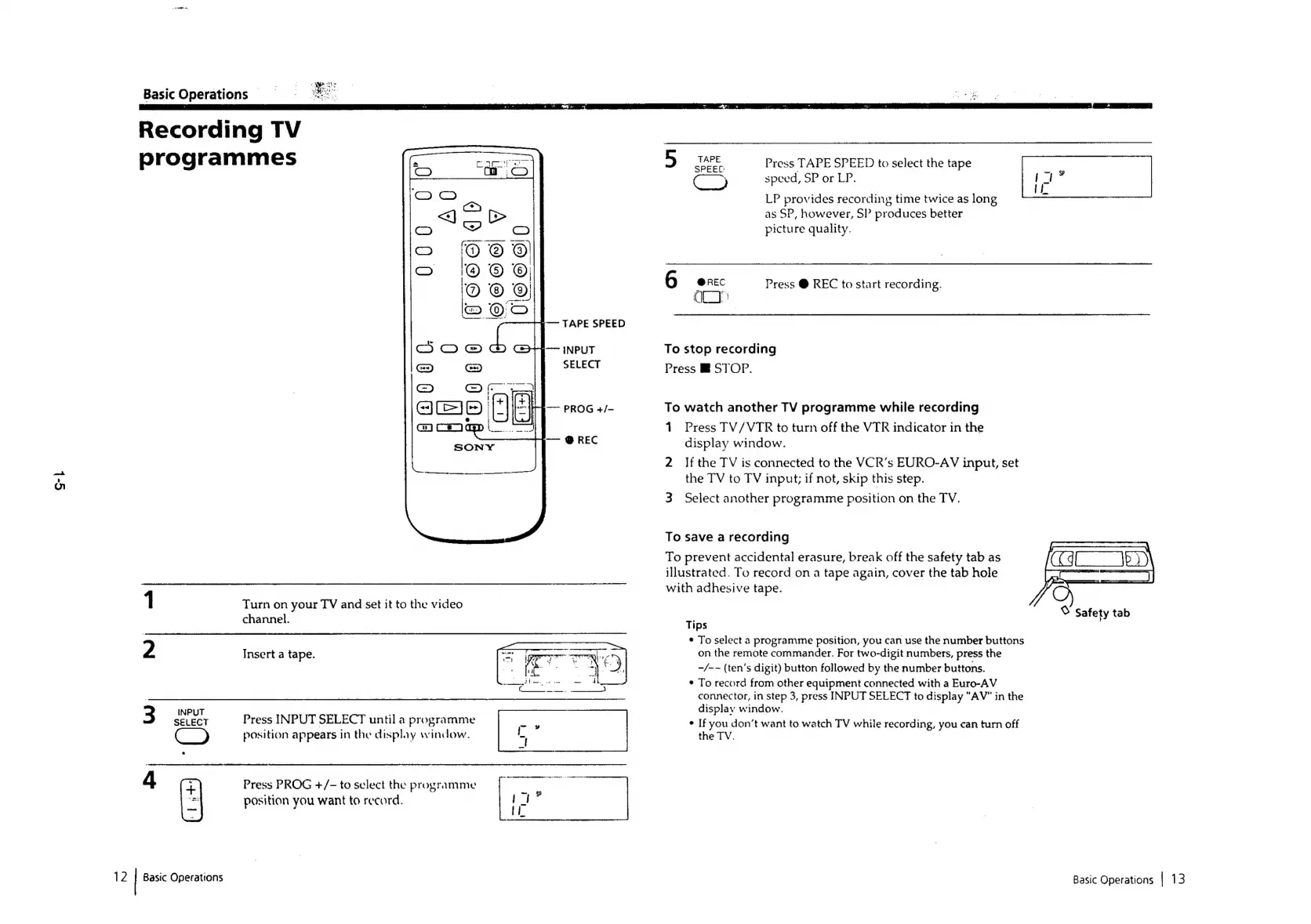
Recording
TV
programmes
2
3
INPUT
SELECT
Basic
Operations
®O!0
S66)
4
Pp
S666
7
tie
:
(
|
Turn
on
your
TV
and
set
it
to
the
video
channel.
Insert
a
tape.
Press
INPUT
SELECT
until
a
programme
position
appears
in
the
display
window.
tL
Press
PROG
+/-
to
select
the
programme
position
you
want
to
record.
Soeen
Press
TAPE
SPEED
to
select
the
tape
;
speed,
SP
or
LP.
LP
provides
recording
time
twice
as
long
as
SP,
however,
SP
produces
better
picture
quality.
@REC
Press
@
REC
to
start
recording.
QU"
To
stop
recording
Press
STOP.
To
watch
another
TV
programme
while
recording
1
2
Press
TV/VTR
to
turn
off
the
VIR
indicator
in
the
display
window.
If
the
TV
is
connected
to
the
VCR’s
EURO-AV
input,
set
the
TV
to
TV
input;
if
not,
skip
this
step.
Select
another
programme
position
on
the
TV.
To
save
a
recording
To
prevent
accidental
erasure,
break
off
the
safety
tab
as
illustrated.
To
record
on
a
tape
again,
cover
the
tab
hole
with
adhesive
tape.
On
%
Safety
tab
Tips
*
To
select
a
programme
position,
you
can
use
the
number
buttons
on
the
remote
commander.
For
two-digit
numbers,
press
the
-/-—
(ten’s
digit)
button
followed
by
the
number
buttons.
*
To
record
from
other
equipment
connected
with
a
Euro-AV
connector,
in
step
3,
press
INPUT
SELECT
to
display
"AV"
in
the
display
window.
*
If
you
don’t
want
to
watch
TV
while
recording,
you
can
turn
off
the
TV.
Basic
Operations
|
13

Related product manuals