EasyManua.ls Logo

Sony SLV-E205EY - Step 3: Selecting a language; Step 4: Tuning the VCR to TV channels

Sony SLV-E205EY
17 pages
Print Icon
To Next Page IconTo Next Page
To Previous Page IconTo Previous Page
Loading...
o-l
6
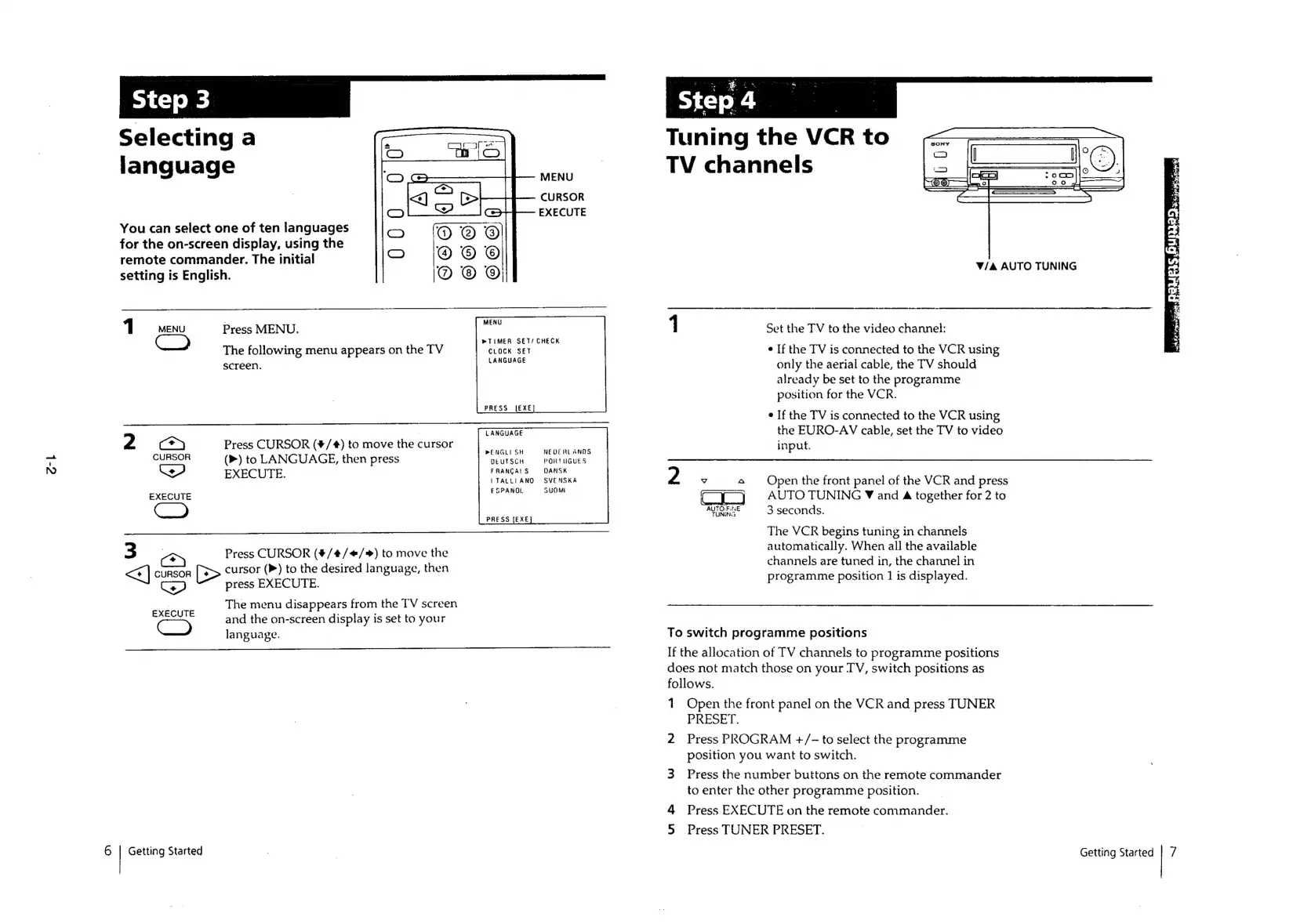
Selecting
a
language
MENU
CURSOR
EXECUTE
You
can
select
one
of
ten
languages
for
the
on-screen
display,
using
the
remote
commander.
The
initial
setting
is
English.
10
omenu
Press
MENU.
°
»
TIMER
SET/
CHECK
The
following
menu
appears
on
the
TV
CLOCK
SET
screen.
LANGUAGE
PRESS
[EXE]
LANGUAGE
2
ne
ieee
i)
tomove
the
cursor
PENGLI
SH
NEOCRLANNS
‘Go
(P)
to
LANGUAGE,
then
Press
DEUTSCH
PORTUGUES
FRANCAIS
DANSK
Cet
ITALLIANO
SVENSKA
EXECUTE
ESPANOL
SUOMI
PRESS
[EXE
3
<=
Press
CURSOR
(#4/4/¢/)
to
move
the
<]
CURSOR
>
cursor
(P)
to
the
desired
language,
then
we
press
EXECUTE.
The
menu
disappears
from
the
TV
screen
and
the
on-screen
display
is
set
to
your
language.
EXECUTE
Getting
Started
Step
4
Tuning
the
VCR
to
TV
channels
V/A
AUTO
TUNING
1
Set
the
TV
to
the
video
channel:
¢
If
the
TV
is
connected
to
the
VCR
using
only
the
aerial
cable,
the
TV
should
already
be
set
to
the
programme
position
for
the
VCR.
e
If
the
TV
is
connected
to
the
VCR
using
the
EURO-AV
cable,
set
the
TV
to
video
input.
2
Vv
o
Open
the
front
panel
of
the
VCR
and
press
Cy
jy
AUTOTUNING
Y
and
4
together
for
2
to
AUTO
FINE
3
seconds.
The
VCR
begins tuning
in
channels
automatically.
When
all
the
available
channels
are
tuned
in,
the
channel
in
programme
position
1
is
displayed.
To
switch
programme
positions
If
the
allocation
of
TV
channels
to
programme
positions
does
not
match
those
on
your
TV,
switch
positions
as
follows.
1
Open
the
front
panel
on
the
VCR
and
press
TUNER
PRESET.
2
Press
PROGRAM
+/-
to
select
the
programme
position
you
want
to
switch.
3
Press
the
number
buttons
on
the
remote
commander
to
enter
the
other
programme
position.
4
Press
EXECUTE
on
the
remote
commander.
5
Press
TUNER
PRESET.
Getting
Started
7

Related product manuals