Getting Started10
Step 3 : Connecting the VCR (continued)
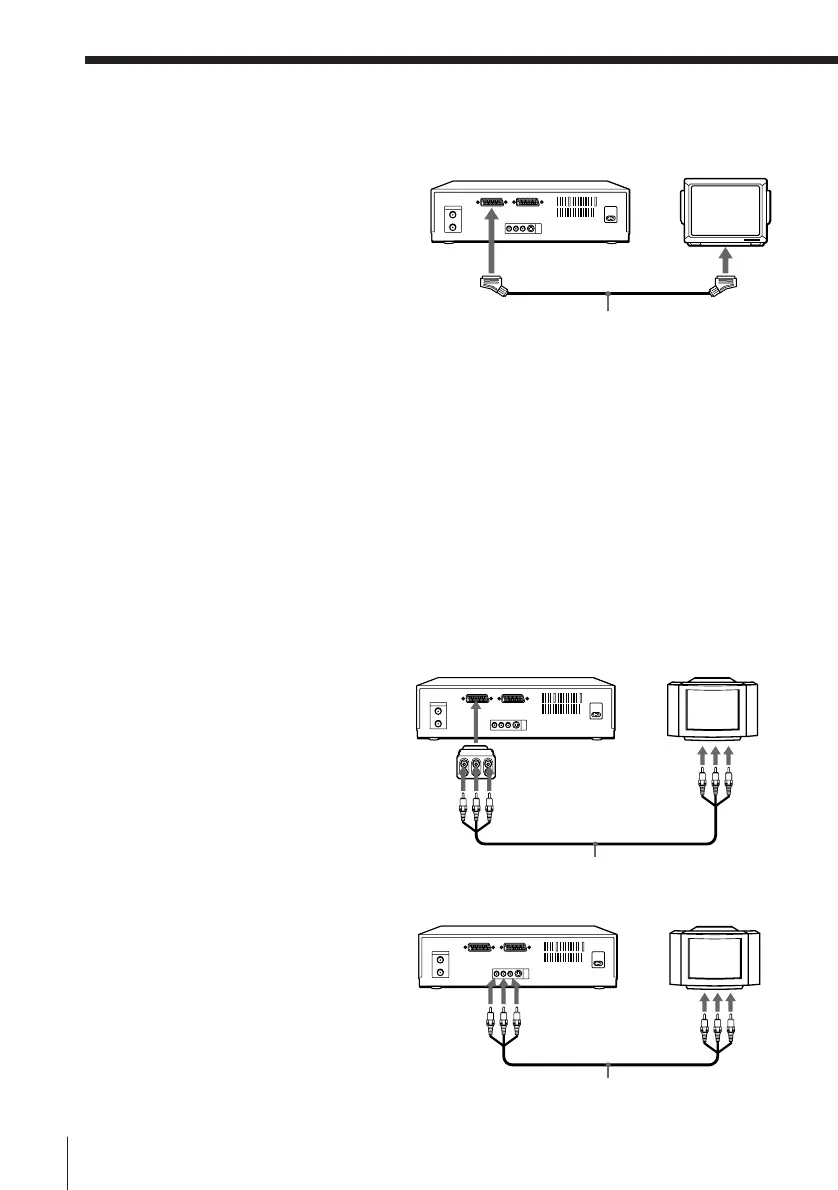
EURO-AV
(Scart)
VMC-2121 EURO-AV cable (not supplied)
Audio/video cable (supplied)
Additional connections
To a TV that has a EURO-AV (Scart)
connector
This additional connection improves
picture and sound quality. Connect the
TV as shown on the right. Whenever
you want to watch the VCR picture,
press TV/VIDEO on the remote
commander (or TV/VTR on the VCR) to
display the VTR indicator in the display
window. When you connect using the
EURO-AV cable, set the RF
MODULATOR option in the SET UP
MENU to OFF. (page 51)
Notes
• If your TV has a EURO-AV connector, set the LINE 1 VIDEO OUT menu option to
NORM. This hookup allows you to display subtitles, but the VCR does not
transmit Y/C signals.
• If your TV has a EURO-AV connector and is S-VIDEO compatible, set the LINE 1
VIDEO OUT menu option to S. This hookup does not allow you to display
subtitles, and some TVs may only display a black-and-white screen. If this is the
case, set the TV to S-VIDEO input.
To a TV using a 21-pin adaptor
(supplied)
If your TV doesn’t have a EURO-AV
connector, connect your TV using the
21-pin adaptor as shown on the right.
To a TV that has an audio/video
connector
LINE OUT
LINE IN
: LINE-1 (TV)
LINE IN
Audio/video cable (supplied)
21-pin
adaptor
(LINE OUT)
: LINE-1 (TV)



 To Next Page