27
Getting Started
Getting Started
Manual setup —
Setting the clock
You must set the time and date on the
VCR to be able to use the timer
recording features properly. You can set
the clock manually.
Before you start…
• Turn on the VCR and the TV.
• Set the TV to the video channel.
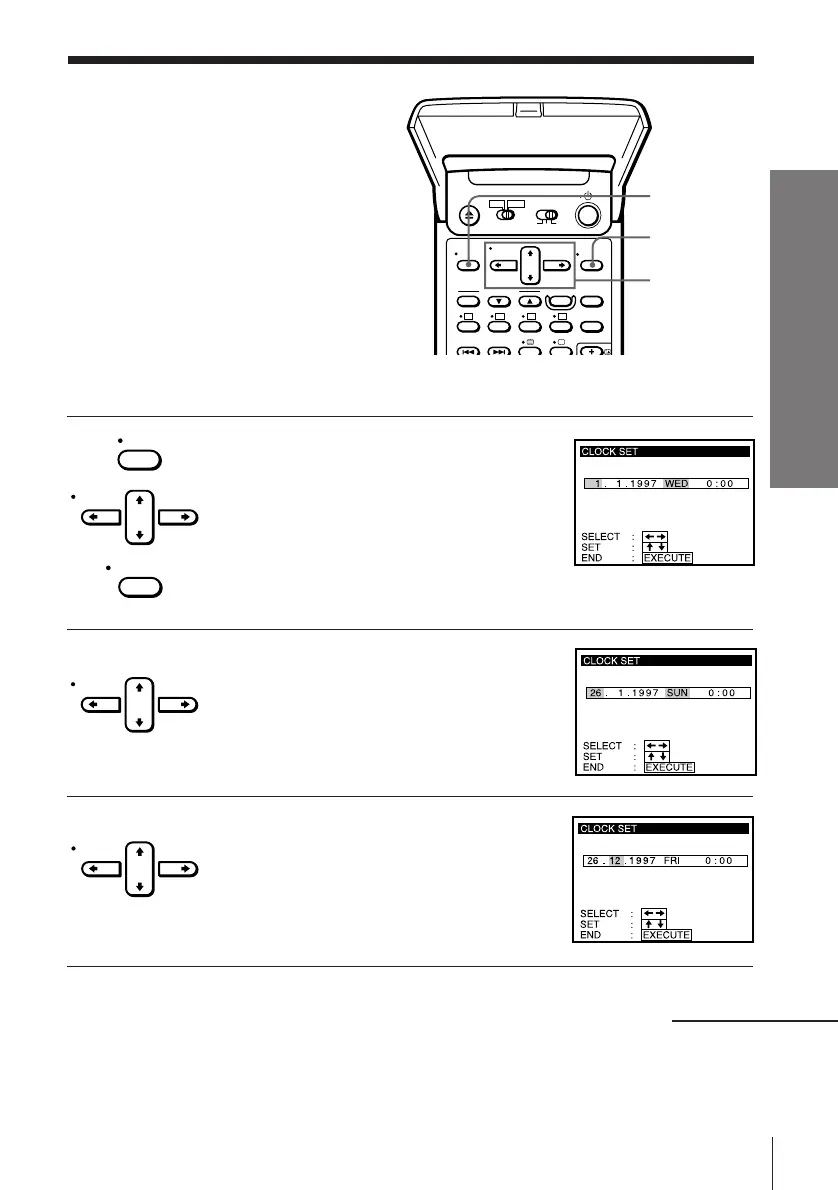
1 Press MENU, then press CURSOR > /. to
move the cursor (I) to CLOCK SET and
press EXECUTE.
When using the EASY SET UP procedure,
skip this step.
2 Press CURSOR > /. to set the day.
The day of the week is set automatically.
3 Press CURSOR / to highlight the month
and set the month using CURSOR > /. .
MENU
EXECUTE
CURSOR
> /. /? //
MENU
CURSOR
EXECUTE
CURSOR
CURSOR
continued



 To Next Page