159
Menu List
Appendix
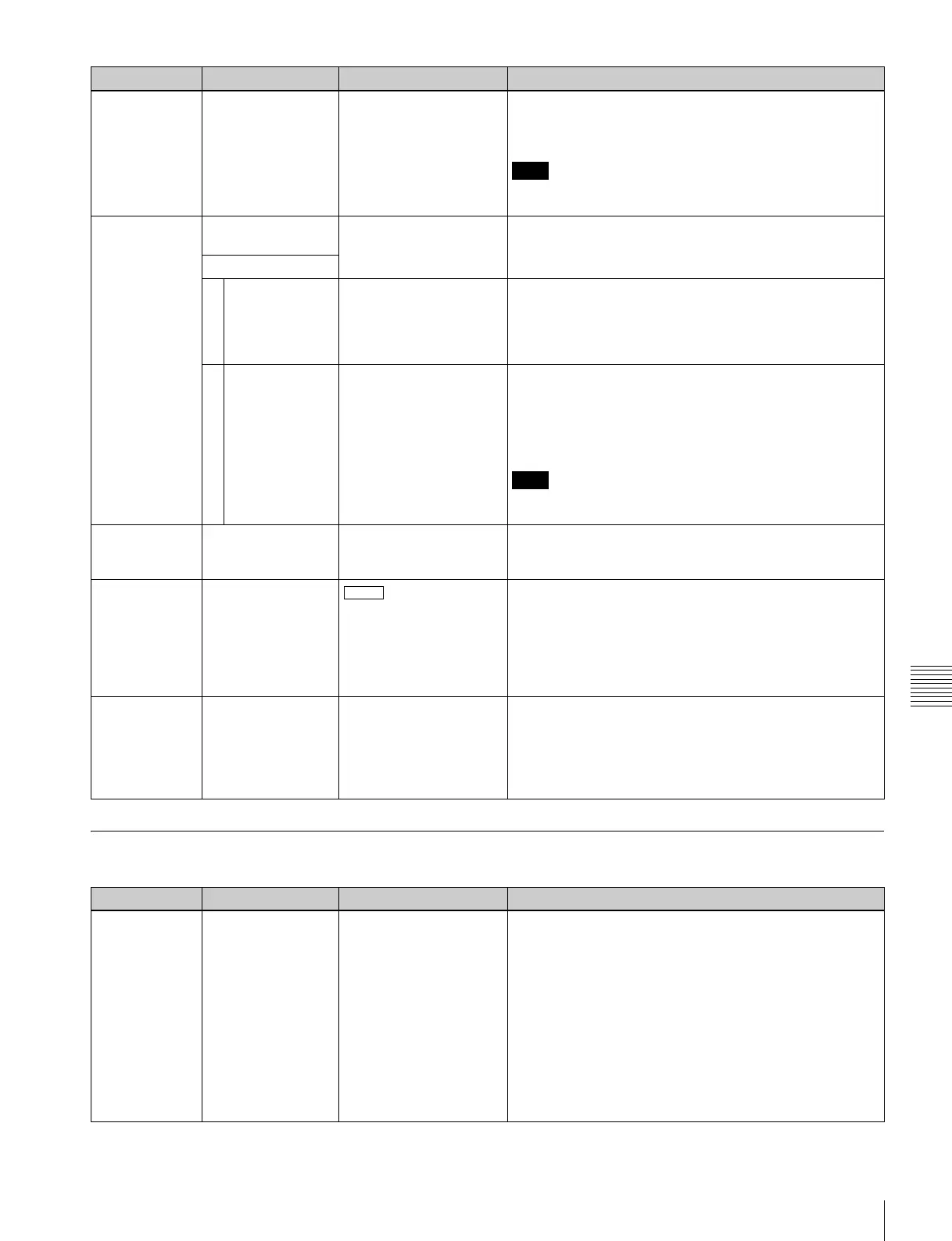
Items Relating to Editing (Nos. 301 to ...)
203 PARALLEL
RUNNING
[disable]
enable
Selects whether two or more VTRs can be operated
synchronized.
disable: Synchronized operation is not carried out.
enable: Synchronized operation is enabled.
Note
For synchronized operation to be possible, this item must
be set to “enable” on all of the connected VTRs.
204 VIDEO REMOTE
CONTROL SELECT
Make settings for control from HKDV-900/503 via the
VIDEO CONTROL (9P) connector.
Sub item
1IMAGE
ENHANCER
U&D
UP
[DOWN]
Select whether to control the up-converter or down-
converter whether controlling the image enhancer.
U&D: Control both the up-converter and down-converter.
UP: Control the up-converter.
DOWN: Control the down-converter.
2 D2 SETUP BLACK
[SETUP]
Select the menu item to be controlled by the SETUP dial on
the HKDV-900/503 with the D2 button pressed.
BLACK: Control menu item 743.
SETUP: Control menu item 762.
For details, see items 743 and 762.
Note
After changing the setting for this item, power off this unit or
HKDV-900/503 and power it on again.
205 REMOTE
NETWORK
on
[off]
Specifies whether or not control from a network is possible.
on: Allows control from a network.
off: Does not allow remote control from a network.
211 REMOTE 1 PORT
IN
I/O
Specifies whether to use one or both of the REMOTE 1-
IN(9P) and REMOTE 1-I/O(9P) connectors on the
connector panel.
I & I/O: Use both the REMOTE 1-IN(9P) connector and the
REMOTE 1-I/O(9P) connector.
IN: Use only the REMOTE 1-IN(9P) connector.
I/O: Use only the REMOTE 1- I/O(9P) connector.
212 MONITOR
SELECTION FOR
VTR TO VTR EDIT
[MAN]
AUTO
For editing with two SRW-5000/5500 units, specifies
whether the recorder is forcibly switched to E-E mode when
the PLAYER button is pressed.
MAN: The recorder is not forcibly switched to E-E mode.
AUTO: The recorder is forcibly switched to E-E mode,
allowing you to monitor the player-side video.
Item number Item Setting Function
301 EDIT OPERATION
MODE
CG
[normal]
KEEP DURATION
Selects the animation edit mode. For normal editing, use
the “normal” setting.
CG: Primarily for recording computer graphics, this setting
allows editing by individual frames. When the edit is
completed, the OUT point automatically becomes the
next IN point. The next OUT point is automatically set
one frame ahead of the IN point.
normal: Use this setting for normal editing.
KEEP DURATION: This setting allows editing in certail
intervals. When the edit is completed, the OUT point
automatically becomes the next IN point. The position
of OUT point for the next edit is shifted automatically so
that the duration is the same as the previous edit.
Item number Item Setting Function
I & I/O



 To Next Page