76
4-4 CUE Menu
Chapter 4 Menu Settings
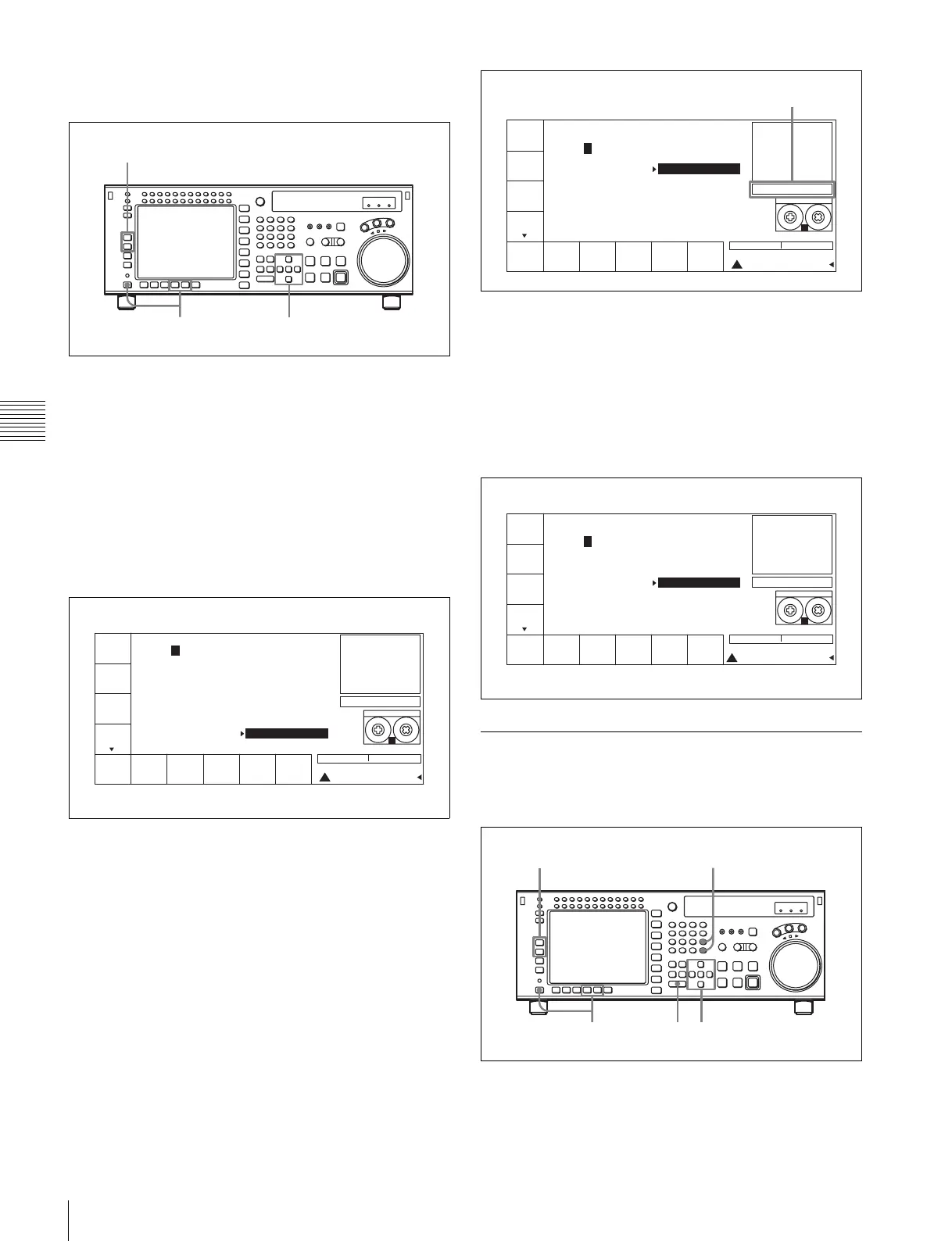
Registering cue points by the numeric
buttons
1
Press the ALT/[F8] (PAGE MODE) buttons or the
ALT/[F9] (EXTEND MODE) buttons.
2
If you selected PAGE mode, press the [F1] (PREV
PAGE) button or [F2] (NEXT PAGE) button to select
a desired page (or use the numeric buttons to enter the
page number in the data entry window, then press the
[F8] (PAGE SET) button).
3
Press the cursor R or r button to move the cursor (B) to
the cue number to be registered.
To select the cue number directly by the numeric
buttons
Enter the cue number in the data entry window with
the numeric buttons, then press the [F9] (CUENUM
SET) button.
4
Enter the cue point data in the data entry window with
the numeric buttons, then press the SET button.
For example, to enter 00:01:30:00, press 0, 0, 1, 3, 0,
0, 0. (The leading 0 is not required. When the entered
value is less than eight digits, the leading digit(s) is
(are) set to 0 when you press the SET button.)
To modify current cue point data
Press the + or – button, enter the value to be added or
subtracted, then press the SET button.
The computation is performed and the results appear
in the data entry window.
5
Press the ENTRY button to set the entered data.
The data are registered in the cue point data indication.
4-4-4 Erasing Cue Point Data
To erase any cue point data, blank out the data entry
window, then do the cue point registration procedure.
1
Press the ALT/[F8] (PAGE MODE) buttons or the
ALT/[F9] (EXTEND MODE) buttons.
1 3
2
PREV
PAGE
NEXT
PAGE
CUE
P-ROLL
PAGE
SET
CUENUM
SET
M-CUE
CLEAR
STILL
77 77 77 77
[(Blank) ]
PAGE: 0
1
2
3
4
5
6
7
8
9
EOS[--:--:--:--]
0 00:01:10:00
1 00:02:10:00
2 00:03:10:00
3 00:04:10:00
4 00:05:10:00
5 00:06:10:00
6 00:07:10:00
7 00:08:10:00
8 00:09:10:00
9 00:10:10:00
SS
HDCAM-SR
REMAIN:01H06M
! CUE
Tele-
File
PREV
PAGE
NEXT
PAGE
CUE
P-ROLL
PAGE
SET
CUENUM
SET
M-CUE
CLEAR
STILL
SET-00 13 00 00SET-00 13 00 00
[(Blank) ]
PAGE: 0
1
2
3
4
5
6
7
8
9
EOS[00:13:00:00]
10 00:10:00:00
11 00:11:00:00
12 00:12:00:00
13 00:13:00:00
14 00:14:00:00
15 00:15:00:00
16 00:16:00:00
17 00:17:00:00
18 00:18:00:00
19 00:19:00:00
SS
HDCAM-SR
REMAIN:01H06M
! CUE
Tele-
File
Entered data
PREV
PAGE
NEXT
PAGE
CUE
P-ROLL
PAGE
SET
CUENUM
SET
M-CUE
CLEAR
STILL
[(Blank) ]
PAGE: 0
1
2
3
4
5
6
7
8
9
SS
HDCAM-SR
REMAIN:01H06M
! CUE
EOS[00:13:00:00]
10 00:10:00:00
11 00:11:00:00
12 00:12:00:00
13 00:13:00:00
14 00:14:00:00
15 00:15:00:00
16 00:16:00:00
17 00:17:00:00
18 00:18:00:00
19 00:19:00:00
Tele-
File
1 35
24



 To Next Page