24
2-1 Control Panel
Chapter 2 Locations and Functions of Parts
The ACTIVE LINE setting displayed on page 2 can be
made in the SYSTEM screen. The phase settings displayed
on pages 3 to 5 and the settings relating to META DATA
recording displayed on page 6 can be made in the PHASE
SET/META DATA menu under the ALT+OTHERS
CHECK menu in the MAINTENANCE menu.
For details, refer to the Installation Manual.
b REF SYNC (reference signal) indicators
These indicate the signal selected as the reference signal.
If there is no reference signal input to the selected
connector, the STOP button flashes.
EXT SD: Lights when “extern SD” is selected by the VTR
SETUP menu item 006 “EXTERNAL REFERENCE
select”.
EXT HD: Lights when “extern HD” is selected by the
VTR SETUP menu item 006 “EXTERNAL
REFERENCE select”.
INPUT VIDEO: Lights when “INPUT” is selected by the
VTR SETUP menu item 005 “SERVO/AV
REFERENCE select”.
c PREREAD indicator
Lights up during preread mode.
For more information about PREREAD, see “6-2-2
Animation Editing” on page 136.
d SERVO indicator
Lights up when the drum servo and capstan servo are
locked.
e REC INHIBIT indicator
Only when this indicator is not lit, you can make settings
for assemble/insert editing mode, and carry out recording
and playback operations.
The status of this indicator depends on the setting of the
[F2] (REC INH) button in the HOME menu and the state
of the record-protect plug on the cassette.
a) Toggling between lit/flashing settings is possible using the VTR SETUP
menu item 104 “REC INHIBIT LAMP FLASHING”.
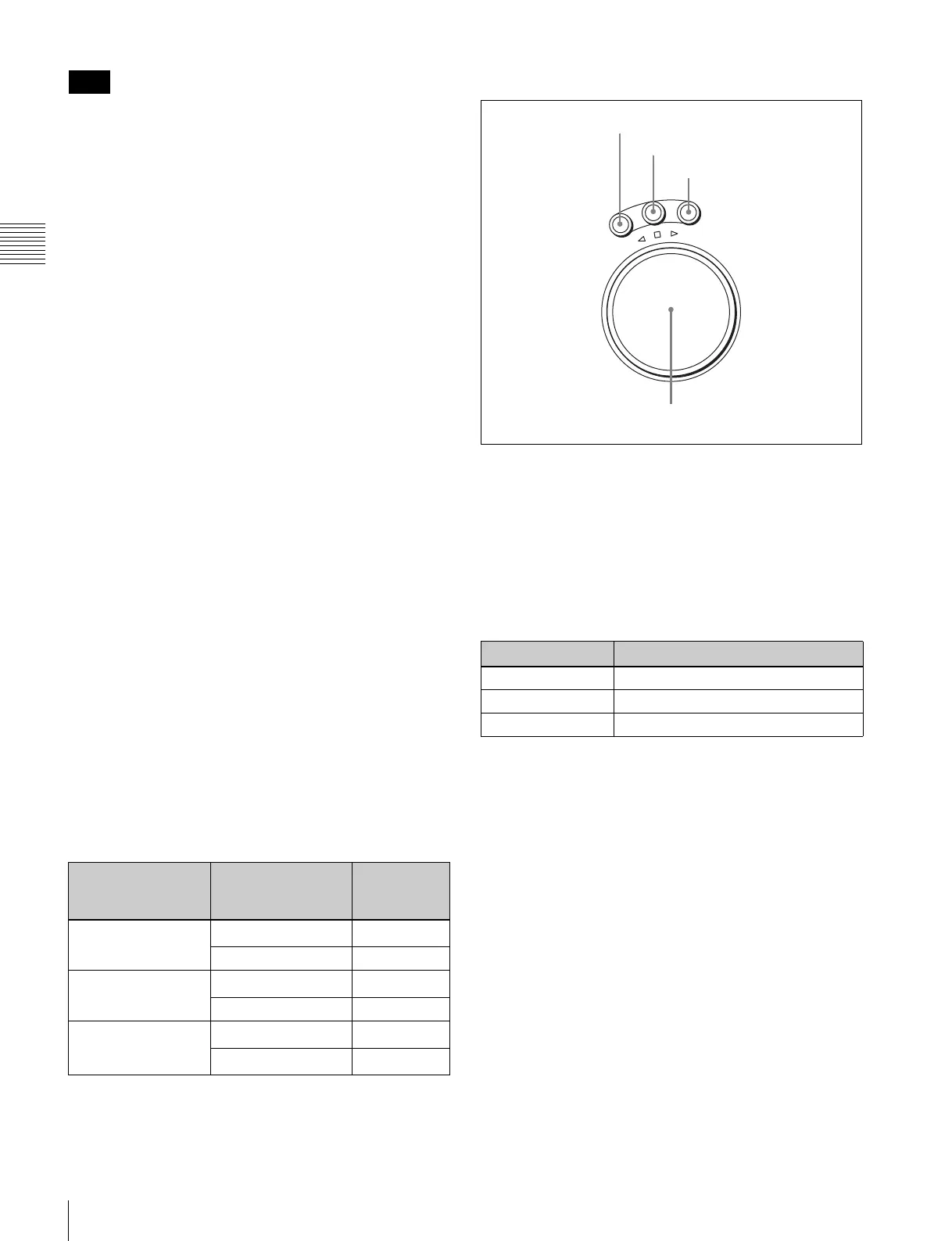
5 Search control section
a SHUTTLE button
Press to enter shuttle mode. In this mode, the button lights
and playback at the speed corresponding to the angle of
rotation of the search dial is possible. The playback speed
range depends on the frame frequency of the unit. In this
mode, the search dial clicks at the positions for 0 (still
picture) and ±10 times normal playback speed (HDCAM/
Digital Betacam) or ±8 times normal playback speed
(HDCAM-SR).
b JOG button
Press to select jog mode. In this mode, the button lights up
and playback is possible at –1 to +1 times normal speed, ±2
times normal speed (HDCAM/HDCAM-SR), or ±3 times
normal speed (Digital Betacam) (determined by the setting
in the VTR SETUP menu item 107 “JOG DIAL
RESPONSE”). In this mode, the search dial does not click.
c VAR (variable) button
Press to select variable speed playback mode for noiseless
playback in the range from –1 to +2 times normal speed
(HDCAM/HDCAM-SR) or –1 to +3 times normal speed
(Digital Betacam). Playback exceeding this speed range is
not possible. The search dial clicks at the positions for still-
picture and normal playback speed.
d Search dial
Rotate to search for edit points. Rotate the dial clockwise
for forward playback (the B indicator lights up) or
counterclockwise for reverse playback (the b indicator
Note
Setting of the [F2]
(REC INH) button in
the HOME menu
State of the record-
protect plug on the
cassette
REC INHIBIT
indicator
all Recording disabled
Lit/flashing
a)
Recording allowed Lit
crash REC, video/
CTL, audio/CTL
Recording disabled
Lit/flashing
a)
Recording allowed Unlit
off Recording disabled
Lit/flashing
a)
Recording allowed
Unlit
a)
Frame frequency
Playback speed
23.98/24 Hz Ranging from ±50
25 Hz Ranging from ±48
29.97/30 Hz Ranging from ±40
R
E
V
E
R
S
E
F
O
R
W
A
R
D
S
H
U
T
T
L
E
J
O
G
V
A
R
1 SHUTTLE button
2 JOG button
3 VAR button
4 Search dial



 To Next Page