80
4-4 CUE Menu
Chapter 4 Menu Settings
To cancel the formatting operation
Press the CLR button.
3
Press the [F1] (FORMAT T-File) button while holding
down the SFT button.
“COMPLETED” appears in the control panel display.
Prohibiting Tele-File menu operations
Press the ALT/[F7] (WRITE PRTEC) buttons.
on: All Tele-File menu operations are prohibited.
off: All Tele-File menu operations are permitted.
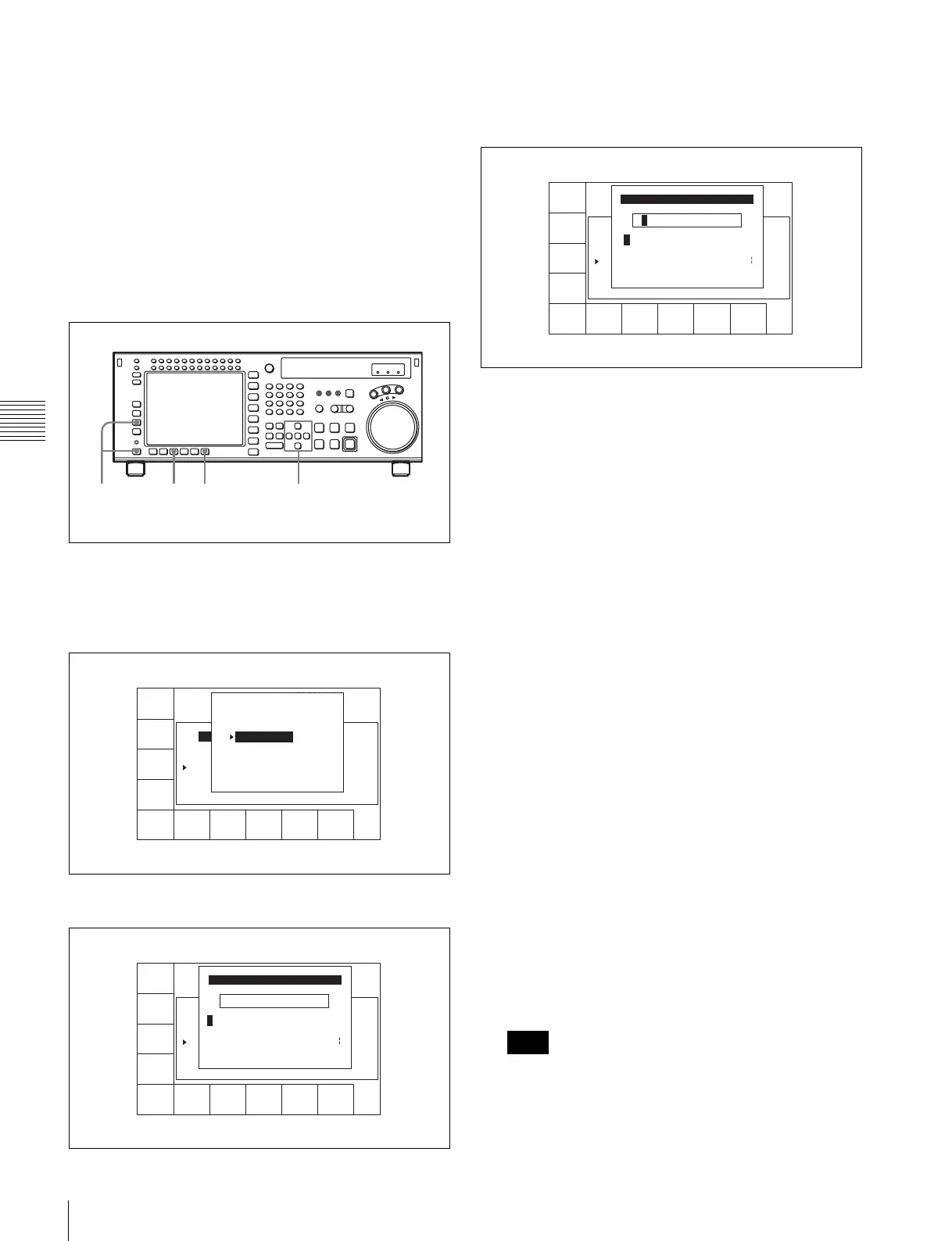
Changing a title
1
Press the ALT/[F3](ATTRIB EDIT) buttons.
2
Press the R or r button to select TITLE, and then press
the ENTRY button.
3
Press the cursor T or t button to select a character.
4
Press the [F7] (SET LETTER) button or the cursor
center button.
The selected character is entered.
5
Repeat steps 3 and 4 to enter more characters.
To enter a space
Press the [F5] (SPACE) button.
If you enter a wrong character
Press the [F6] (BACK SPACE) button to go back.
Then re-enter the character.
To start the procedure over again
Press the [F9] (CANCEL) button to start again.
To change a character
Press the cursor R button to move the cursor to the title
box. Then press the cursor T or t button to change
the insertion position.
If entered title exceeds the length of the title box
t or T appears to the left or right of the box.
6
Press the [F10] (SAVE/EXIT) button.
The screen that was on before the title was entered is
displayed again.
To change IN/OUT point time data
1
Use the cursor buttons to move the cursor (B) to the
line where you want to change IN/OUT point time
data.
To move the cursor using the numeric buttons
With the cursor specifying IN or OUT, enter the line
number using the numeric buttons. Then press the [F9]
(CUENUM POINT) button. The cursor will move to
the line specified by the numeric buttons.
If the cursor (B) is not linked with the cursor buttons,
the cursor (B) will not move when the cursor buttons
are pressed.
To link the cursor (B) with the cursor buttons
2,364
1
FORMAT
T-File
UNDO
ALL
ATTRIB
EDIT
COPY
toCUE
WRITE
PRTEC
off
REC DATE[2003/02/25]
TITLE[ isplay Sample
No. Tape Format Duration
0 59i 1080 422 01:00:36:06 --------
1 59i 1080 422 01:00:36:06 --------
2 59i 1080 422 00:01:25:08 --------
3 60p 720 422 00:02:36:45 --------
EOS[01:01:--:--]
] Rest 95%
Date/Time
ATTRIB EDIT SELECT
TITLE
ID
ADMIN
Press [ENTRY] to edit
Press [CLR] to CANCEL
SPACE SET
LETTER
CANCEL SAVE/
EXIT
BACK
SPACE
REC DATE[2003/02/25]
TITLE[ isplay Sample
No. Tape Format Duration
0 59i 1080 422 01:00:36:06 --------
1 59i 1080 422 01:00:36:06 --------
2 59i 1080 422 00:01:25:08 --------
3 60p 720 422 00:02:36:45 --------
EOS[01:01:--:--]
] Rest 95%
Date/Time
_ ->
A BCDEFGHIJKLMNOPQRSTUVWXYZ
abcdefghjiklmnopqrstuvwxyz
0123456789[]()<>@+-*=!?:;
EDIT TITLE
$#%&,."\^_'/~ {} HD1D2CAM
'
Note
SPACE SET
LETTER
CANCEL SAVE/
EXIT
BACK
SPACE
REC DATE[2003/02/25]
TITLE[ isplay Sample
No. Tape Format Duration
0 59i 1080 422 01:00:36:06 --------
1 59i 1080 422 01:00:36:06 --------
2 59i 1080 422 00:01:25:08 --------
3 60p 720 422 00:02:36:45 --------
EOS[01:01:--:--]
] Rest 95%
Date/Time
B ->
A B CDEFGHIJKLMNOPQRSTUVWXYZ
abcdefghjiklmnopqrstuvwxyz
0123456789[]()<>@+-*=!?:;
EDIT TITLE
$#%&,."\^_'/~ {} HD1D2CAM
'



 To Next Page