76
US
D:\NORM'S JOB\SONY HA\SO0046\STR-DA3500ES\U VERSION\US\4144907111\01US-
STRDA3500ESUC\080TUN.fm
masterpage: Left
STR-DA3500ES
4-144-907-11(1)
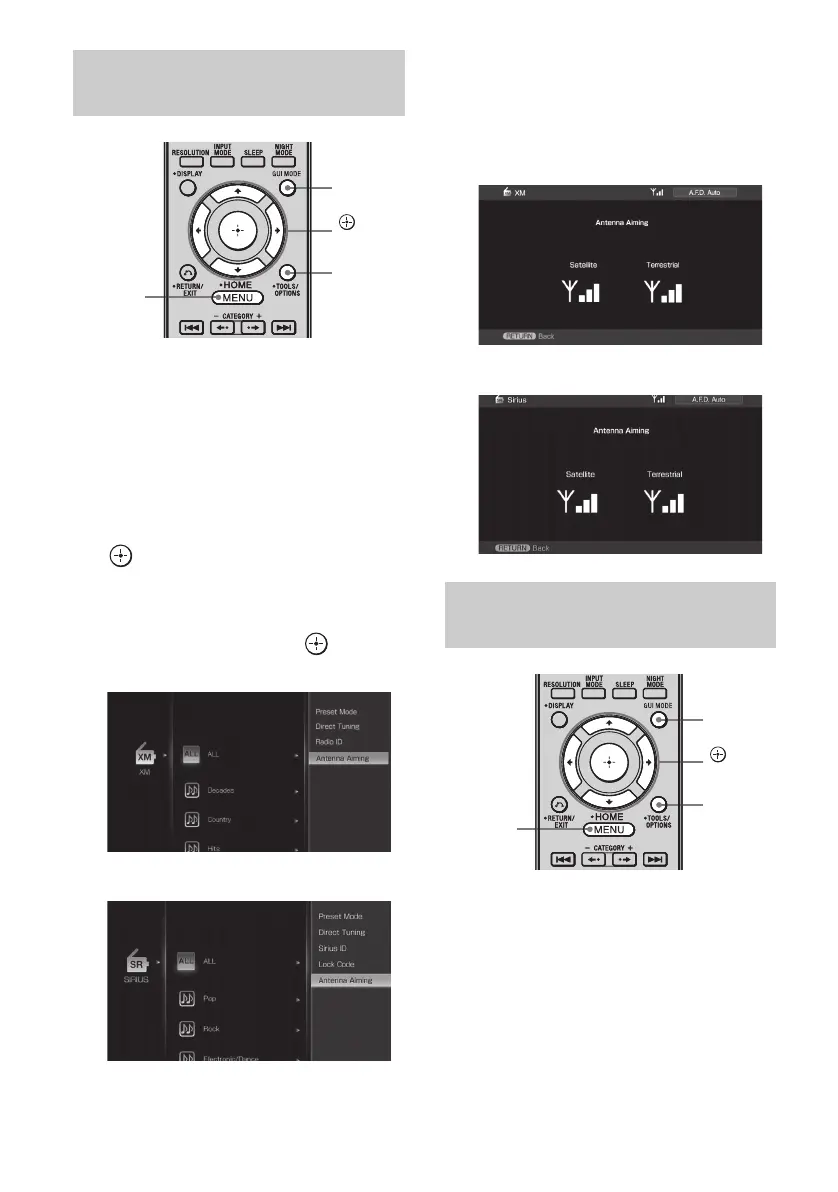
1 Press GUI MODE repeatedly to
select “GUI ON”.
The GUI menu appears on the TV screen.
Press MENU if the GUI menu does not
appear on the TV screen.
2 Press V/v repeatedly to select
“XM” or “SIRIUS”, then press
or b.
3 Press OPTIONS, then press V/v
repeatedly to select “Antenna
Aiming”, then press .
4 While checking the parameter
on the TV screen, aim your
antenna to where the best
reception will be received.
1 Press GUI MODE repeatedly to
select “GUI ON”.
The GUI menu appears on the TV screen.
Press MENU if the GUI menu does not
appear on the TV screen.
Aiming the XM Radio or SIRIUS
antenna
MENU
GUI
MODE
OPTIONS
,
V/v/B/b
XM
SIRIUS
Checking the XM Radio ID or
SIRIUS ID number
XM
SIRIUS
MENU
GUI
MODE
OPTIONS
,
V/v/B/b















 To Next Page