77
US
D:\NORM'S JOB\SONY HA\SO0046\STR-DA3500ES\U VERSION\US\4144907111\01US-
STRDA3500ESUC\080TUN.fm
masterpage: Right
STR-DA3500ES
4-144-907-11(1)
Tuner Operations
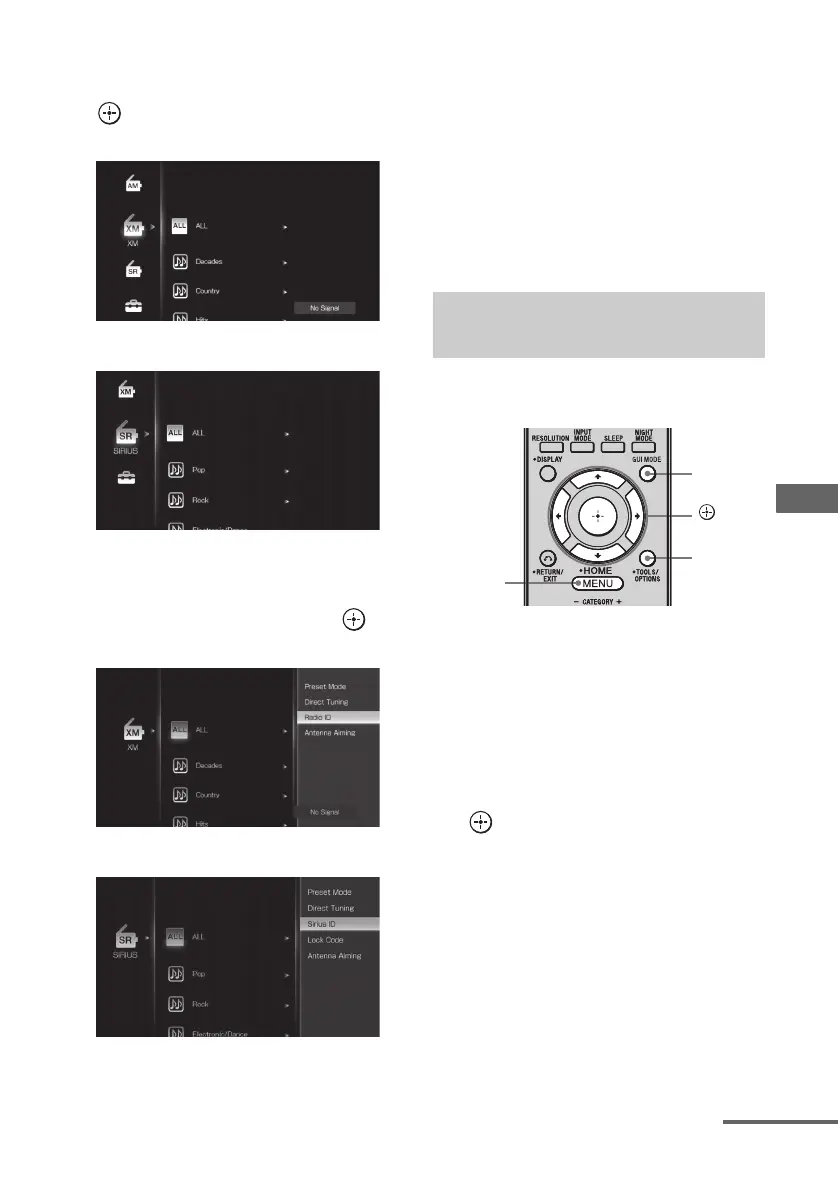
2 Press V/v repeatedly to select
“XM” or “SIRIUS”, then press
or b.
3 Press OPTIONS, then press V/v
repeatedly to select “Radio ID”
or “Sirius ID”, then press .
4 Check the XM Radio ID or Sirius
ID on the TV screen and write it
in the space provided here.
XM Radio ID:_____________________
SIRIUS ID:_______________________
You can also check the XM Radio ID and
SIRIUS ID using the display on the
receiver.
You can select a channel from one category or
all the categories.
1 Press GUI MODE repeatedly to
select “GUI ON”.
The GUI menu appears on the TV screen.
Press MENU if the GUI menu does not
appear on the TV screen.
2 Press V/v repeatedly to select
“XM” or “SIRIUS”, then press
or b.
XM
SIRIUS
XM
SIRIUS
Selecting a channel by Category
Mode
MENU
GUI
MODE
OPTIONS
,
V/v/B/b
continued















 To Next Page