Remote button description
(continued)
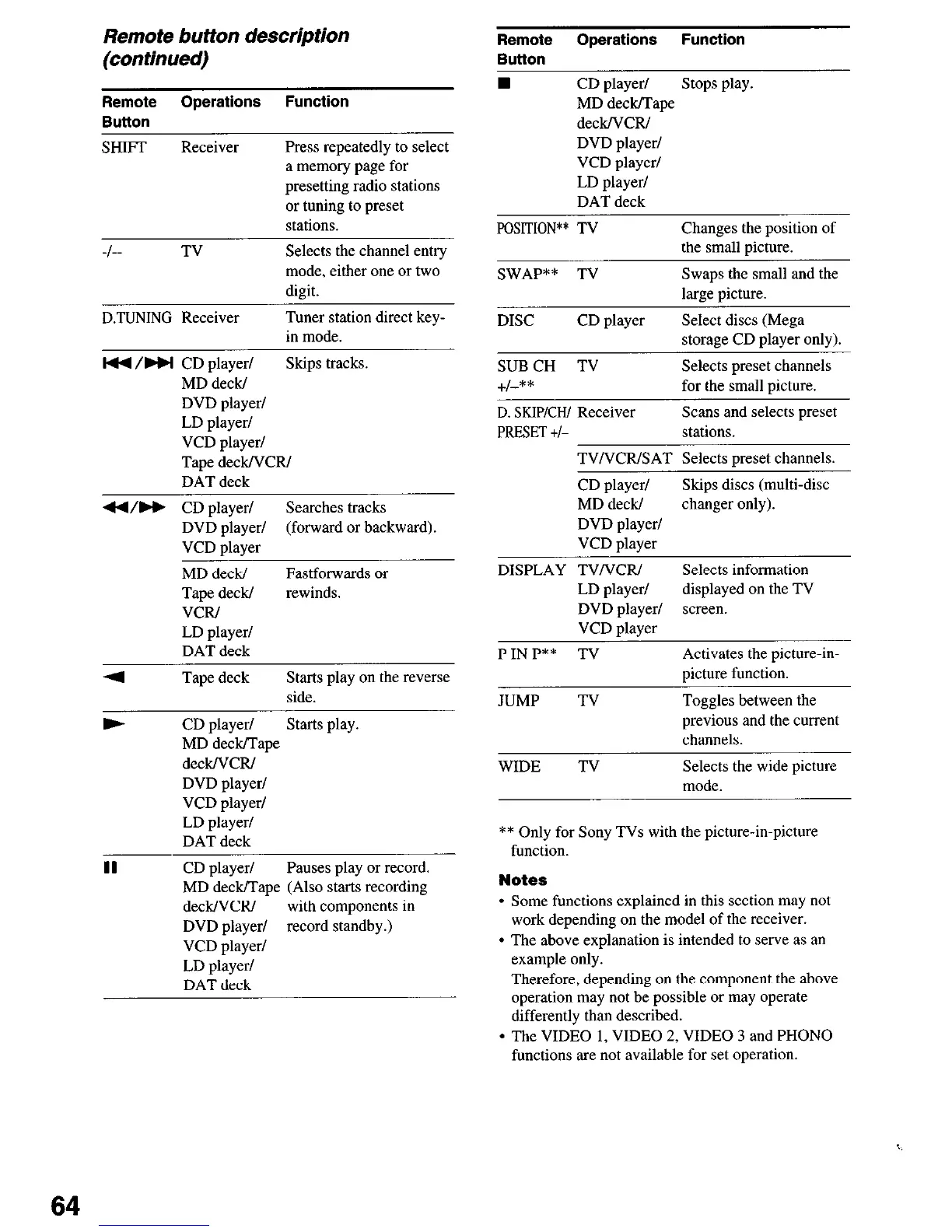
Remote Operations Function
Button
SHIFT Receiver
Press repeatedly to select
a memory page for
presetting radio stations
or tuning to preset
stations.
-I-- TV
D.TUNING Receiver
Selects the channel entry
mode, either one or two
digit.
Tuner station direct key-
in mode.
I44 /HI CD player/ Skips tracks.
MD deck/
DVD player/
LD player/
VCD player/
Tape deck/VCR/
DAT deck
44/H CD player/
Searches tracks
DVD player/ (forward or backward)
VCD player
MD deck/
Tape deck/
VCR/
LD player/
DAT deck
Fastforwards or
rewinds.
4 Tape deck Starts play on the reverse
side.
b CD player/ Starts play
MD deck/Tape
deck/VCR/
DVD player/
VCD player/
LD player/
DAT deck
II CD player/ Pauses play or record.
MD deck/Tape (Also starts recording
deck/VCR/ with components in
DVD player/ record standby.)
VCD player/
LD player/
DAT deck
Remote Operations
Function
Button
n CD player/ Stops play.
MD deck/Tape
deck/VCR/
DVD player/
VCD player/
LD player/
DAT deck
POSITION** TV Changes the position of
the small oicture.
SWAP** TV Swaps the small and the
large uicture.
DISC
CD player Select discs (Mega
storage CD plaver onlv).
SUBCH TV
i-1-**
Selects preset channels
for the small picture.
D. SKIP/CW Receiver
PRESET t/-
Scans and selects preset
stations.
TVNCRISAT Selects preset channels.
CD player/ Skips discs (multi-disc
MD deck/ changer only).
DVD player/
VCD player
DISPLAY TVNCRI Selects information
LD player/ displayed on the TV
DVD player/ screen.
VCD ulaver
PINP** TV Activates the picture-in-
uicture function.
JUMP TV Toggles between the
previous and the current
channels.
WIDE TV Selects the wide picture
mode
** Only for Sony TVs with the picture-in-picture
function.
Notes
l
Some functions explained in this section may not
work depending on the model of the receiver.
l
The above explanation is intended to serve as an
example only.
Therefore, depending on the component the above
operation may not be possible or may operate
differently than described.
l
The VIDEO I, VIDEO 2, VIDEO 3 and PHONO
functions are not available for set operation.
64



 To Next Page