Other Hookups
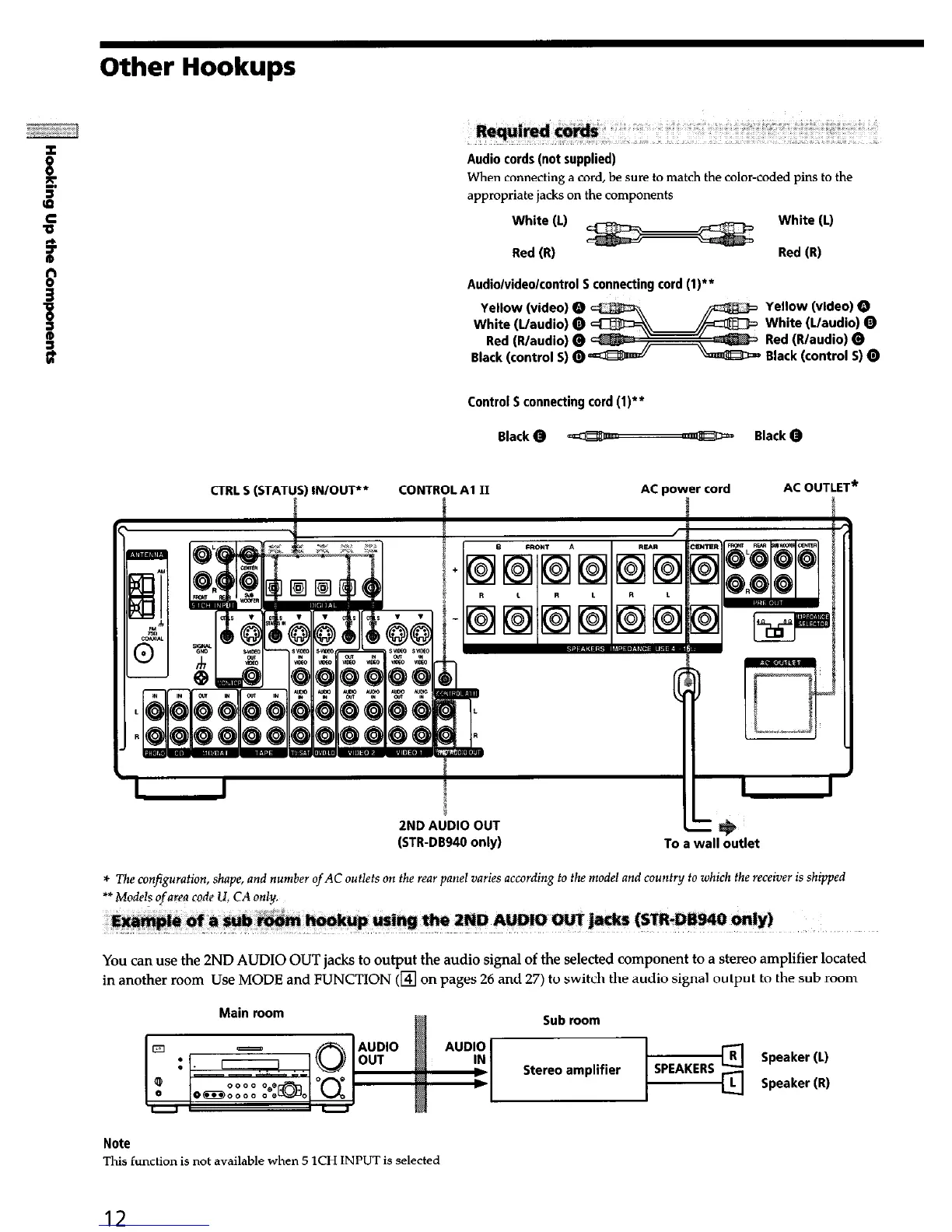
Audio cords (not supplied)
When connecting a cord, be sure to match the color-coded pins to the
appropriate jacks on the components
White (L)
Red (R)
White (L)
Red (R)
Audio/video/control 5 connecting cord (l)**
Yellow (video) Q
White (L/audio) 0
Red (R/audio) 0
Black (control 5) @
Yellow (video) Q
White (L/audio) Q
Red (R/audio) 0
Black (control 5) 0
Control 5 connecting cord (l)‘*
Black@ - Black@
CTRL 5 (STATICS)
IN/OUT**
CONTRTL Al II AC power cord
AC OUTLET*
(STR-DB940 only)
To a wall outlet
* The configuration, shape, and number
of
AC outlets on the rear panel varies according to the model and county to which the receiver is shipped
** A4odAs ofam code U, CA only.
You can use the 2ND AUDIO OUT jacks to output the audio signal of the selected component to a stereo amplifier located
in another room Use MODE and FUNCTION (m on pages 26 and 27) to switch the audio signal output to the sub room
Main room
Sub room
Note
This function is not available when 5 ICH INPUT is selected


 To Next Page