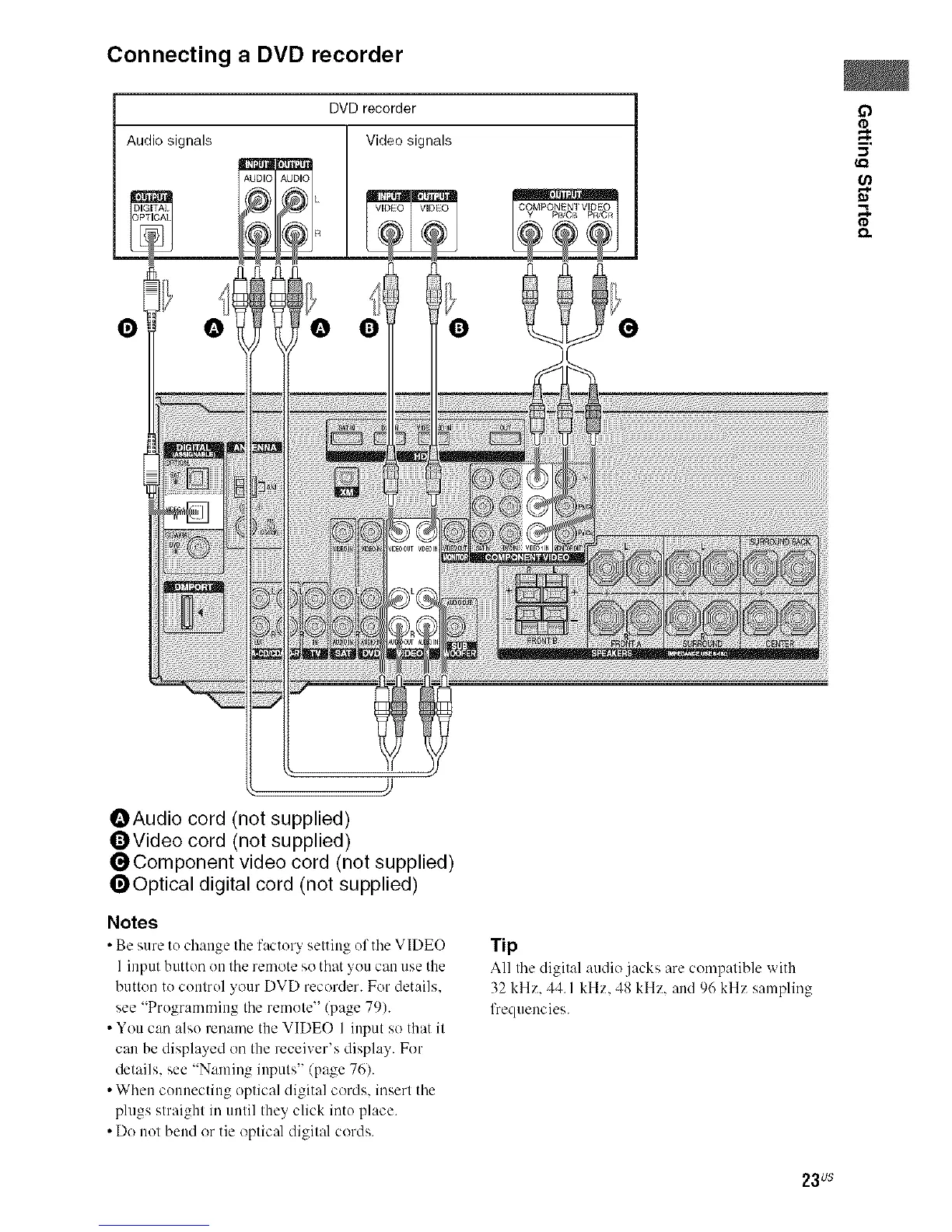
Connecting a DVD recorder
DVD recorder
Audio signals Video signals
AUDIC _UL)IO
O
O
m.
(,el
,.%
OAudio cord (not supplied)
OVideo cord (not supplied)
_Component video cord (not supplied)
_Optical digital cord (not supplied)
Notes
• Be sure to change the factor_ setting of the VIDEO
1 input button enthe remote so that you can use the
button te control your DVD recorder. For details.
see "Pregramming the remote" (page 79).
• You can also rename the VIDEO 1 input so that it
can be displayed on the receiver's display. For
details, see "Naming inputs" (page 76).
• When cennecting optical digital cords, insert the
plugs straight in until they click inte place.
• Do not bend or tie optical digital cords.
Tip
All the digit:d :radio jacks are compatible with
32 kHz. 44.1 kHz. 48 kHz. and 96 kHz sampling
frequencies.
23us



 To Next Page