45
US
Getting Started
Guide to on-screen
display operation
You can display the menu of the receiver on
the TV screen and select the function you want
to use on the TV screen by pressing V/v/B/b
and on the remote.
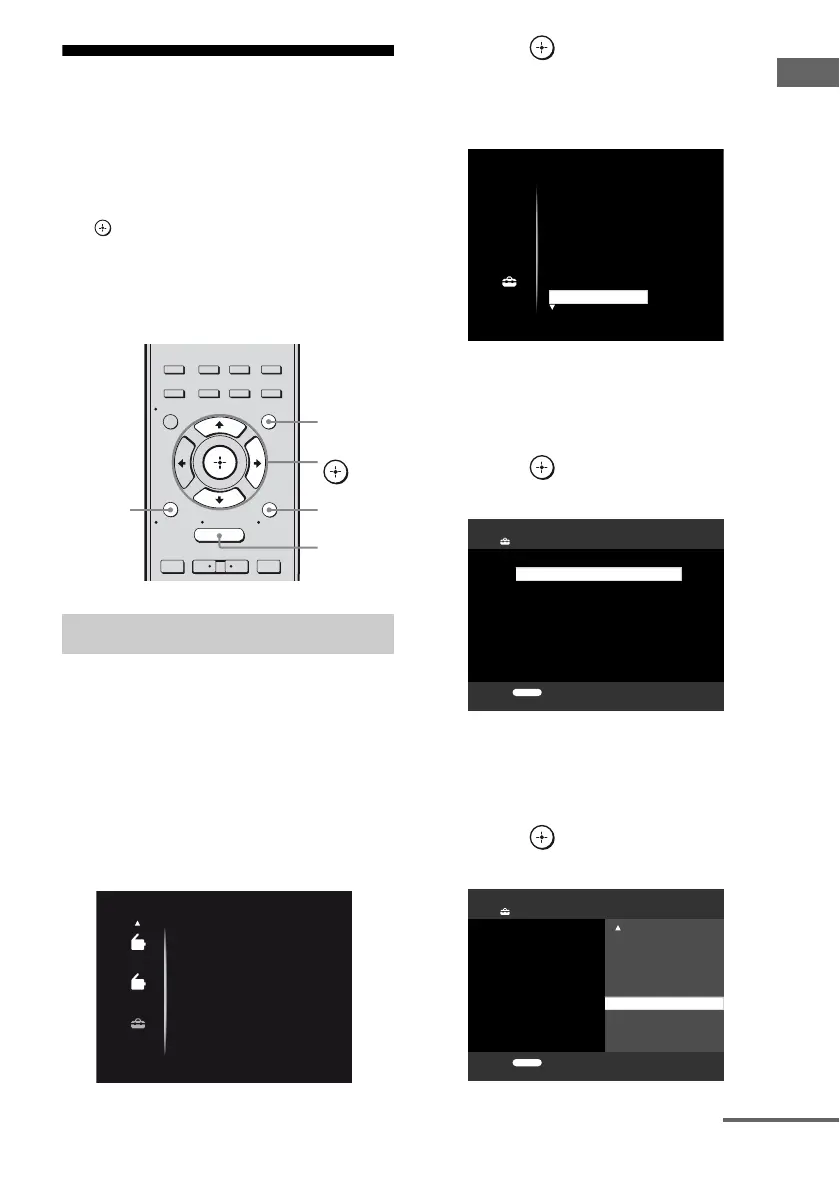
To display the menu of the receiver on the TV
screen, make sure that the receiver is in “GUI
MODE” following the steps in “7: Displaying
the GUI menu on the TV screen” (page 37).
1 Press GUI MODE.
After “MENU ON” appears on the
display for a while, “GUI” appears and
the GUI menu appears on the TV screen.
Press MENU if the GUI menu does not
appear on the TV screen.
2 Press V/v repeatedly to select a
menu you want.
3 Press or b to enter the
menu.
The menu item list appears on the TV
screen.
4 Press V/v repeatedly to select
the menu item you want to
adjust.
5 Press or b to enter the
menu item.
6 Press V/v repeatedly to select
the parameter you want to
adjust.
7 Press or b to enter the
parameter.
Using the menu
2CH/
A.DIRECT
A.F.D. MOVIE MUSIC
RESOLUTION
.
>
<
<
MENU
RETURN/
EXIT
TOOLS/
OPTIONS
HOME
DISPLAY
GUI MODE
O
INPUT
MODE
SLEEP
NIGHT
MODE
– CATEGORY +
V/v/b,
GUI MODE
MENU
TOOLS/
OPTIONS
RETURN/
EXIT O
AM
AM
SR
SR
Setting
Auto Cal.
Speaker
Surround
EQ
Audio
Setting
Auto Cal.
Speaker
Surround
EQ
Audio
Main/Sub
Dec. Priority:
Dual Mono:
Audio Settings
RETURN
0 ms
A/V Sync:
30 ms
A/V Sync:
20 ms
10 ms
Dec. Priority:
Dual Mono:
Audio Settings
RETURN
0 ms
continued



 To Next Page