47
US
Playback
4 Press TOOLS/OPTIONS while
the menu item list is displayed.
The option menu appears.
5 Press V/v repeatedly to select
the option menu item you want,
then press or b.
6 Press V/v repeatedly to select
the parameter you want, then
press .
To exit the menu
Press MENU.
Enjoying sound/images
from the component
connected to the receiver
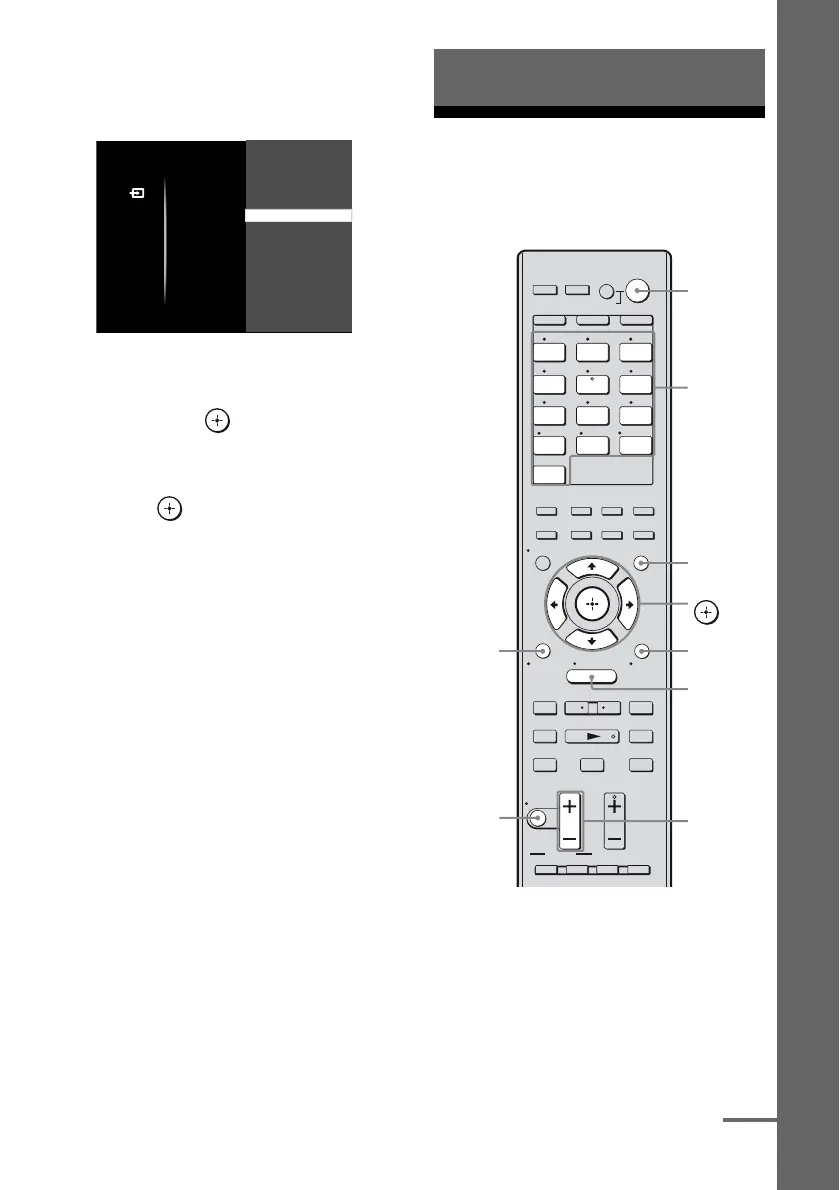
1
Press GUI MODE.
After “MENU ON” appears on the
display for a while, “GUI” appears and
the GUI menu appears on the TV screen.
Press MENU if the GUI menu does not
appear on the TV screen.
Input
VIDEO 1
VIDEO 2
DVD
SAT
BD
Name lnput
Input Assign
Playback
1 2 3
4 5 6
7 8 9
-/-- 0/10
ENT/MEM
2CH/
A.DIRECT
A.F.D. MOVIE MUSIC
THEATER
SYSTEM STANDBY
RM SET UP
?/1
CLEAR
/
>10
SHIFT
TUNING – TUNING +
DISC SKIP D.TUNING
RESOLUTION
.
mM
>
Xx
MUTING
VIDEO 1 VIDEO 2 BD
SAT TV
HDMI 3HDMI 2HDMI 1
HDMI 4
SA-CD/
CD
DMPORTTUNER
TV VOL
MASTER VOL
TV CH
PRESET
<
<
MENU
AV
?/1
F1 F2
TV INPUT
TOP MENU MENU
BD/DVD
WIDE
RETURN/
EXIT
TOOLS/
OPTIONS
HOME
DISPLAY
GUI MODE
O
DVD
INPUT
MODE
SLEEP
NIGHT
MODE
TV AMP
– CATEGORY +
CATEGORY MODE
V/v/B/b,
GUI MODE
MENU
TOOLS/
OPTIONS
MUTING
MASTER
VOL +/–
Input
buttons
?/1 switch
RETURN/
EXIT O
continued



 To Next Page