29
GB
D:\NORM'S JOB\SONY HA\SO0071\STR-DN2010\GB\GB04GET_STR-DN2010-CEL.fm masterpage: Right
STR-DN2010
4-182-049-11(1)
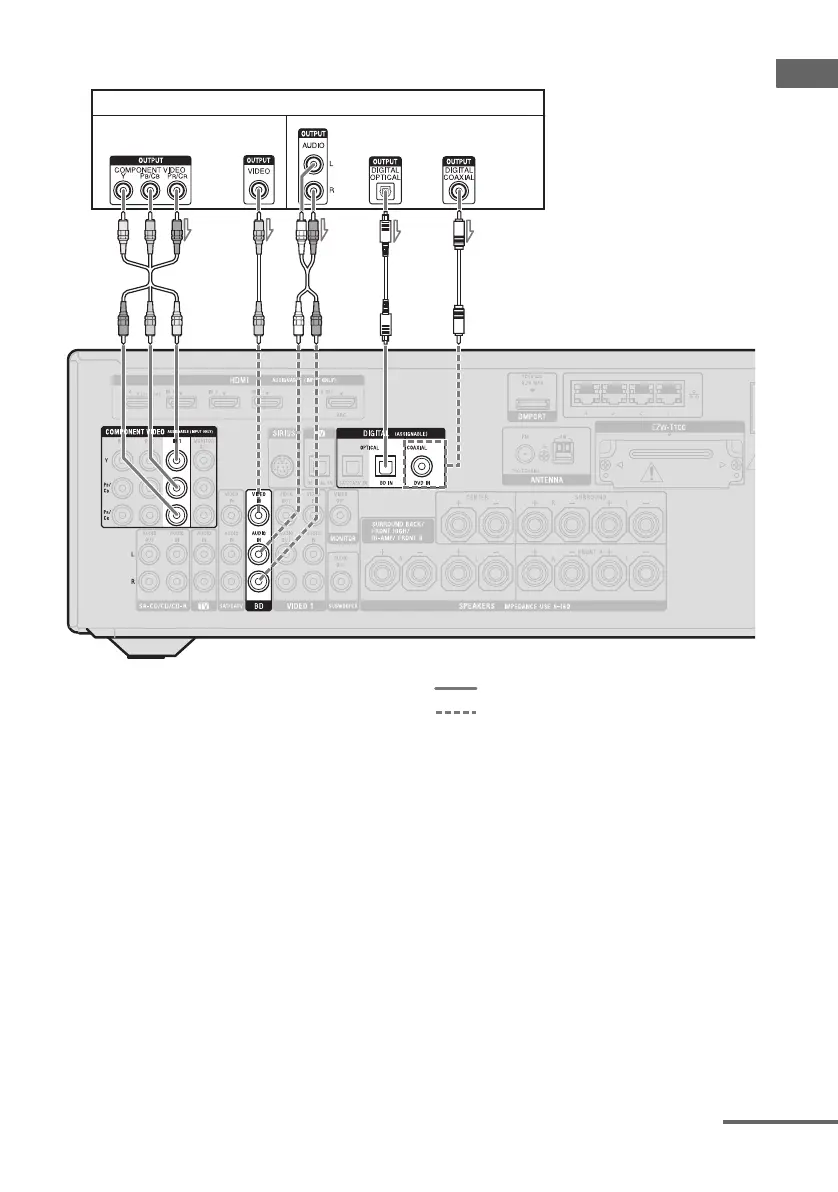
Connections
To connect a Blu-ray Disc player
A Component video cord (not supplied)
B Video cord (not supplied)
C Audio cord (not supplied)
D Optical digital cord (not supplied)
E Coaxial digital cord (not supplied)
Recommended connection
Alternative connection
* When you connect a component equipped with an
COAXIAL jack, set “Input Assign” in the Input
Option menu (page 104).
Notes
• The initial setting of the COMPONENT VIDEO
IN 1 jacks are Blu-ray Disc player. If you want to
connect your Blu-ray Disc player to the
COMPONENT VIDEO IN 2 or IN 3 jacks, set
“Input Assign” in the Input Option menu
(page 104).
• To input multi channel digital audio from the
Blu-ray Disc player, set the digital audio output
setting on the Blu-ray Disc player. Refer to the
operating instructions supplied with the Blu-ray
Disc player.
Blu-ray Disc player
ACB
Video signals Audio signals
DE
*
or oror
continued



 To Next Page