35
GB
D:\NORM'S JOB\SONY HA\SO0071\STR-DN2010\GB\GB04GET_STR-DN2010-CEL.fm masterpage: Right
STR-DN2010
4-182-049-11(1)
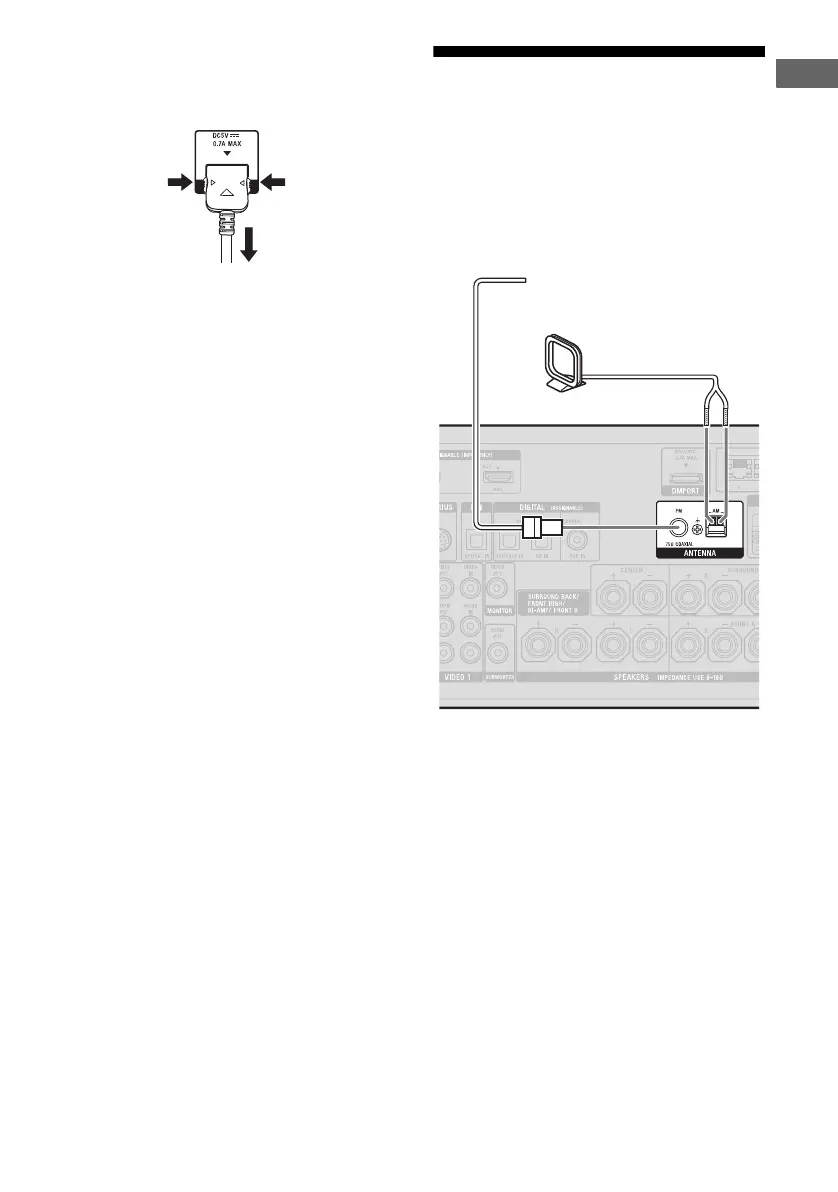
Connections
To detach the DIGITAL MEDIA
PORT adapter from DMPORT
jack
Press and hold both sides of the connector and
then pull out the connector.
5: Connecting the
antennas (aerials)
Connect the supplied AM loop antenna
(aerial) and FM wire antenna (aerial).
Before connecting the antennas (aerials), be
sure to disconnect the AC power cord (mains
lead).
Notes
• To prevent noise pickup, keep the AM loop
antenna (aerial) away from the receiver and other
components.
• Be sure to fully extend the FM wire antenna
(aerial).
• After connecting the FM wire antenna (aerial),
keep it as horizontal as possible.
2
1
FM wire antenna (aerial) (supplied)
AM loop antenna (aerial)
(supplied)



 To Next Page