66
GB
D:\NORM'S JOB\SONY HA\SO0071\STR-DN2010\GB\GB04GET_STR-DN2010-CEL.fm masterpage: Left
STR-DN2010
4-182-049-11(1)
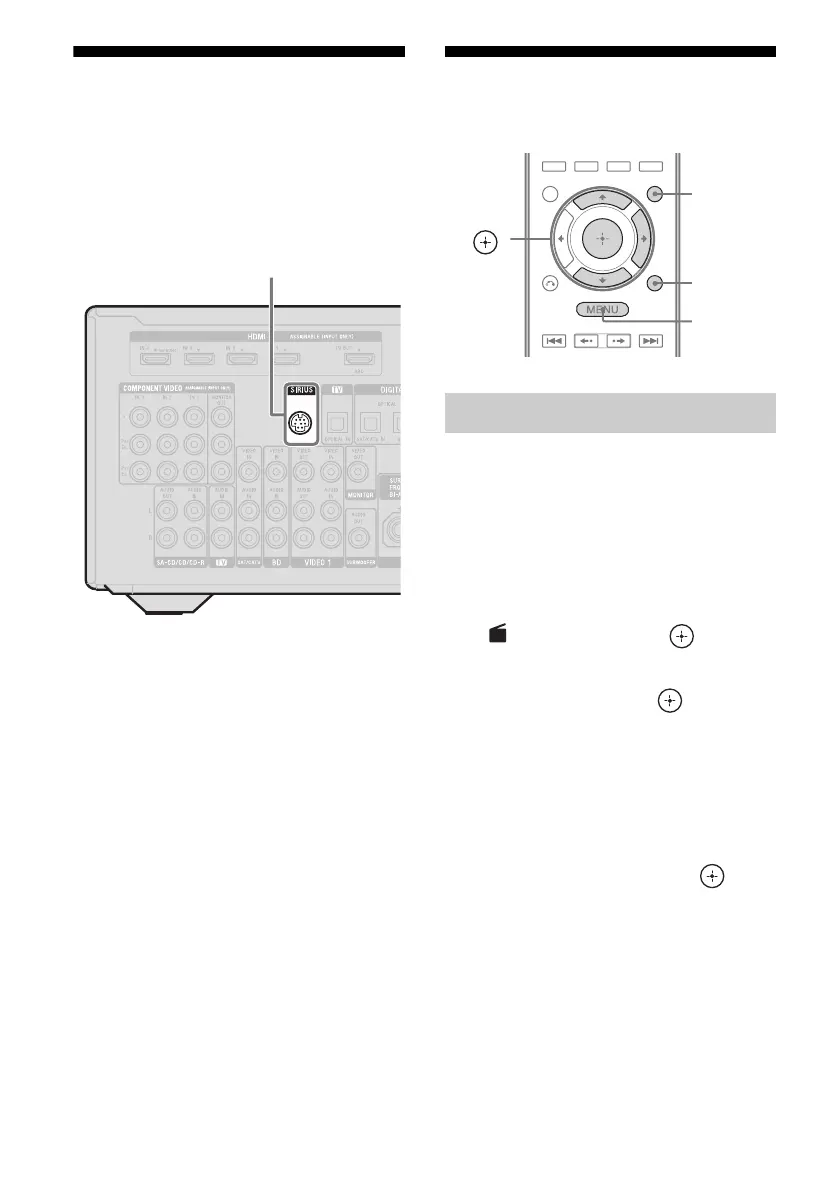
Connecting a satellite
radio tuner
Connect the SiriusConnect Home tuner. When
you use the SiriusConnect Home tuner with
this receiver, be sure to connect the AC power
adaptor supplied with the tuner to a wall outlet.
Note
Keep the SiriusConnect Home tuner, antenna, and
AC power adaptor away from the speaker cords and
the power cord to avoid picking up noise.
Preparing to listen to a
satellite radio
1
Press GUI MODE.
After “GUI ON” appears on the display
for a while, the GUI menu appears on the
TV screen.
Press MENU if the GUI menu does not
appear on the TV screen.
2 Press V/v repeatedly to select
“
SR”, then press or b.
3 Press V/v repeatedly to select
“ALL”, then press .
When the “Preset Mode” screen is
displayed, change the tuning mode to
“Category Mode”, then select “ALL”.
Press TOOLS/OPTIONS, then select
“Category Mode”.
4 Press V/v repeatedly to select
“Sirius ID”, then press .
5 Check the SIRIUS ID on the TV
screen and write it in the space
provided here.
SIRIUS ID:_________________________
You can also check the SIRIUS ID using
the display on the receiver.
SIRIUS jack
Checking the ID number
V/v/b,
GUI MODE
MENU
TOOLS/
OPTIONS
SR



 To Next Page