32
GB
D:\NORM'S JOB\SONY HA\SO0071\STR-DN2010\GB\GB04GET_STR-DN2010-CEL.fm masterpage: Left
STR-DN2010
4-182-049-11(1)
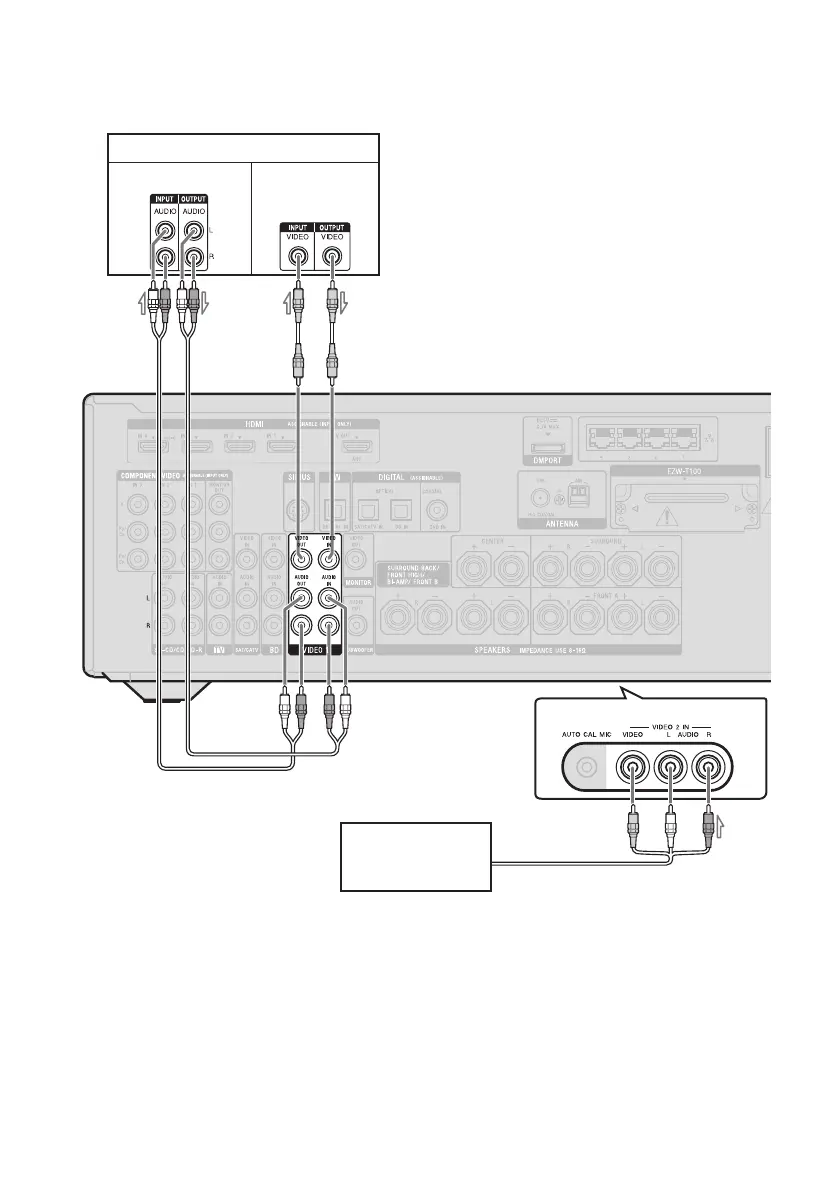
To connect components with analog video and audio jack
The following illustration shows how to connect a component which has analog jacks such as a
DVD recorder, VCR, etc.
A Audio cord (not supplied)
B Video cord (not supplied)
C Audio/video cord (not supplied)
Notes
• Be sure to change the initial setting of the VIDEO
1 input button on the remote so that you can use the
button to control your DVD recorder. For details,
see “Programming the remote” (page 130).
• You can also rename the VIDEO 1 input so that it
can be displayed on the TV screen and display. For
details, see “Naming the input (Name Input)”
(page 55).
DVD recorder, VCR
A
Camcorder,
video game
C
Audio signals Video signals
B
(On the front panel)



 To Next Page