m
O
5'
e-
B
e-
u_
0
€
@
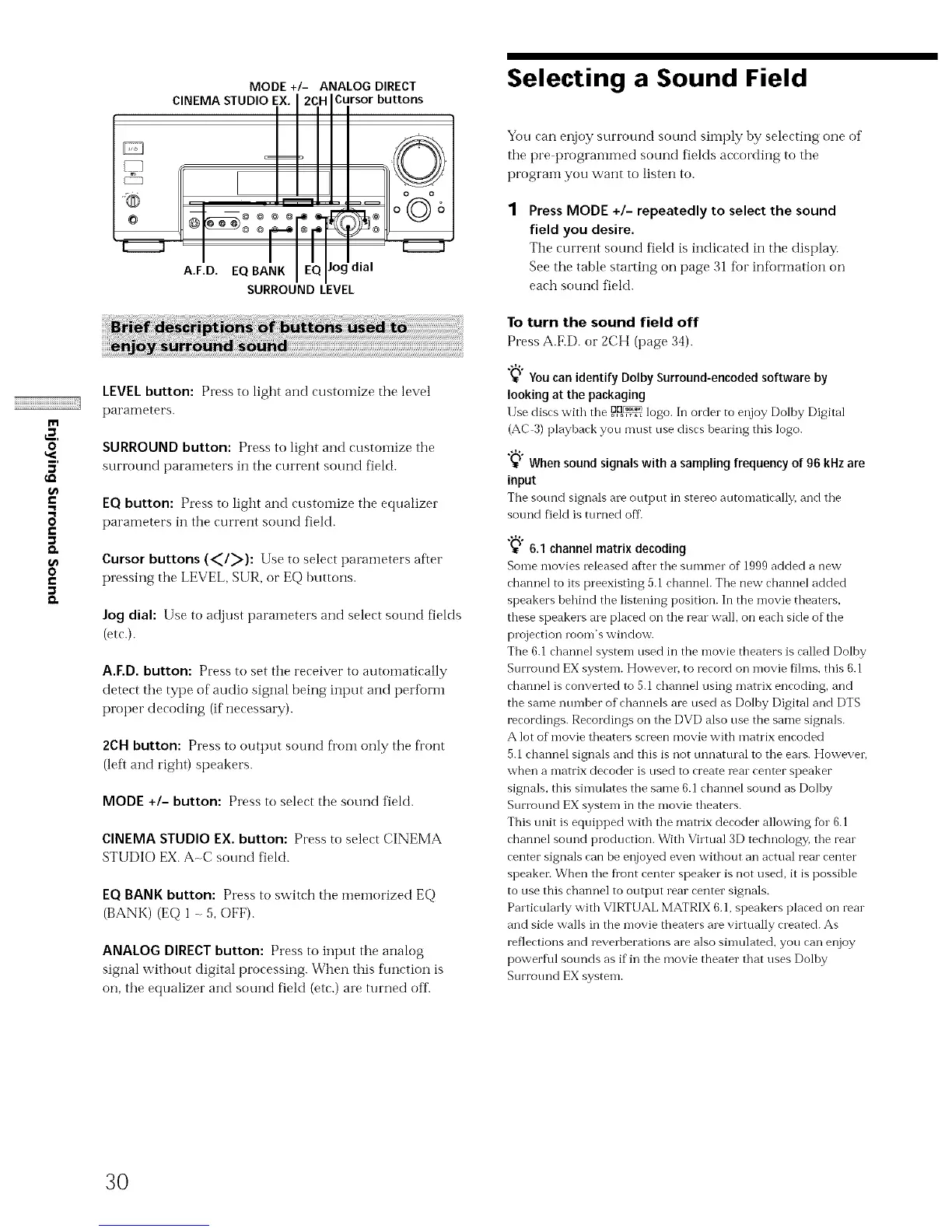
MODE +/- ANALOG DIRECT
CINEMA STUDIO EX. I 2CH ICursor buttons
A.F.D. EQ BANK lEQJJ°g ,a
SURROUND LEVEL
LEVEL button: Press to light and customize the level
parameters.
SURROUND button: Press to light and ctlstoiiL_ze tile
surround parameters in the current sound field.
EQ button: Press to light and customize tile equalizer
parameters in tile current sound field.
Cursor buttons (<1>): Use to select parameters after
pressing tile LEVEL, SUR, or EQ buttons.
Jog dial: Use to adjust parameters and select sound fields
(etc.).
A.F.D. button: Press to set tire receiver to automatically
detect tire type of audio signal being input and perform
proper decoding (if necessary).
2CH button: Press to outt)ut sotmd fi'oi]l only the front
(left and right) speakers.
MODE +/- button: Press to select the sound field.
CINEMA STUDIO EX. button: Press to select CINEMA
STUDIO EX. A-C sound fieM.
EQ BANKbutton: Press to switch the meinorized EQ
(BANK) (EQ 1 - 5, OFF).
ANALOG DIRECT button: Press to input the analog
signal without digital processing. When this function is
oIL, the equalizer and sound field (etc.) are turned off.
Selecting a Sound Field
You can enjoy surrormd sound simply by selecting one of
tire pre programmed sound fields according to the
prograin you want to listen to.
Press MODE +/- repeatedly to select the sound
field you desire.
Tire current sound fieM is indicated in the display.
See the table starting on page 31 for information on
each sound field.
To turn the sound field off
Press A.F.D. or 2CH (page 34).
"_" You can identify Dolby Surround-encoded software by
looking at the packaging
Use discs with the O,Do_ logo. In order to enjoy Dolby Digital
(AC 3) playback you must use discs bearing this logo.
"_" When sound signals with a sampling frequency of 96 kHz are
input
The sound signals are output in stereo automatically, and the
soui'_d fieM is turned off
"_";q6.1 channel matrix decoding
Some movies released after the summer of 1999 added a new
channel to its preexisting 5.1 channel. The new channel added
speakers behind the listening position. In the movie theaters,
these speakers are placed on the rear wall, on each side of the
projection room's window.
The 6.1 channel system used in the movie theaters is called Dolby
Surround EX system. However. to record on movie films_ this 6.1
channel is converted to 5.1 channel using matrix encoding, and
the same number of channels are used as Dolby Digital and DTS
recordings. Recordings on the DVD also use the same signals.
A lot of movie theaters screen movie with matrix encoded
5.1 channel signals and this is not unnatural to the ears. Howeven
when a matrix decoder is used to create rear center speaker
signals_ this simulates the same 6.1 channel sotn'_d as Dolby
Surrotmd EX system in the movie theaters.
This trait is equipped with the matrix decoder allowing fur 6.1
channel sound production. With Virtual 3D technology, the rear
center signals can be enjoyed even without an actual rear center
speaken When the fi'ont center speaker is not used, it is possible
to use this channel to output rear center signals.
Particularly with VIRTUAL MATRIX 6.1, speakers placed on rear
and side walls in the movie theaters are virtually created. As
reflections and reverberations are also simulated, you can enjoy
powerful sounds as if in the movie theater that uses Dolby
Surrotmd EX system.
3O



 To Next Page