¢D
@,
w
B
e_
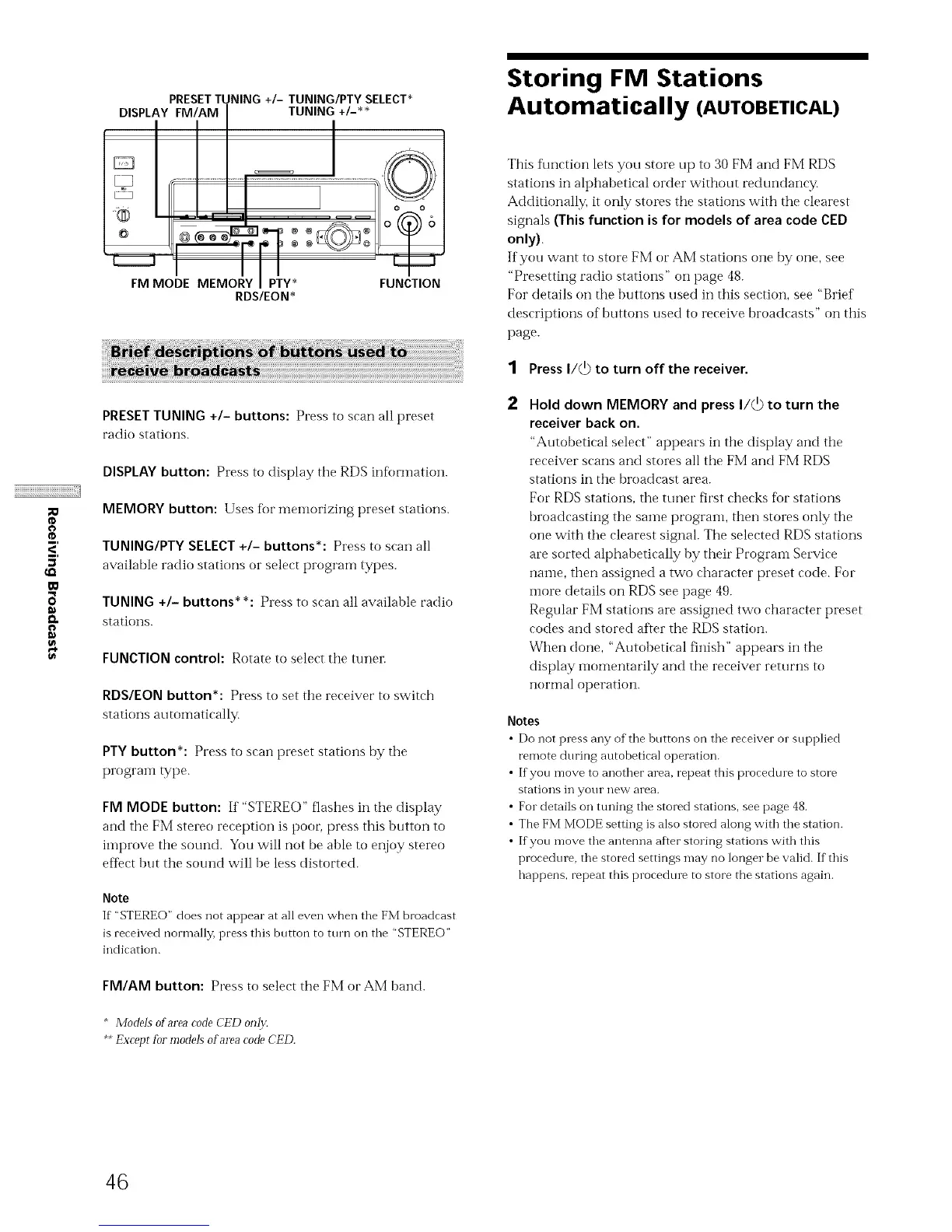
PRESETTUNING +/- TUNING/PTY SELECT*
DISPLAY FM/AM TUNING +/-**
PRESET TUNING +I- buttons: Presstoscanallpreset
radio stations.
DISPLAY button: Press to display the RDS infbrmation.
MEMORY button: Uses for memorizing preset stations.
TUNING/PTY SELECT +I- buttons*: Press to scan all
available radio stations or select program types.
TUNING +/- buttons* *: Press to scan all available radio
stations.
FUNCTION control: Rotate to select the tuner.
RDS/EON button*: Press to set the receiver to switch
stations automatically.
PTY button*: Press to scan preset stations by the
progratn type.
FM MODE button: If "STEREO" flashes in the display
and the FM stereo reception is poor press this button to
improve the sound. You will not be able to enjoy stereo
efIect but the sound will be less distorted.
Note
If""STEREO" does not appear at all even when the FM broadcast
is received normally, press this button to turn on the "STEREO"
indication.
FM/AM button: Press to select the FM or AM band.
* Models of area code CED on12:
**Excep_ for models of area code CED.
Storing FM Stations
Automatically (AUTOBETICAL)
This flmction lets you store up to 30 FM and FM RDS
stations in alphabetical order without redundancy.
Additionally. it only stores the stations with the clearest
signals (This function is for models of area code CED
only).
If you want to store FM or AM stations one by one, see
"Presetting radio stations" on page 48.
For details on the buttons used in this section, see "Brief
descriptions of buttons used to receive broadcasts" on this
page.
1 Press I/_ to turn off the receiver.
Hold down MEMORY and press I/_) to turn the
receiver back on.
"Autobetical select" appears in the display and the
receiver scans and stores all the FM and FM RDS
stations in the broadcast area.
For RDS stations, the tuner first checks fbr stations
broadcasting the same program, then stores only the
one with the clearest signal. The selected RDS stations
are sorted alphabetically by their Prograin Service
name, then assigned a two character preset code. For
inore details on RDS see page 49.
Regular FM stations are assigned two character preset
codes and stored after the RDS station.
When done, "Autobetical finish" appears in the
display inomentarily and the receiver returns to
normal operation.
Notes
• Do not press any of the buttons on the receiver o1"supplied
remote during autobetical operation.
• If you move to another area, repeat this procedure to store
stations in your nevv area.
• For details on tuning the stored stations, see page 48.
• The FM MODE setting is also stored along with the station.
• If you move the antenna after storing stations with this
procedure, the stored settings may no longer be valid. If this
happens, repeat this procedure to store the stations again.
46



 To Next Page