Note
Sony recommends that you use an HDMI-authorized cable or HDMI cable made by Sony. Be sure to
use a High Speed HDMI Cable with Ethernet. Premium High Speed HDMI Cable with Ethernet that
supports 18 Gbps is required for 4K/60p 4:4:4, 4:2:2, and 4K/60p 4:2:0 10 bit, etc.
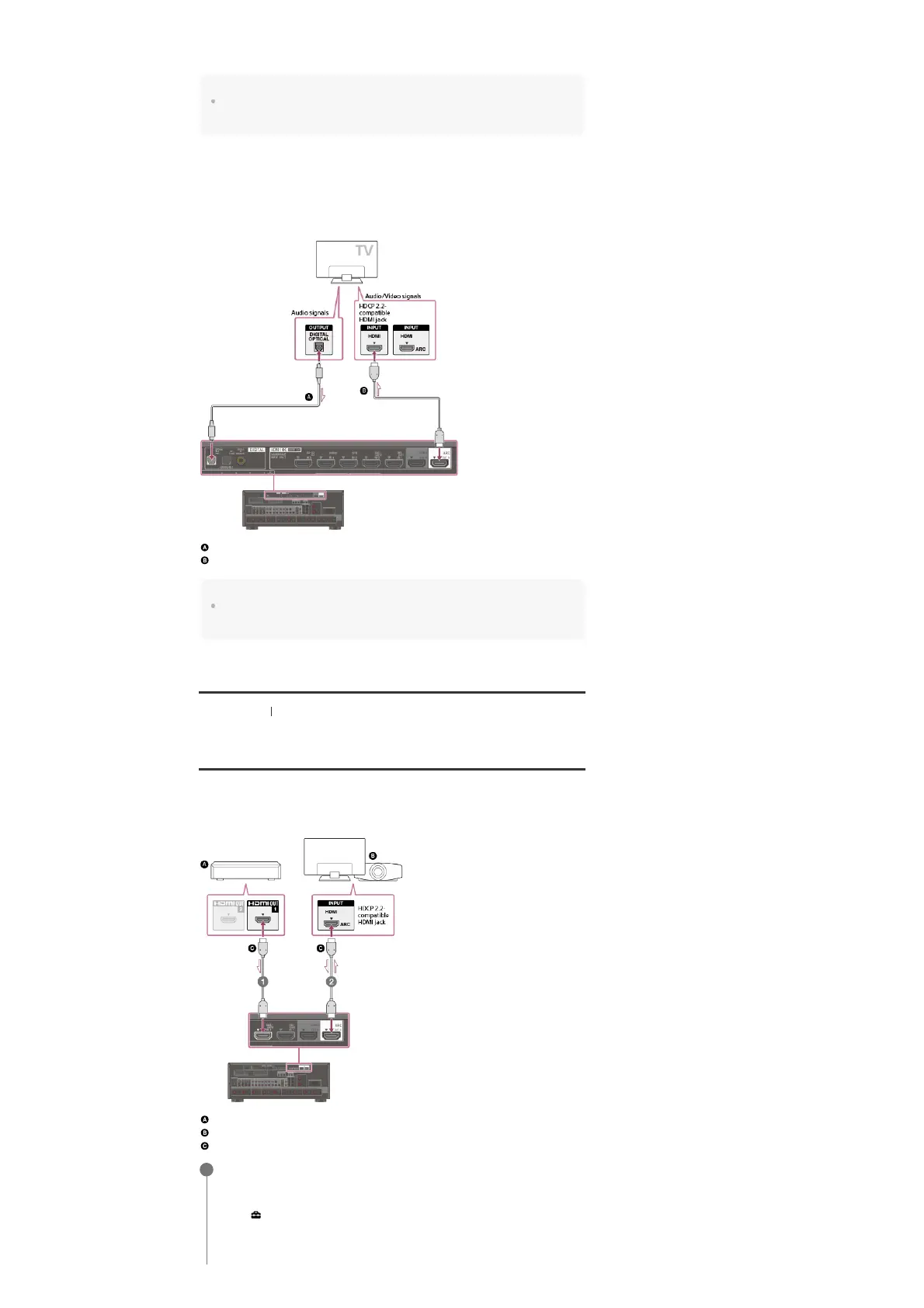
When you want to watch HDCP 2.2 protected content and the non-HDCP 2.2-
compatible HDMI jack on the TV is labeled “ARC”
If the HDMI jack on the TV is labeled ARC and is not HDCP 2.2-compatible, connect the
receiver to the HDCP 2.2-compatible HDMI jack on the TV using a Premium High Speed HDMI
Cable with Ethernet that supports 18 Gbps. Then, connect an optical digital cable to the optical
output jack of the TV to listen to digital sound.
Optical digital cable (not supplied)
HDMI cable (not supplied)
Note
Sony recommends that you use an HDMI-authorized cable or HDMI cable made by Sony. Be sure to
use a High Speed HDMI Cable with Ethernet. Premium High Speed HDMI Cable with Ethernet that
supports 18 Gbps is required for 4K/60p 4:4:4, 4:2:2, and 4K/60p 4:2:0 10 bit, etc.
[23] Preparation 3. Connecting a TV
Connecting a 4K TV that supports HDCP 2.2 and a 4K
streaming box using a 4K-compatible HDMI cable
To enjoy audio from 4K content such as 4K movies, connect the HDMI output/input jacks of
each device that supports HDCP 2.2 (*) using HDMI cables, as illustrated below.
4K media player
4K TV or 4K projector
HDMI cable (not supplied)
The ARC (Audio Return Channel) function sends digital sound from a TV to the receiver using only an HDMI
cable.
HDCP 2.2 (High-bandwidth Digital Content Protection 2.2) is newly enhanced copyright protection technology
that is used to protect content such as 4K movies from Studios.
*
Connect the receiver to a 4K media player using an HDMI cable.
If you are using an FMP-X10/X5 Media Player:
Connect the cable to the HDMI OUT 1 (for AUDIO VIDEO) jack of the player.
Select [
(Settings)] - [Sound] - [Audio from HDMI OUT] - [HDMI OUT 1] in the Home
menu of the FMP-X10/X5 Media Player after Initial Setup is complete.
If you are using a different 4K media player:
Connect the cable to one of the HDCP 2.2-compatible HDMI output jacks. For details, refer
1



 To Next Page