HDCP 2.2 is newly enhanced copyright protection technology that is used to protect content
such as 4K movies.
BT.2020 color space is new wider color standard that is defined for ultra-high definition
television systems.
HDR is an emerging video format that can display a wider range of brightness levels.
Note
Depending on the TV or video device, 4K or 3D content may not be displayed. Check the HDMI
video formats supported by the receiver.
Refer to the operating instructions of each connected device for details.
[26] Preparation 4. Connecting audio-visual devices and the antennas (aerials)
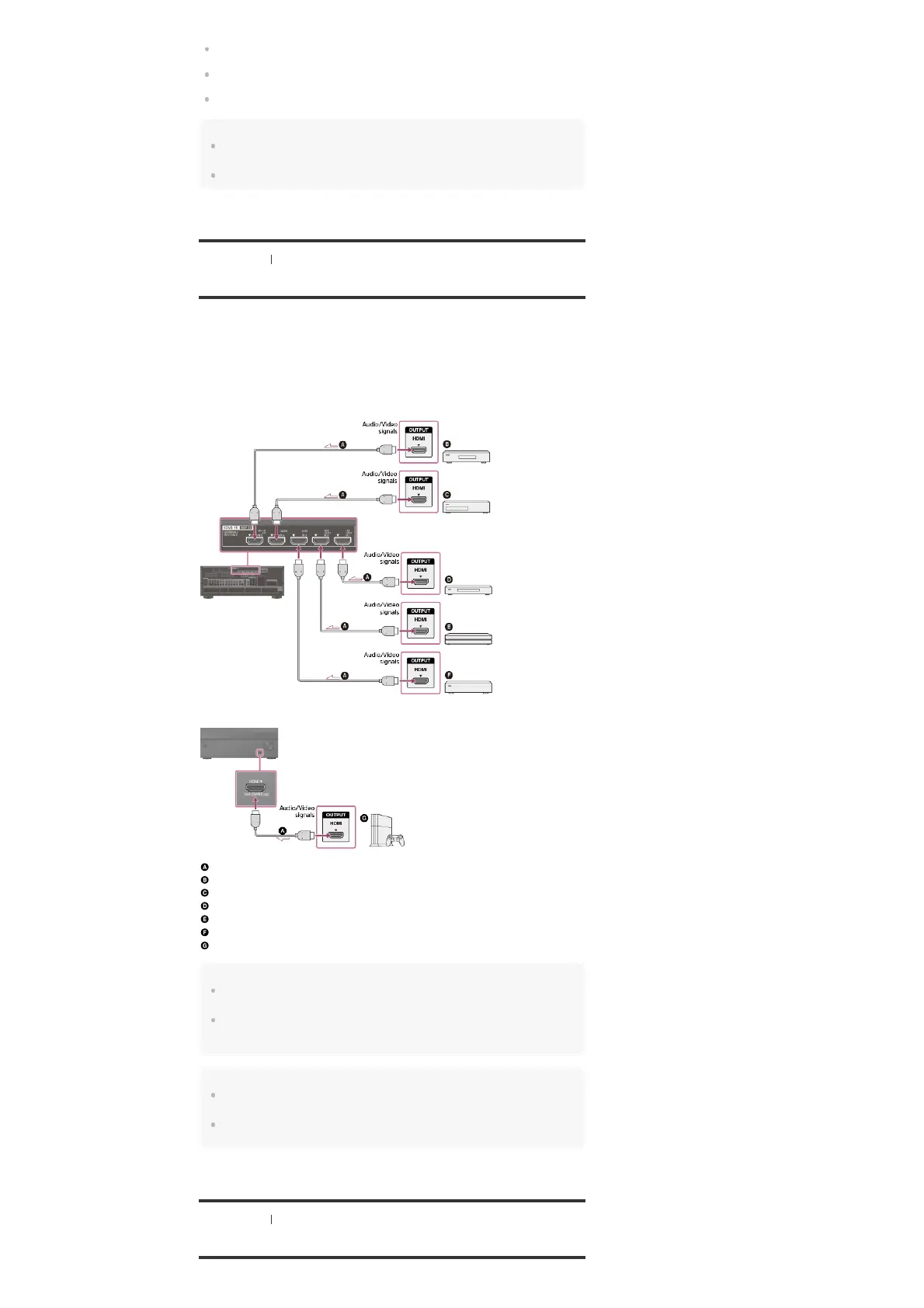
Connecting devices with HDMI jacks
Connect devices to the receiver as illustrated below.
Before connecting cables, be sure to disconnect the AC power cord (mains lead).
All HDMI jacks on the receiver support High-bandwidth Digital Content Protection System
Revision 2.2 (HDCP 2.2). To watch content protected by HDCP 2.2, such as 4K content,
connect these HDMI jacks to jacks that support HDCP 2.2 on the TV and AV device. Refer to
the operating instructions of the connected device for details.
Rear
Front
HDMI cable (not supplied)
Super Audio CD player, CD player
DVD recorder
Blu-ray Disc™ Player, DVD player
4K Media Player
Set-top box
Game console such as PlayStation 4
Note
HDMI IN 1, 2, 3, 4, 5 and all HDMI OUT jacks support bandwidth up to 18 Gbps, and HDMI IN 6
(GAME) jack supports bandwidth up to 9 Gbps.
Sony recommends that you use an HDMI-authorized cable or HDMI cable made by Sony. Be sure to
use a High Speed HDMI Cable with Ethernet. Premium High Speed HDMI Cable with Ethernet that
supports 18 Gbps is required for 4K/60p 4:4:4, 4:2:2, and 4K/60p 4:2:0 10 bit, etc.
Hint
This HDMI connection is an example. You can connect each HDMI device to any HDMI input,
including the HDMI input on the front panel.
The image quality depends on the connecting jack. We recommend that you connect your devices
via an HDMI connection if they have HDMI jacks.
[27] Preparation 4. Connecting audio-visual devices and the antennas (aerials)
Connecting devices with jacks other than HDMI jacks



 To Next Page