EasyManua.ls Logo

Sony Trinitron KV-13VM20 - Page 38

Sony Trinitron KV-13VM20
97 pages
Print Icon
To Next Page IconTo Next Page
To Previous Page IconTo Previous Page
Loading...
Timer
Recording
L
OO)
0
SOLS
I
+
———
TRACKING
NORMALSLOW
wns
(STILL
ADJUST)
INOEX
MARK
ERASE
CO
CO
Co
RM-Y126
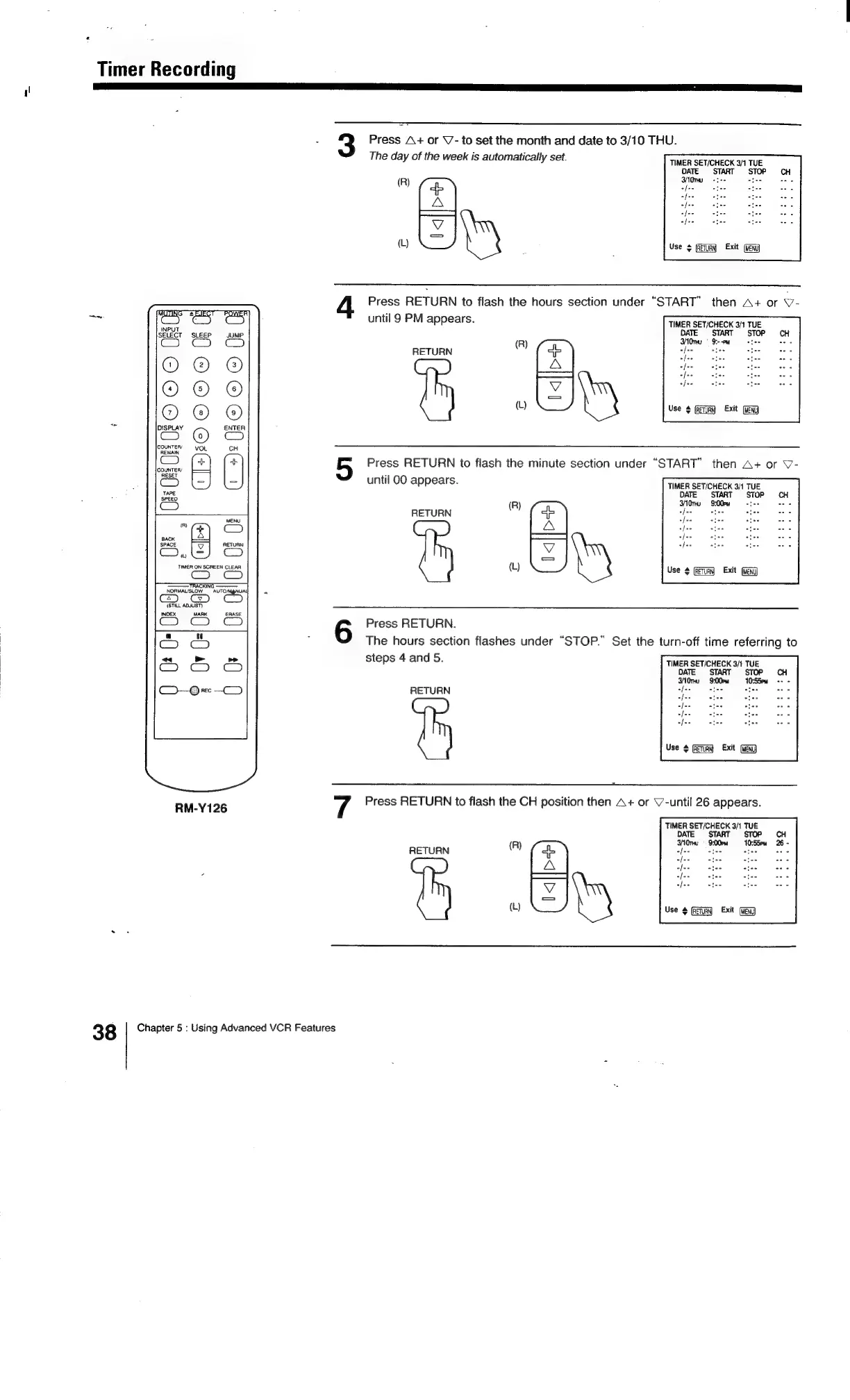
Press
A+
or
V-
to
set
the
month
and
date
to
3/10
THU.
The
day
of
the
week
is
automatically
set.
TIMER
SET/CHECK
3/1
TUE
DATE
START
STOP
CH
af
ate
(R)
fa
“hs
es ae
A
5
ee
ae
J
+[--
cies
ties
ES
ag
_
oy
Use
¢
(eTuaN
Exit
(Meng
Press
RETURN
to
flash
the
hours
section
under
“START”
then
A+
or
v-
until
9
PM
appears.
RETURN
A)
Cb
A
(L)
Press
RETURN
to
flash
the
minute
section
under
“START”
then
A+
or
\7-
until
00
appears.
TIMER
SET/CHECK
3/1
TUE
DATE
START
STOP
S3AOnu
9:--pw
[--
nies
fo»
io
[>
fit
Use
4
Exit
TIMER
SET/CHECK
3/1
TUE
DATE
START
STOP
CH
3NOnu
9:00em
ree
we
R
RETURN
Ca
es
ee
A
do
oh.
Oe
J
of--
stee
cies
[=
a
.
(L)
Use
4
Exit
(eng)
Press
RETURN.
The
hours
section
flashes
under
“STOP.”
Set
the
turn-off
time
referring
to
steps
4
and
5.
TIMER
SET/CHECK
3/1
TUE
DATE
START
STOP
3G
9:00
=
10:S5eu
RETURN
eo
pas,
“ben”
ee
Use
+
Exit
7
Press
RETURN
to
flash
the
CH
position
then
A+
or
V’-until
26
appears.
RETURN
®)
(a,
A
w
Y
yi
TIMER
SET/CHECK
3/1
TUE
DATE
START
STOP
30nu
9:00PM
10:55pm
26
-
ie
[e+
Jeo
Use
4
Exit
38
Chapter
5
:
Using
Advanced
VCR
Features

Related product manuals