30
Operating Instructions
Using the Video Menu
Mode
Customized
picture viewing
Use the
F or f buttons to highlight one of the following options, then press
to select it.
Vivid: Select for enhanced picture contrast and sharpness.
Standard:
Select for a standard picture.
Movie:
Select for a finely detailed picture.
Pro:
Select for natural picture and sharpness.
Picture
Press G to
decrease the contrast. Press
g to increase the contrast
.
Brightness
Press
G to darken the picture.
Press
g to brighten the picture.
Color
Press
G to decrease color saturation.
Press
g to increase color saturation.
Hue
Press
G to increase the red tones.
Press
g to increase the green tones.
Sharpness
Press
G to soften the picture.
Press
g to sharpen the picture.
Color Temp.
White tint
adjustment
Use the
F or f buttons to highlight one of the following options, then press
to select it.
Cool:
Gives white colors a blue tint.
Neutral:
Gives white colors a neutral tint.
Warm:
Gives white colors a red tint.
ClearEdge
VM
Sharpens picture definition to give objects a crisp, clean edge.
Use the
F
or
f
buttons to highlight one of the following options
:
High
,
Low
,
Off,
then press
to select it.
DynaBlack
Improves contrast and sharpens image detail.
Use the
F
or
f
buttons to
highlight one of the following options
:
High
,
Low
,
Off,
then press
to select it
.
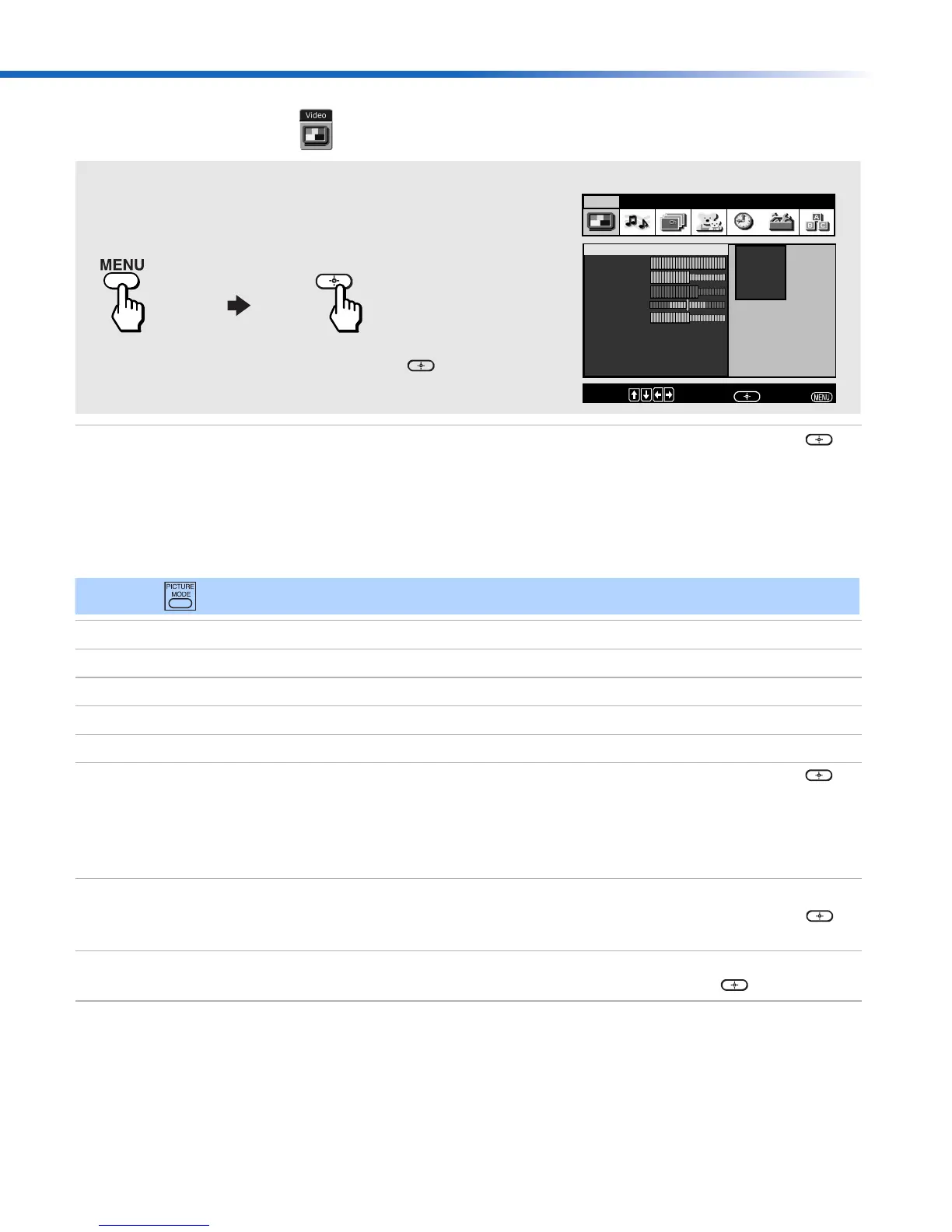
Picture
Brightness
Color
Hue
Sharpness
Color Temp. : Cool
ClearEdge VM: High
DynaBlack: High
Video Audio Channel Parent Timer Setup Basic
Custom settings
Mode : Vivid
Vivid
Standard
Movie
Pro
Move:
Select:
End:
To Display To Select
To access the Video menu, use the following steps:
Press
f to highlight an option; then press .
✍ Press on the remote control for direct access to the picture modes (Vivid, Standard, Movie, Pro).
01US01COV-BR2.book Page 30 Tuesday, February 4, 2003 11:51 AM










 To Next Page