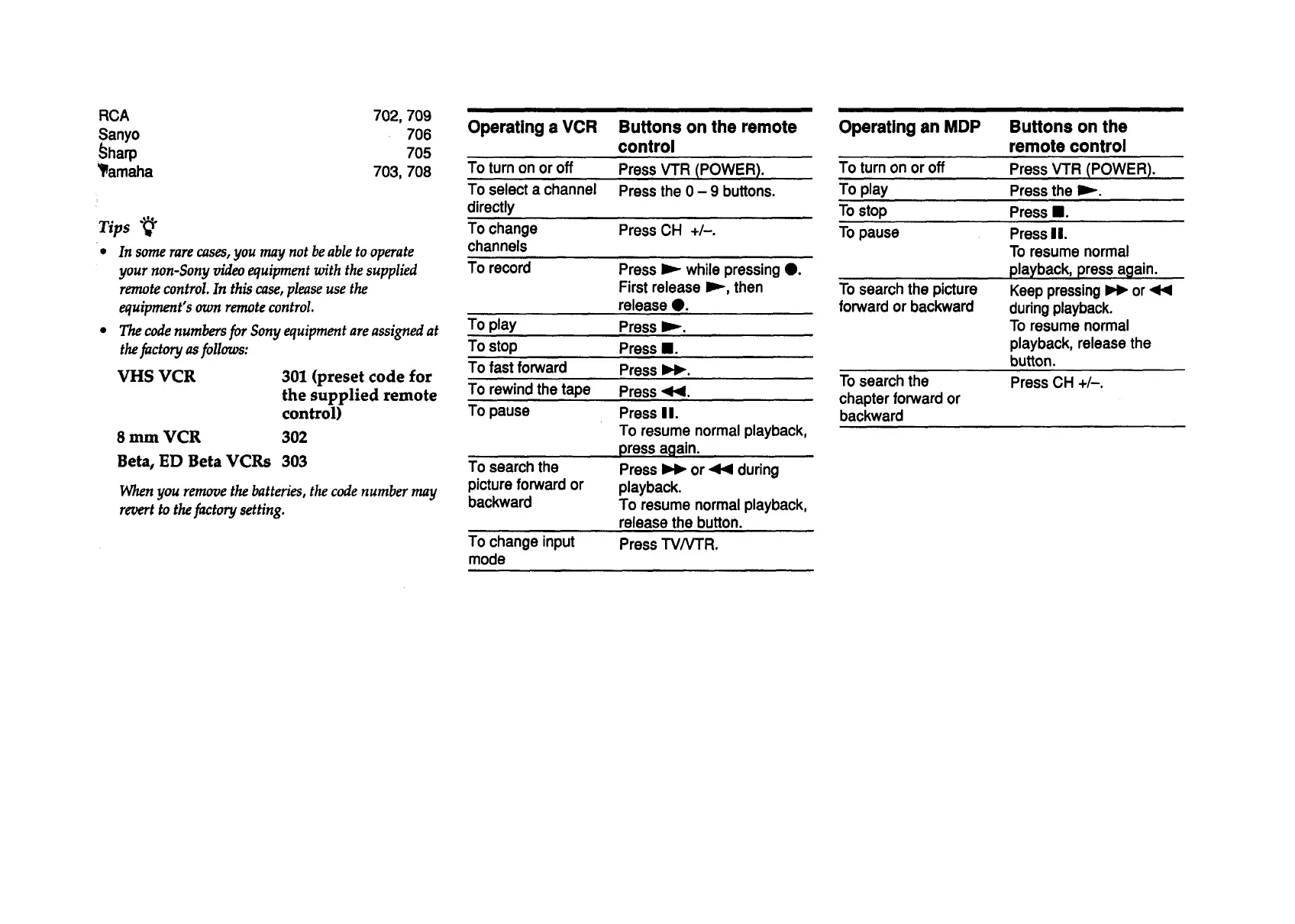
RCA 702,709
Sanyo 706
_harp 705
_amaha 703,708
Tips ""_
• In some rare cases, you may not be able to operate
your non-Sony video equipment with the supplied
remote control. In this case, please use the
equipment's own remote control.
• The code numbers for Sony equipment are assigned at
the factory as follows:
VHS VCR
301 (preset code for
the supplied remote
control)
8 mm VCR 302
Beta, ED Beta VCRs 303
When you remove the batteries, the code number may
revert to the factory setting.
Operating a VCR
To turn on or off
To select a channel
directly
To change
channels
To record
To play
To stop
To fast forward
To rewind the tape
To pause
To search the
picture forward or
backward
To changeinput
mode
Buttons on the remote
control
Press VTR (POWER).
Press the 0 - 9 buttons.
Press CH +/-.
Press I_- while pressing 0.
First release Imp,then
release e.
Press iP-.
Press II.
Press I_1_.
Press <1<1.
Press I I.
To resume normal playback,
press again.
Press _ or <1<1during
playback.
To resume normal playback,
release the button.
Press TV/VTR.
Operating an MDP
To turn on or off
To play
To stop
To pause
To search the picture
forward or backward
To search the
chapter forward or
backward
Buttons on the
remote control
Press VTR (POWER).
Press the It,,-.
Press II.
Press II.
To resume normal
playback, press again.
Keep pressing_ or <1<1
duringplayback.
To resume normal
playback, release the
button.
Press CH +/-.



 To Next Page