3-11. Blue-only white balance adjustment
1. Tum ON the blue-only of the user controller SW. (To set blue-
only.) ·
2. Input all-white (COMPOSITE signal without burst).
The all-white signal luminance shall be 100 IRE.
CONT:80%
BRT: 50%
3. Select COL TEMP/BAL.
4. Select 6500K.
5. Adjust to the standard values with iCJTI 6500K B/O<RED>! and
jcm 6500K B/O<GREEN>! or !Clf2 6500K B/O<RED> I and
!C/1'1 6500K B/O<GREEN>I .
6. Select COL TEMP/BAL.
7. Select 9300K.
8. Adjust to the standard values with IC/f2 9300K B/O<RED>! and
1cm 9300K B/O<GREEN>! or 1cm 9300K B/O<RED>I and
iC/Tl 9300K B/O<GREEN>I •
9. Adjust the all-white signal luminance, and check that the white
balance is satisfactory when the luminance of the screen is SNIT.
3-12.SUB BRT adjustment
1. Input a 525 monoscope signal.
2. CONT ... MIN
BRT .... CENTER (50&)
3. Select !SUB BRIGHT I in the service mode.
4. Adjust !SUB BRIGHT I so that 10 IRE glows slightly and O IRE is
cut off.
3-13. Focus adjustment
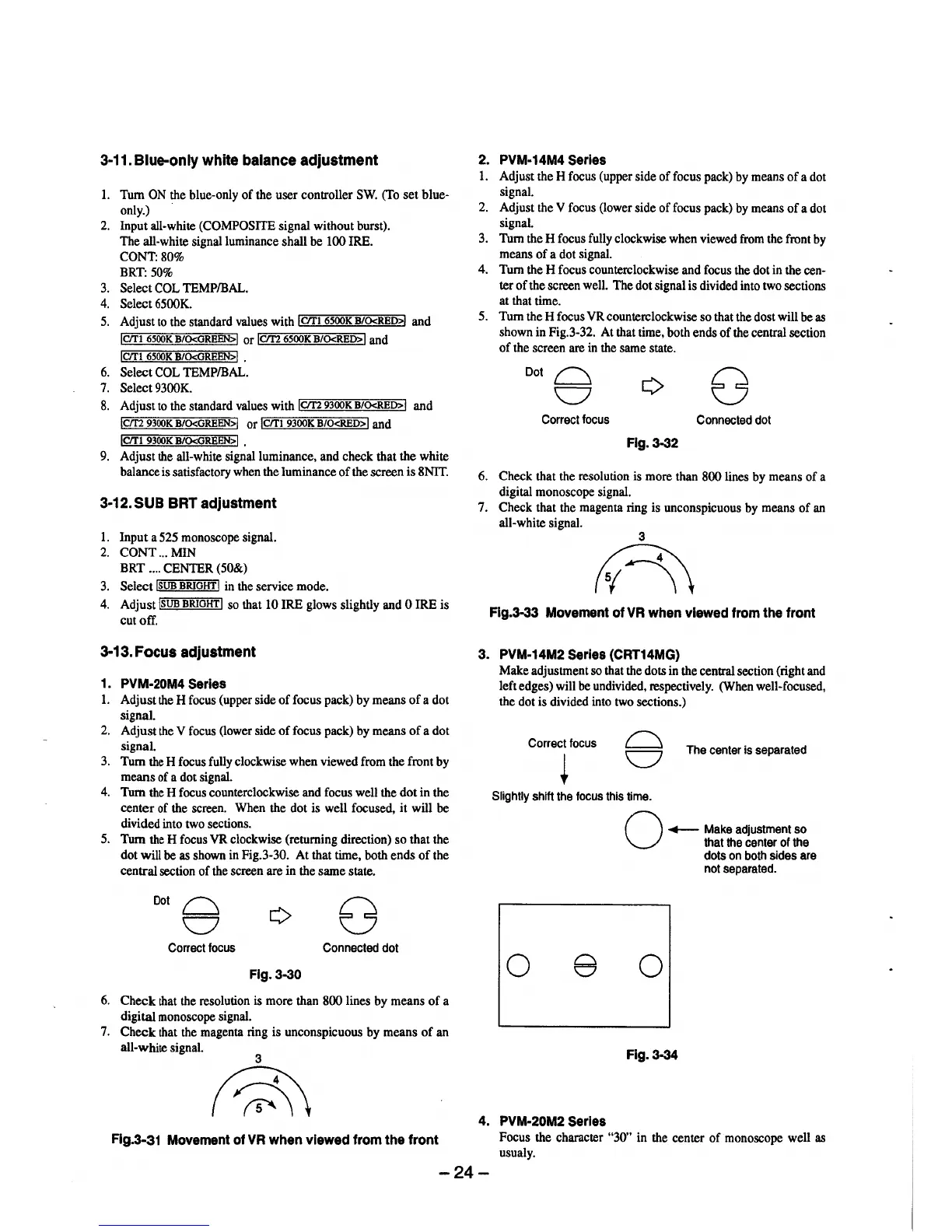
1. PVM-20M4 Serles
1. Adjust the H focus (upper side of focus pack) by means of a dot
signal.
2. Adjust the Y focus (lower side of focus pack) by means of a dot
signal.
3. Tum the H focus fully clockwise when viewed from the front by
means of a dot signal.
4. Tum the H focus counterclockwise and focus well the dot in the
center of the screen. When the dot is well focused, it will be
divided into two sections.
5. Tum the H focus YR clockwise (returning direction) so that the
dot will be as shown in Fig.3-30. At that time, both ends of the
central section of the screen are in the same state.
Dot~
v
Correct focus
Connected dot
Flg.3-30
6. Check that the resolution is more than 800 lines by means of a
digital monoscope signal.
7. Check that the magenta ring is unconspicuous by means of an
all-white signal.
Flg.3-31 Movement of VR when viewed from the front
2. PVM-14M4 Serles
1. Adjust the H focus (upper side of focus pack) by means of a dot
signal.
2. Adjust the V focus (lower side of focus pack) by means of a dot
signal.
3. Tum the H focus fully clockwise when viewed from the front by
means of a dot signal.
4. Tum the H focus counterclockwise and focus the dot in the cen-
ter of the screen well. The dot signal is divided into two sections
at that time.
5. Tum the H focus YR counterclockwise so that the dost will be as
shown in Fig.3-32. At that time, both ends of the central section
of the screen are in the same state.
Dot~
v
Correct focus
Connected dot
Fig. 3-32
6. Check that the resolution is more than 800 lines by means of a
digital monoscope signal.
7. Check that the magenta ring is unconspicuous by means of an
all-white signal.
3
n
Flg.3-33 Movement of VR when viewed from the front
3. PVM-14M2 Serles {CRT14MG)
Make adjustment so that the dots in the central section (right and
left edges) will be undivided, respectively. (When well-focused,
the dot is divided into two sections.)
Correct focus
The center is separated
Slightly shift the focus this time.
0 e
4. PVM-20M2 Serles
O
,.__ Make adjustment so
that the center of the
dots on both sides are
not separated.
0
Fig.3-34
Focus the character "30" in the center of monoscope well as
usualy.
-24-





 To Next Page