7. Horizontal deflection adjustment (UNDER SCAN ad-
justment}
1. Input a 525 monoscope signal.
2. CONT ... 80%
BRT .... 50%
3. Set the unit in the U/S mode.
4. Set the unit in the service mode.
5. Adjust !UISVSIZB<60>! so that UNDER V.SIZE will be within
the standard.
6. Adjust =1u=,s=H=s1ZB=! so that UNDER H.SIZE will be within the
standard.
7. Adjust ~,u=,s~PIN-AMP~I and !UIS PIN-PHASBL (Adjust tracking accord-
ing to 5., 6., and 7.)
8. After adjustment, the white frame of the monoscope shall not be
out of the effective screen.
9. Set the unit in the 16:9 mode.
10. Make the same adjustment with 5. and 7. by means of
ll6:9U/SV SIZB<60>1. i16:9UIS PIN-AMP! and I 16:9 UIS PIN-PHASB!.
Table 5-5
Standerd values for groups of models 1, 2, and 3 (14"}
525
625
U/S H-SIZE
252mm
V-SIZE
188mm
-
16: 9
142mm
-
U/SV-SIZE
Table 5-6
Standerd values for groups of models 4 and 5 (20"}
525 625
U/S H-SIZE
364mm
272mm
-
V-SIZE
16: 9
205mm
-
U/SV-SIZE
I 1. Set the unit in the 16:9 mode.
12. Input a monoscope signal.
13. Make the same adjustment with 5. by means of iUISVSIZB<SO>I.
14. Set the unit in the 16:9 mode.
15. Make the same adjustment with 5. by means of
i 16:9 U/SV SIZB <511>I.
Note : If there is not time enough for adjustment (5. Vertical
deflection adjustment and 6. and 7. Horizontal deflection
adjustment), confirm that the respective sections will
operate normally and that adjustment is possible, and then
input standard adjustment values.
8. HIV-DELAY adjustment
Note : This item applies only to groups of models 1, 2. 4, and 5.
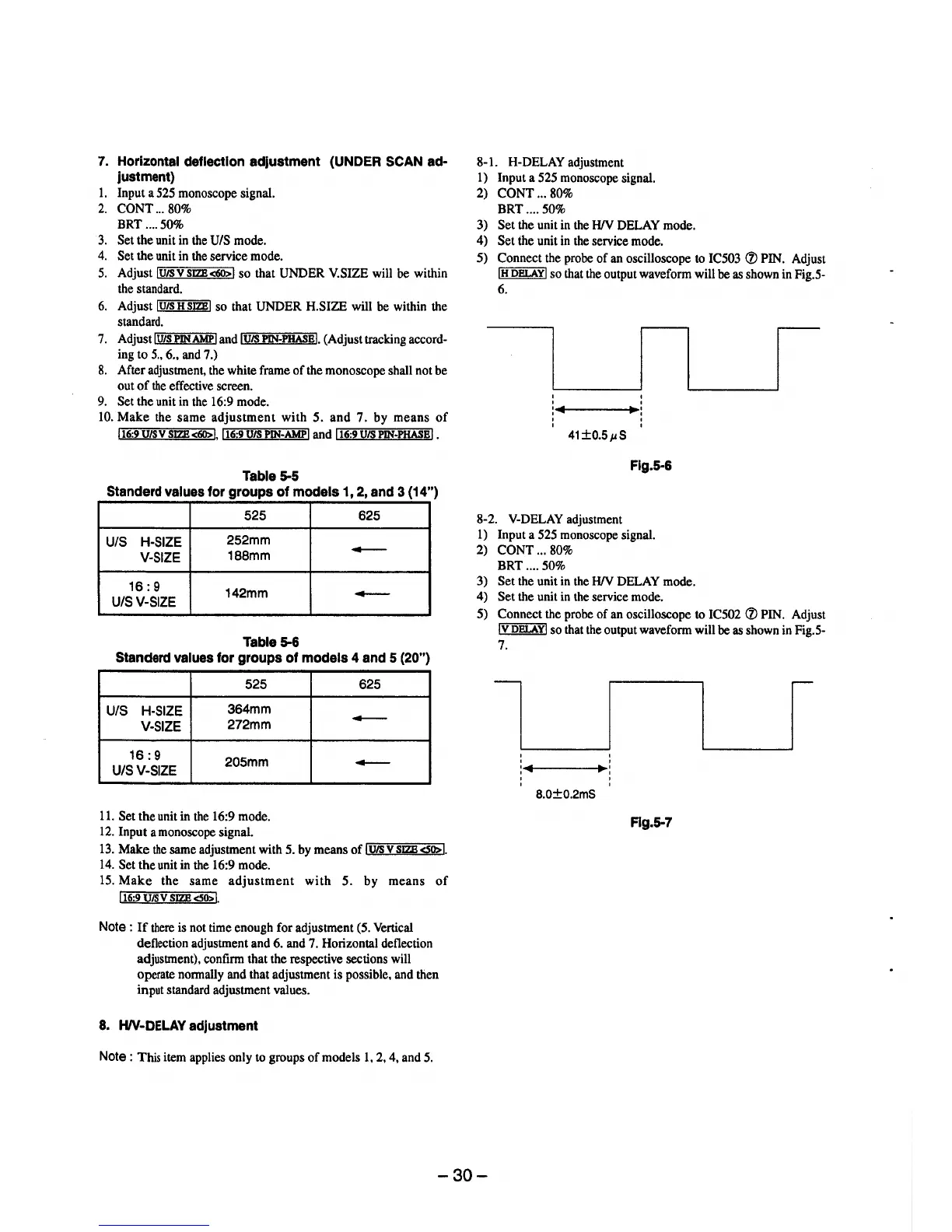
8-1. H-DELAY adjustment
1) Input a 525 monoscope signal.
2) CONT ... 80%
BRT .... 50%
3) Set the unit in the HIV DELAY mode.
4) Set the unit in the service mode.
5) Connect the probe of an oscilloscope to IC503 (J) PIN. Adjust
!H DELAY! so that the output waveform will be as shown in Fig.5-
6.
I
I I
'
'
'
'
: ..
11r:
'
'
41±0.5µS
Flg.5-6
8-2. V-DELAY adjustment
1) Input a 525 monoscope signal.
2) CONT ... 80%
BRT .... 50%
3) Set the unit in the HIV DELAY mode.
4) Set the unit in the service mode.
5) Connect the probe of an oscilloscope to IC502 (J) PIN. Adjust
!V DELAY! so that the output waveform will be as shown in Fig.5-
7.
l.....______.
.....___I
' '
' '
: .... 111i-------•~:
8.0±0.2mS
Flg.5-7
-30-





 To Next Page