22
Setting/Operating via Web
• Immediately report if any error occurs
with the projector (Error Report).
• Send warning e-mail messages when a
preset time for use of the projector lamp
has been reached (Lamp Reminder).
• Send warning e-mail messages when a
preset time for maintenance of the
projector has been reached (Maintenance
Reminder).
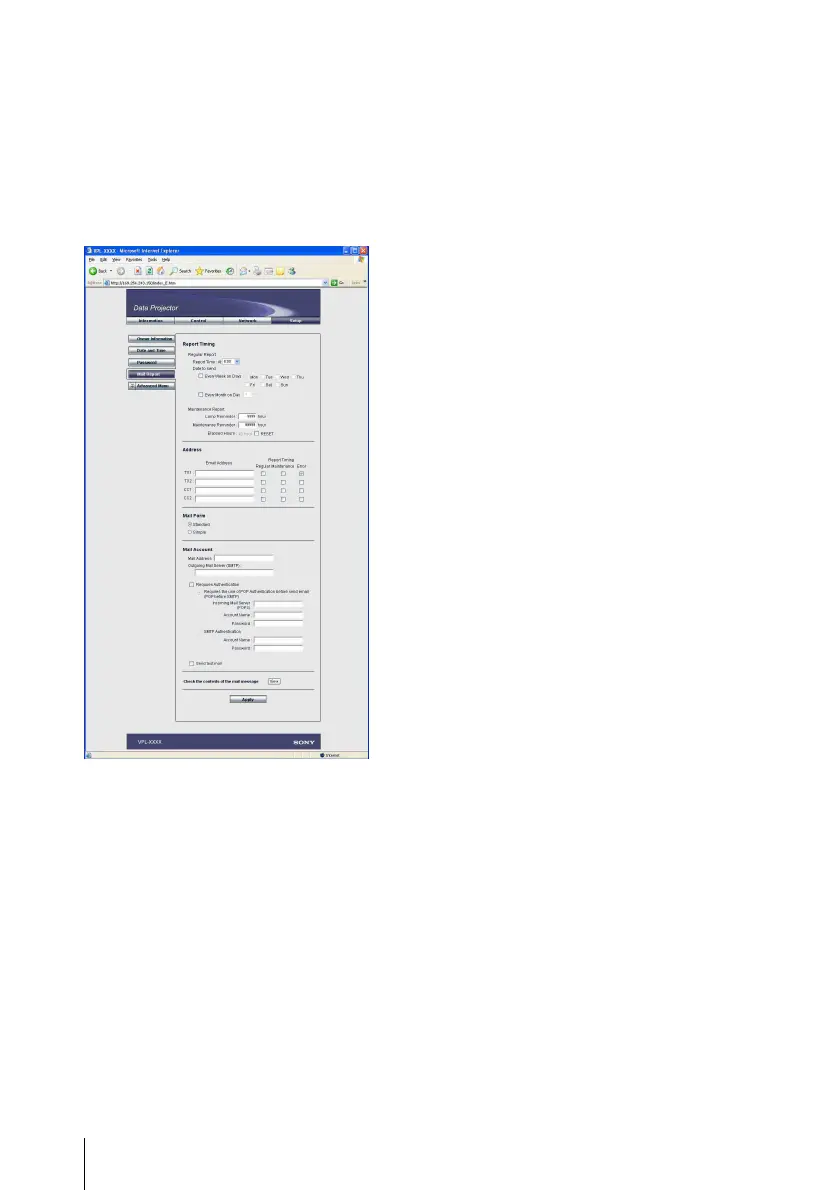
x Report Timing field
Regular Report
A report on the present status of the
projector, installation status, etc. of the
projector is periodically sent by e-mail.
Set the timing for sending the e-mail
messages as follows:
AT: Specify the time when e-mail is to be
sent. Select the hour from the drop-down
list.
Every Week on Days: Select this check box
to send e-mail on the selected days every
week.
Mon/Tue/Wed/Thu/Fri/Sat/Sun: Specify
the days of the week when e-mail is to be
sent. You can check two or more days.
Every Month on Day: Select this check box
and select the day from the drop-down
list to send e-mail on a pre-defined day
every month. The Regular Report
contains the product information, owner
information, usage information (time)
for the projector, lamp mode, memos,
etc.
Maintenance Report
Lamp Reminder: Select this check box and
enter the limit for the number of hours
the projector lamp is to be used in the
text box. This information will be used
to send e-mail informing you that
replacement is required for the projector
lamp when the preset time has been
reached. You can specify a time between
1 and 9999 hours.
Maintenance Reminder: Select this check
box and enter the hours of use before
maintenance is required for the projector
in the text box. You can specify a time
between 1 and 99999 hours.
The elapsed time is displayed in the
Elapsed Hours text box. Selecting the
RESET and clicking “Apply” will reset
the elapsed time to zero.
x Address field
E-mail Address
Enter the e-mail addresses to which you
want the e-mail messages to be sent in each
text box. The projector allows you to send e-
mail to 4 different addresses. You can enter
up to 64 characters for each address.
Report Timing
Regular: Select this check box to arrange
the sending of the Regular Report.
Maintenance: Select this check box to
arrange the sending of an e-mail
message that informs you of the number
of hours the projector lamp has been
used and the time when maintenance is
required for the projector.



 To Next Page