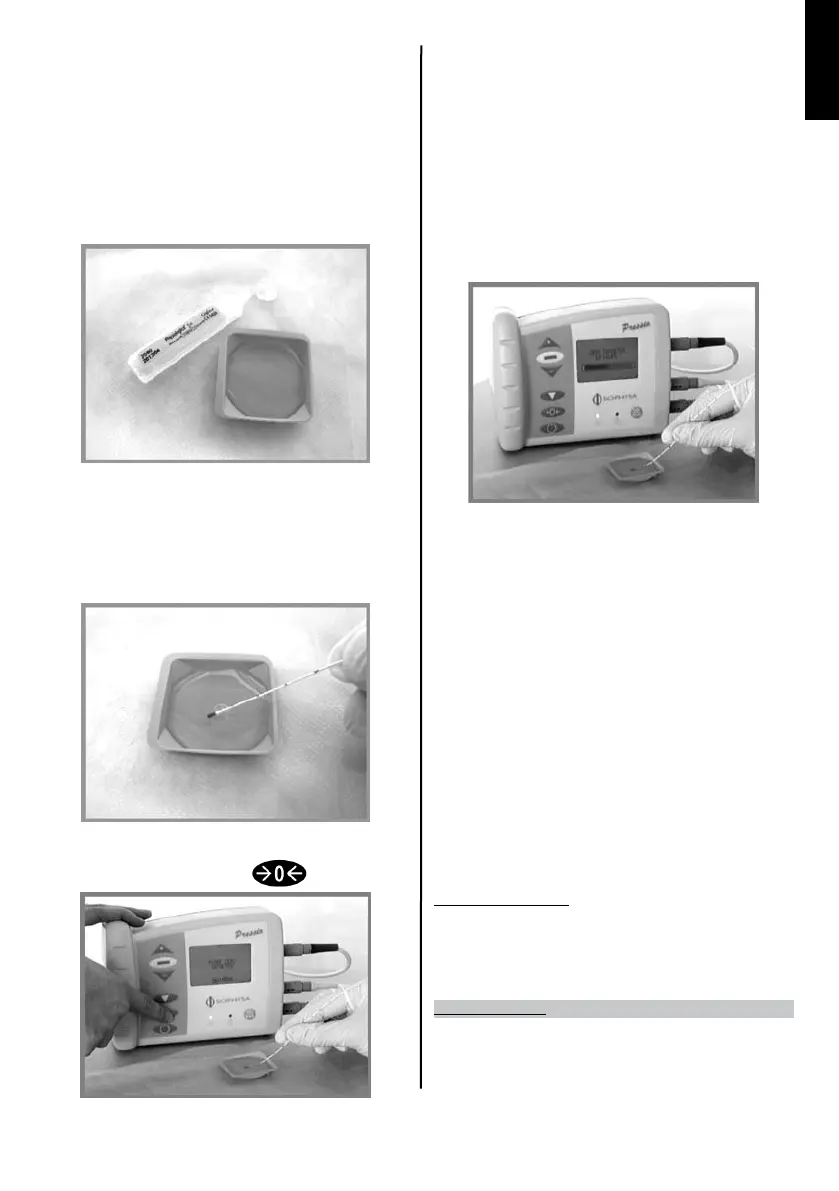
The message “ZERO SENSOR” is then displayed on the Pressio® monitor (PSO-3000).
The appearance of error codes, “E001”, “E002”, “E005” or the message, “CONNECT
SENSOR” on the Pressio® monitor after connecting the catheter to the extension cable
may be a sign of an incorrect connection.
In this case, make sure that the catheter connector is pushed right up to the stop
in the catheter extension cable, and that the latter is correctly connected
to the Pressio® monitor.
3) Preparation of the sterile water cup
Prepare a sterile saline solution (or even sterile water) and a cup in a sterile environment.
Pour the sterile saline solution (or sterile water) into the cup.
Pr e c a u t i o N :
p
R e s s u R e s e n s o R z e R o i n g m u s t b e p e R f o R m e d i n s h a l l o w l i qu i d (~5m m ). us i n g a d e e p
R e c e p t a c l e c o u l d l e a d t o h y d R o s t a t i c p R e s s u R e g R e a t e R t h a n a t m o s p h e R i c z e R o , w h i c h
w o u l d t h e n l e a d t o a n e R R o n e o u s Re f e R e n c e z e R o .
4) Zeroing the catheter
Immerse the sensor (metal part) in the liquid completely.
Be careful not to touch the cup with the sensor.
When the sensor is ready, press the zeroing key.
No t e :
d
u R i n g z e R o i n g ke e p t h e s e n s o R i m m e R s e d a n d a v o i d m o v i n g it i n t h e c u p .
P
r e c a u t i o N s :
a
v o i d m a k i n g a n y c o n t a c t w i t h t h e e n d o f t h e c a t h e t e R d u R i n g s e n s o R z e R o i n g .
c
a l i bR a t i o n i n R e l a t i o n t o a t m o s p h e R i c p R e s s u R e c o u l d b e f a l s i f i e d .
en s u R e t h e e n d o f t h e c a t h e t e R i s i m m e R s e d i n t h e s t e R i l e w a t e R o R a s t e R i l e s a l i n e s o l u t i o n
d u R i n g z e R o i n g . se n s o R z e R o i n g i n c o n d i t i o n s o t h e R t h a n t h o s e R e c o m m e n d e d m a y c a u s e
i n a c c u R a t e p R e s s u R e R e a d i n g s .
Movement of a task progress bar makes it possible to follow the correct performance
of the zeroing.
The procedure takes about 3 seconds.
5) Verication that the zeroing procedure took place correctly
When the progress bar reaches the end, the message “ZERO SENSOR OK – INSERT
SENSOR” shows that the procedure has taken place correctly.
Check that the Pressio® monitor screen displays the value “0 mmHg” (or the patient
monitor screen if the Pressio® interface is used).
If during zeroing, the sensor suers parasite pressure variations or is damaged,
the screen will display the message ”ZERO SENSOR FAILURE – REPLACE SENSOR”.
In this case, disconnect and then reconnect the catheter, and try the zeroing sequence
again.
If this fails again, change the catheter.
Also refer to the instructions for use for the Pressio® monitoring system used
(PSO-3000 or PSO-IN00, § “Anomaly in operation: symptoms / suggested measures”).
No t e :
s
e n s o R z e R o i n g c a n o n l y b e d o n e o n c e . if a n e w a t t e m p t t o z e R o t h e s a m e s e n s o R i s m a d e ,
t h e m e s s a g e , “sensoR alReady zeRoed” i s d i s p l a y e d .
Storing data in the catheter connector memory (cf. §3) makes it possible to use
Pressio® monitors or interfaces (PSO-3000 models software V2, PSO-3000 software
V1 and PSO-IN00) other than the model on which the zeroing was performed.
Specic case for the PSO-PBT:
No t e :
w
h e n t h e t e m p e R a t u R e R e a d b y t h e s e n s o R i s l o w e R t h a n 20°c, t h e pRe s s i o ® m o n i t o R
d i s p l a y s : “ - - - “. th i s m e a n s t h a t t h e m e a s u R e m e n t i s i n t h e s e n s o R m e a s u R e m e n t R a n g e
b u t o u t s i d e t h e d i s p l a y R a n g e s f o R t h e pR e s s i o ® s y s t e m .
Implantation Technique
Positioning of the bolt and implantation of the Pressio® catheter must take account
of current aseptic neurosurgical practices.
Use the insertion accessories supplied by Sophysa in the Pressio® monitoring kit.
ENGLISH


 To Next Page
 Loading...