DOWNLOADING AND TRANSFERRING FILES (CONT.)
12
TRANSFERRING MP3/WMA FILES USING WINDOWS MEDIA PLAYER 10 (FOR WINDOWS XP
ONLY)
For Windows XP to transfer MP3/WMA files to the player,
follow the procedure described below using the previously
installed WMP (Windows Media Player) 10. Before beginning
the procedure, please connect the unit to the computer as
previously described.
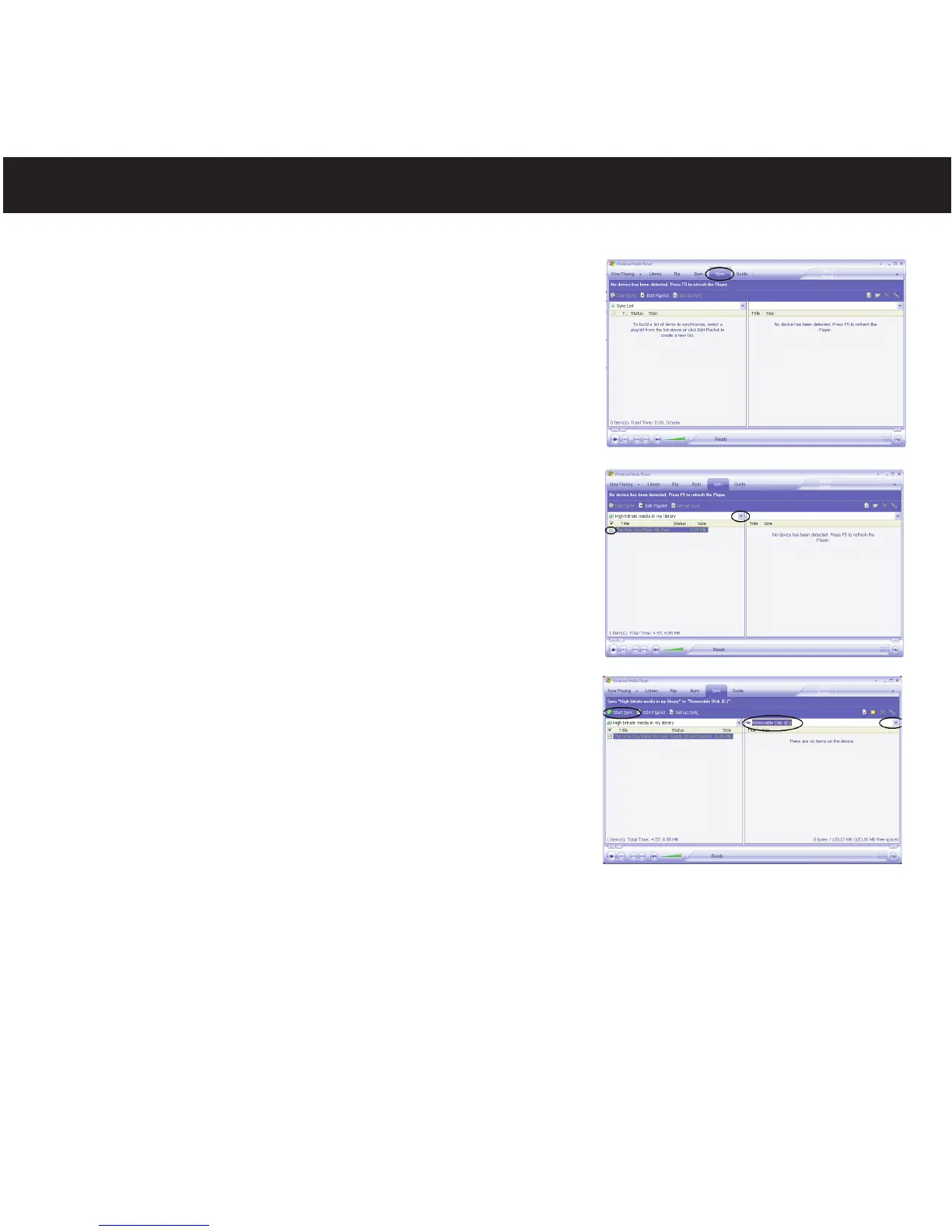
1. Open the “Windows Media Player Browser 10” and click on
“Sync”.
2. Click on the “Sync List” pull-down menu to locate the music
files you wish to download. Then make sure to tick the box
next to the files.
3. Select the Portable Device ("Removable Disk") that you
want to copy to from the right side drop-down menu. Click
“Start Sync” to start transferring music files to the player.
4. After you are finished transferring all the desired files to your
unit, follow the “Safely Remove Hardware” procedure on
page 15.
NOTES:
• For Windows Media Player 11 users, please visit the
following link for instructions on how to sync files to this unit:
http://www.microsoft.com/windows/windowsmedia/knowledgecenter/howto/mp11/sync.aspx
• Windows Vista users must use Windows Media Player 11 to transfer music files to the player.



 To Next Page