24
C
A
B
1 3
4 2
D
Equal Gap
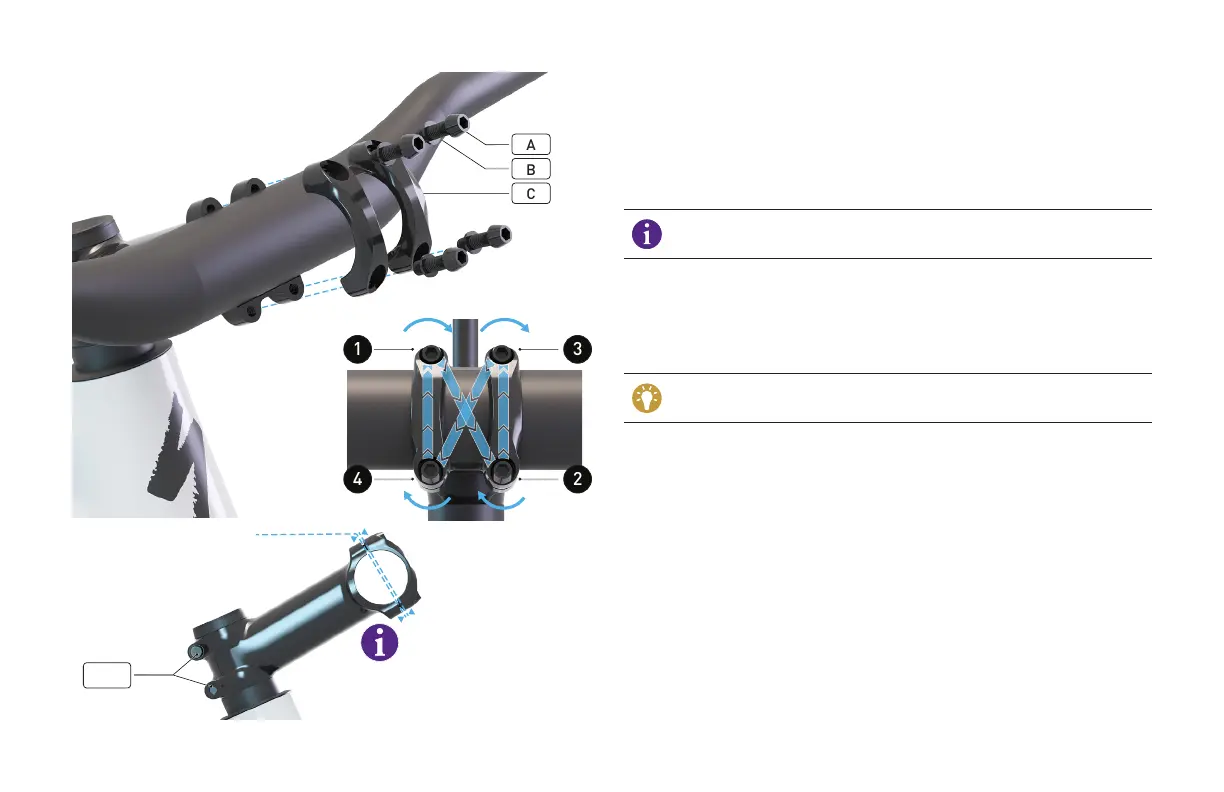
Using a 4 mm hex key, remove the four faceplate bolts (A) with washers
(B) and remove the faceplate (C).
Install the handlebar then place the faceplate over the handlebar, then
thread in the bolts with washers back into the stem.
Using a torque wrench and 4 mm hex bit, tighten each faceplate bolt
approximately a half turn at a time in an alternating (cross) pattern until
each is torqued to 6 Nm / 53 in-lbf.
When torquing the stem faceplate bolts, the gap between the stem
body and the faceplate should be equal on the top and the bottom.
With the bicycle on the ground, pull the front brake and rock the bicycle
back and forth to ensure the headset is fully seated. Re-check the top
cap’s tightness.
Align the stem with the front wheel. Using a torque wrench and 4 mm
hex bit, torque the stem bolts (D) to 6 Nm / 53 in-lbf.
You shouldn't be able to rotate the stem spacers by hand if the
system is sufficiently tightened.





 To Next Page