11
seen clearly.
HFR: High Frame Rate. If “ON” is selected, the system will restart and then the maximum value of the frame rate of the main stream
can be set to 60 fps /50fps.
Antiflicker:
Off: disables the anti-flicker function. This is used mostly in outdoor installations.
50Hz: reduces flicker in 50Hz lighting conditions.
60Hz: reduces flicker in 60Hz lighting conditions.
Smart IR: Choose “ON” or “OFF”. This function can effectively avoid image overexposure so as to make the image more realistic. The
higher the level is, the more overexposure compensation will be given.
White Balance: Adjust the color temperature according to the environment automatically.
Day/Night Mode: Choose “Auto”, “Day”, “Night” or “Timing”.
Exposure Mode: Choose “Auto” or “Manual”. If manual is chosen, the digital shutter speed can be adjusted.
Gain Mode: Choose “Auto” or “Manual”. If “Auto” is selected, the gain value will be automatically adjusted according to the actual
situation. If “Manual” is selected, the gain value shall be set manually. The higher the value is, the brighter the image is.
Frequency: 50Hz and 60Hz can be optional.
Infra-red Mode: Choose “Auto”, “ON” or “OFF”.
Corridor Pattern: Corridor viewing modes can be used for situations such as long hallways. 0, 90, 180 and 270 are available. The
default value is 0. The video resolution should be 1080P or below if this function is used.
Image Mirror: Turn the current video image horizontally.
Image Flip: Turn the current video image vertically.
Schedule Settings of Image Parameters:
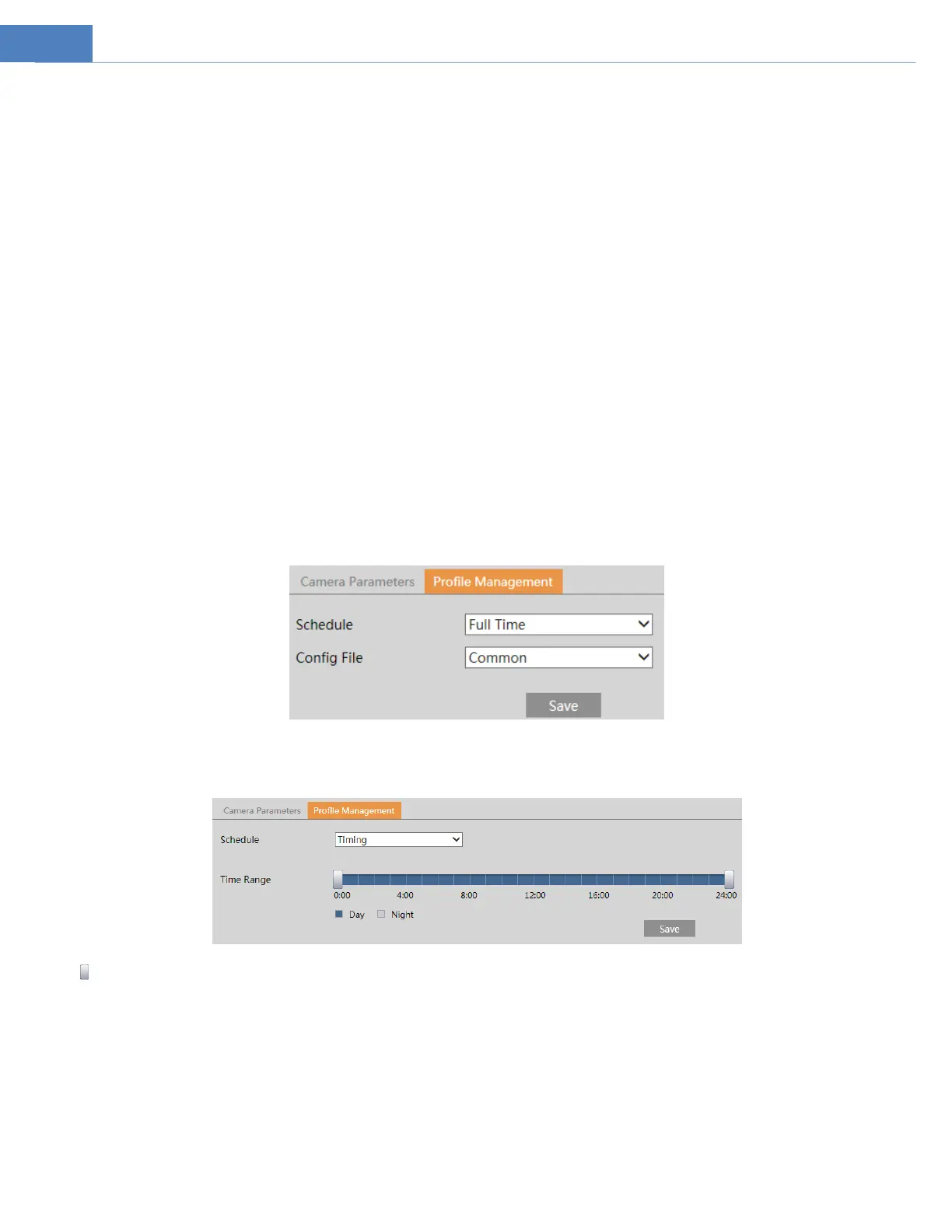
Click the “Profile Management” tab as shown below.
Set full time schedule for common, day or night mode and specified time schedule for day and night. Choose “Timing” in the
drop-down box of schedule as shown below.
Drag “ ” icons to set the time of day and night. Blue means daytime and blank means night time. If the current mode of camera
parameters is set to “Timing”, the image configuration mode will automatically switch between day and night according to the
schedule.
4.2.2 Video / Audio Configuration
Go to ImageVideo / Audio interface as shown below. In this interface, set the resolution, frame rate, bitrate type, video quality
and so on subject to the actual network condition.



 To Next Page