22
1. Auto-focusing function should not be enabled for intrusion detection.
2. Avoid the scenes with many trees or the scenes with various light changes (like many flashing headlights). The ambient brightness
of the scenes shouldn’t be too low.
3. Cameras should be mounted at a height of 10ft or above.
4. Keep the mounting angle of the camera at about 45°.
5. The detected objects should not be less than 1% of the entire image and the largest sizes of the detected objects should not be
more than 1/8 of the entire image.
6. Make sure cameras can view objects for at least 2 seconds in the detected area for accurate detection.
7. Adequate light and clear scenery are crucial to line crossing detection.
4.5 Network Configuration
4.5.1 TCP/IP
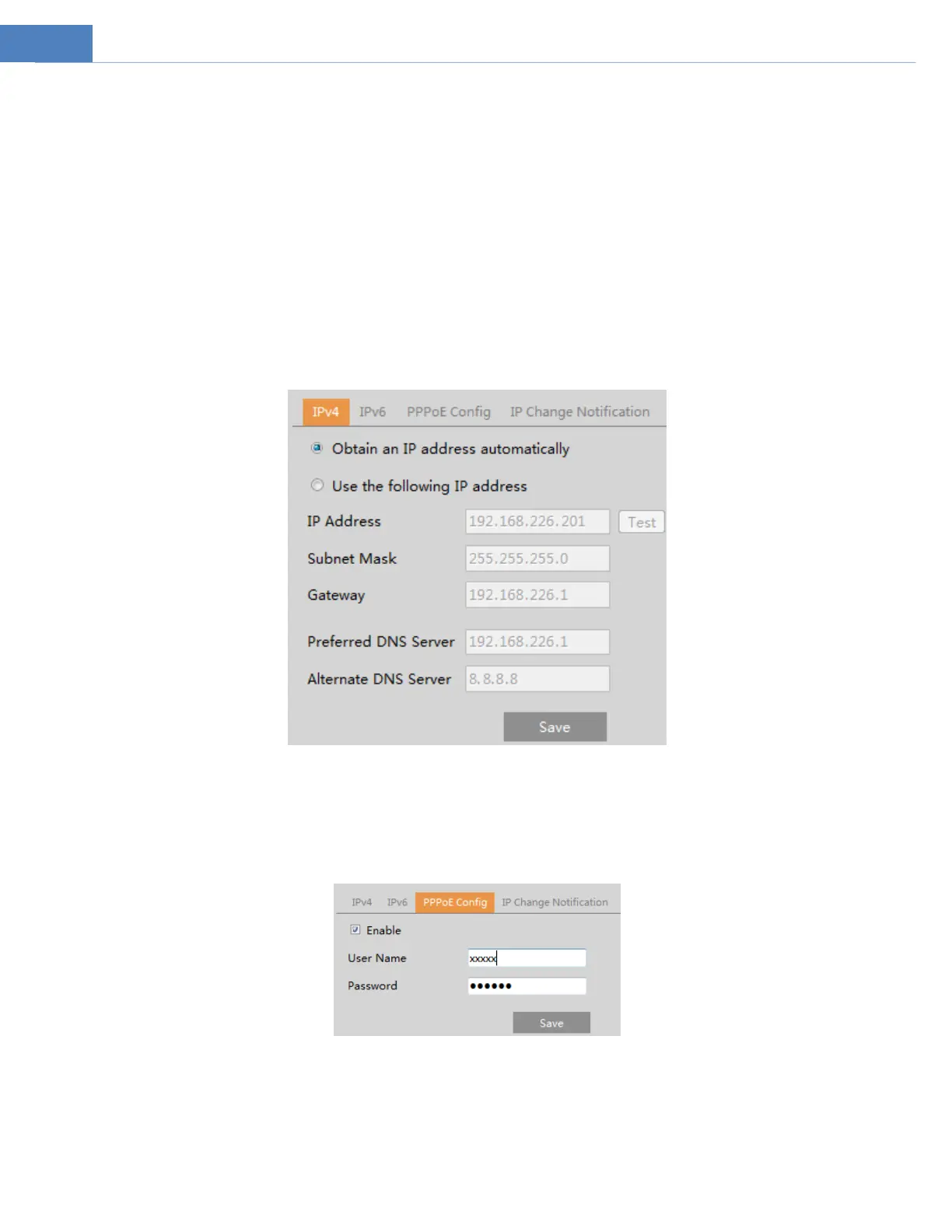
Go to NetworkTCP/IP interface as shown below. There are two ways for network connection.
Use IP address (take IPv4 for example)-obtain a local IP address automatically through DHCP. A typical router has a DHCP server
built in, and therefore is able to assign an IP address to the camera.
Use PPPoE-Click the “PPPoE Config” tab to go to the interface as shown below. Enable PPPoE and then enter the user name and
password from your ISP.
Either method of network connection can be used. If PPPoE is used to connect internet, the camera will get a dynamic WAN IP
address. This IP address will change frequently. To be notified, the IP change notification function can be used.
Click “IP Change Notification Config” to go to the interface as shown below.



 To Next Page