Home
Spectra
Motherboard
SAM-3040D
Page 99
Spectra SAM-3040D - Page 99
164 pages
Manual
Save Page as PDF
To Next Page
To Next Page
To Previous Page
To Previous Page
Loading...
99
Suppor
ted Softwar
e
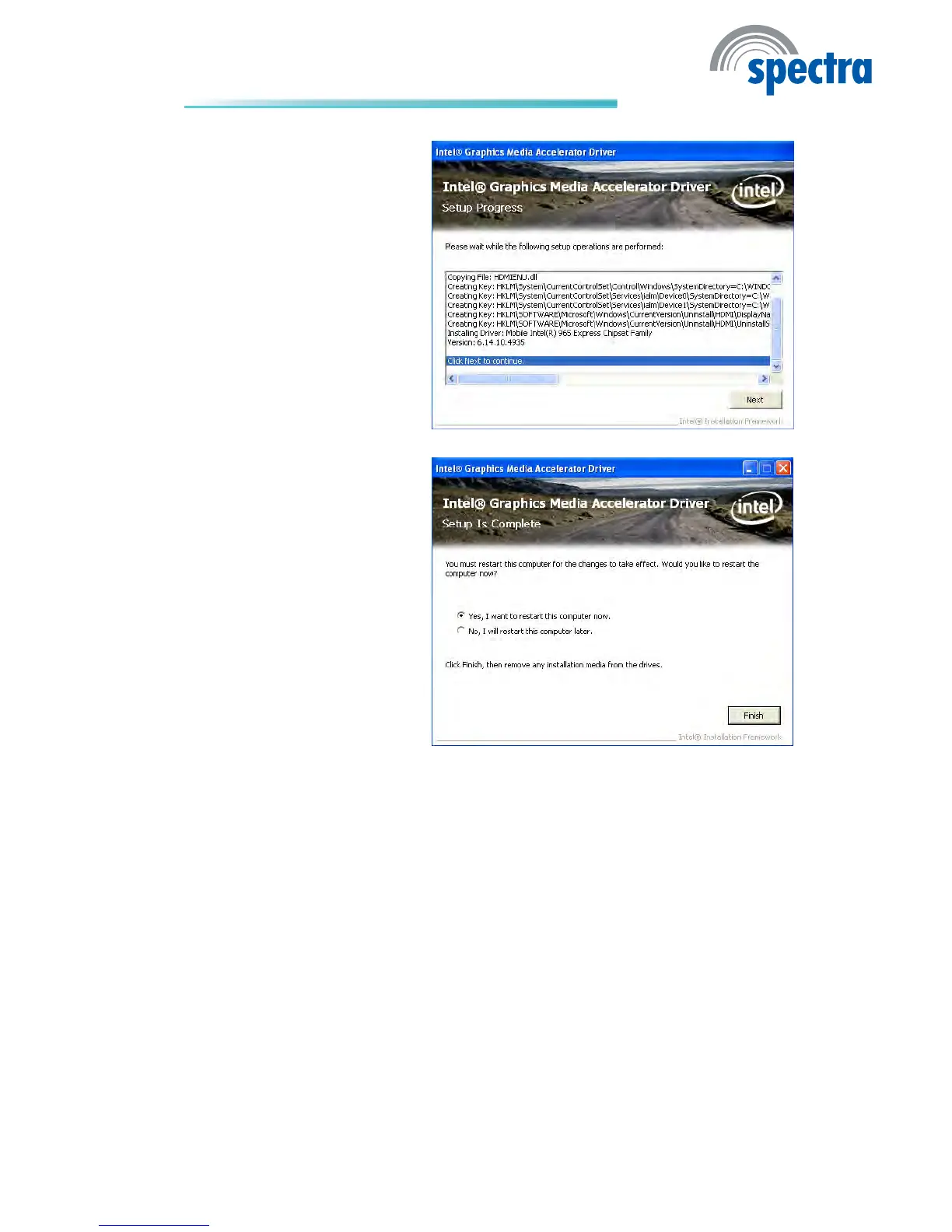
4.
Setup
is
currently
installing
the
driv
er
.
After
installation
has
completed,
click
Next.
5.
Click
“Y
es,
I
want
to
restart
t
hi
s
c
o
mp
ut
er
n
ow.
”
t
he
n
click
Finish.
Resta
rtin
g
th
e
sys
tem
wil
l
allow
the
new
software
in-
stalllation
to
take
effect.
98
100
Table of Contents
Main Page
Default Chapter
1
System Board
1
Copyright
2
Trademarks
2
FCC and DOC Statement on Class B
3
Table of Contents
4
About this Manual
7
Warranty
7
Safety Measures
8
Static Electricity Precautions
8
About the Package
9
Before Using the System Board
9
Chapter 1 - Introduction
10
Specifications
10
Features
12
Chapter 2 - Hardware Installation
16
System Board Layout
16
System Memory
17
Installing the DIM Module
18
Cpu
20
Installing the CPU
20
Installing the Fan and Heat Sink
22
Jumper Settings
24
Clear CMOS Data
24
PS/2 Power Select
25
USB Power Select
26
Panel Power Select
27
COM 3 RS232/RS422/RS485 Select
28
COM 2 Rs232/Power Select
29
Power-On Select
30
Rear Panel I/O Ports
31
PS/2 Mouse and PS/2 Keyboard Ports
32
COM (Serial) Ports
33
VGA Port
35
DVI-I Port
36
RJ45 LAN Port
37
USB Ports
38
Audio
40
I/O Connectors
42
CD-In Internal Audio Connector
42
S/PDIF-Out Connector
43
LVDS LCD Panel and Lcd/Inverter Power Connector
44
Digital I/O Connector
46
SATA (Serial ATA) Connectors
47
IDE Connector
48
Cooling Fan Connectors
50
Chassis Instrusion Connector
51
Power Connector
52
Standby Power LED
53
Front Panel Connectors
54
Expansion Slots
55
Battery
56
Chapter 3 - BIOS Setup
57
Overview
57
Default Configuration
57
Entering the BIOS Setup Utility
57
Legends
58
Main
59
Bios Setup
59
System Date
59
System Time
59
Advanced
60
Pci Subsystem Settings
61
Pci Rom Priority
61
Pci Latency Timer
61
Trusted Computing
62
Tpm Support
62
Pc Health Status
63
Smart Fan Function
63
Enable Acpi Auto Configuration
65
Cpu Configuration
67
Active Processor Cores
67
Hardware Prefetcher
67
Intel Virtualization Technology
67
Power Technology
67
Sata Configuration
68
Intel Igd Swsci Opregion
69
Usb Configuration
73
Legacy Usb Support
73
Device Reset Timeout
73
Serial Port
75
Intelligent Power Sharing
77
Amt Configuration
78
Ata Controller
79
Serial Port Console Redirection
80
Terminal Type
80
Chipset
81
North Bridge
82
South Bridge
84
Gbe Controller
84
Azalia Hd Audio
84
High Precision Timer
84
All Usb Devices
85
Boot
87
Security
88
Administrator Password
88
User Password
88
Save & Exit
89
Discard Changes and Exit
89
Discard Changes and Reset
89
Restore Defaults
89
Updating the BIOS
90
Chapter 4 - Supported Software
91
Drivers, Utilities and Software Applications
91
Microsoft .NET Framework 3.5
92
Microsoft Directx 9.0C Driver
94
Intel Chipset Software Installation Utility
96
Intel Graphics Drivers
98
Intel Management Engine Drivers
100
Audio Drivers
102
Intel LAN Drivers
103
Realtek LAN Drivers
105
Myguard Hardware Monitor
106
Adobe Acrobat Reader 7.0
108
Chapter 5 - RAID
110
RAID Levels
110
Settings
111
Chapter 6 - Intel AMT Settings
115
Overview
115
Enable Intel® AMT in the AMI BIOS
116
Enable Intel® AMT in the Intel® Management Engine BIOS Extension (MEBX) Screen
119
Appendix A - Watchdog Sample Code
157
Appendix B - System Error Message
159
Error Messages
159
Appendix C - Troubleshooting
161
Troubleshooting Checklist
161
Power Supply
162
Floppy Drive
162
Hard Drive
163
Troubleshooting
164
Related product manuals
Spectra MB720
64 pages
Spectra H11H4-II1
66 pages



 To Next Page